
如何使用json和串行化与火力基地和集团?错误:将对象转换为可编码对象失败
如何使用json和串行化与火力基地和集团?错误:将对象转换为可编码对象失败
提问于 2019-06-22 06:39:56
这是我的云防火墙,看起来:
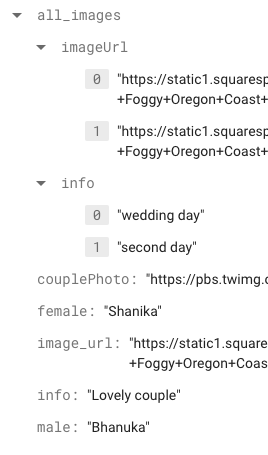
错误消息:未处理异常:将对象转换为可编码对象失败:摄影
我的数据库使用了jsonSerialization
import 'package:json_annotation/json_annotation.dart';
part 'Model.g.dart';

@JsonSerializable()
class Photography{
  String couplePhoto;
  String female;
  String image_url;
  String info;
  String male;
  AllImages all_images;

  Photography();

  factory Photography.fromJson(Map<String, dynamic> json) => _$PhotographyFromJson(json);
  Map<String,dynamic> toJson() => _$PhotographyToJson(this);
}

@JsonSerializable()
class AllImages {
  List<String> imageUrl = List<String>();

  AllImages();

  factory AllImages.fromJson(Map<String, dynamic> json) => _$AllImagesFromJson(json);
  Map<String,dynamic> toJson() => _$AllImagesToJson(this);
}通过在项目根目录中运行flutter pub run build_runner build,每当需要照片和AllImages时,我都会为它们生成JSON序列化代码。
Model.g.dart
// GENERATED CODE - DO NOT MODIFY BY HAND

part of 'Model.dart';

// **************************************************************************
// JsonSerializableGenerator
// **************************************************************************

Photography _$PhotographyFromJson(Map<String, dynamic> json) {
  return Photography()
    ..couplePhoto = json['couplePhoto'] as String
    ..female = json['female'] as String
    ..image_url = json['image_url'] as String
    ..info = json['info'] as String
    ..male = json['male'] as String
    ..all_images = json['all_images'] == null
        ? null
        : AllImages.fromJson(json['all_images'] as Map<String, dynamic>);
}

Map<String, dynamic> _$PhotographyToJson(Photography instance) =>
    <String, dynamic>{
      'couplePhoto': instance.couplePhoto,
      'female': instance.female,
      'image_url': instance.image_url,
      'info': instance.info,
      'male': instance.male,
      'all_images': instance.all_images
    };

AllImages _$AllImagesFromJson(Map<String, dynamic> json) {
  return AllImages()
    ..imageUrl = (json['imageUrl'] as List)?.map((e) => e as String)?.toList();
}

Map<String, dynamic> _$AllImagesToJson(AllImages instance) =>
<String, dynamic>{'imageUrl': instance.imageUrl};之后,我创建了DB类,
如何使用模型类?
    class DB {
      final db = Firestore.instance;

     // Stream<QuerySnapshot> initStream() {
     //   return db.collection('photography').snapshots();
     // }

    getPhotography() async {
      return db.collection('photography')
        .document("0yUc5QBGHNNq6WK9CyyF")
        .setData(jsonDecode(jsonEncode(Photography)));
}
    }

    DB db = DB();
我的photography_bloc课程
class PhotographyBloc extends BlocBase{
  //PhotographyBloc(){
  //  db.initStream().listen((data) => inFirestore.add(data));
  //}
PhotographyBloc(){
  init();
}
Photography photography;

  //final _firestoreController = StreamController<Photography>();
  //Stream<Photography> get outFirestore => _firestoreController.stream;
  //Sink<Photography> get inFirestore => _firestoreController.sink;

    final _firestoreController = StreamController<Photography>();
    Stream<Photography> get outFirestore => _firestoreController.stream;
    Sink<Photography> get inFirestore => _firestoreController.sink;

  void init() async{
    photography = db.getPhotography();
    inFirestore.add(photography);
  }


  @override
  void dispose() {
    _firestoreController.close();
  }
}
如何使用StreamBuilder序列化获取数据
                    child: StreamBuilder<Photography>(
                        stream: bloc.outFirestore,
                        initialData: null,
                        builder: (context, snapshot) {
                          if (snapshot.hasData) {
                            return Column(
                                children: buildItem(snapshot.data, bloc));
//                                children: snapshot.data.documents
//                                    .map<Widget>((doc) => buildItem(doc, bloc))
//                                    .toList());
                          } else {
                            return SizedBox();
                          }
                        }),
builderItem()方法
buildItem(Photography doc, PhotographyBloc bloc) {
...
 child: ClipRRect(
                            borderRadius: BorderRadius.circular(20.0),
                            child: FadeInImage.assetNetwork(
                              placeholder: "assets/images/photography.jpg",
                              image: doc.couplePhoto,
//                              image: doc.data['couplePhoto'],
                              fit: BoxFit.fill,
                            ),
),回答 1
Stack Overflow用户
发布于 2019-06-23 08:32:49
根据一揽子消息来源:
  /// Writes to the document referred to by this [DocumentReference].
  ///
  /// If the document does not yet exist, it will be created.
  ///
  /// If [merge] is true, the provided data will be merged into an
  /// existing document instead of overwriting.
  Future<void> setData(Map<String, dynamic> data, {bool merge = false}) {
    return Firestore.channel.invokeMethod<void>(
      'DocumentReference#setData',
      <String, dynamic>{
        'app': firestore.app.name,
        'path': path,
        'data': data,
        'options': <String, bool>{'merge': merge},
      },
    );
}必须将<String, dynamic>映射交给setData(x)方法。
所以在你的情况下,你也许应该这样做:
getPhotography() async {
      return db.collection('photography')
        .document("0yUc5QBGHNNq6WK9CyyF")
        .setData(photography.toJson());
}页面原文内容由Stack Overflow提供。腾讯云小微IT领域专用引擎提供翻译支持
原文链接:
https://stackoverflow.com/questions/56713219
复制相关文章
相似问题
腾讯云开发者

Copyright © 2013 - 2026 Tencent Cloud. All Rights Reserved. 腾讯云 版权所有
深圳市腾讯计算机系统有限公司 ICP备案/许可证号:粤B2-20090059  粤公网安备44030502008569号
腾讯云计算(北京)有限责任公司 京ICP证150476号 | 京ICP备11018762号