
为UITableView滑动操作(UIContextualAction)设置自定义字体
为UITableView滑动操作(UIContextualAction)设置自定义字体
提问于 2019-06-13 21:20:43
如何在UIContextualAction中为标题设置自定义字体
我试过UIAppearance但是没有任何运气..。
干杯!:)
回答 4
Stack Overflow用户
回答已采纳
发布于 2019-06-13 21:20:43
我找到了一种方法通过使用图像属性而不是标题来实现这一点.
标准字体(删除/重命名)
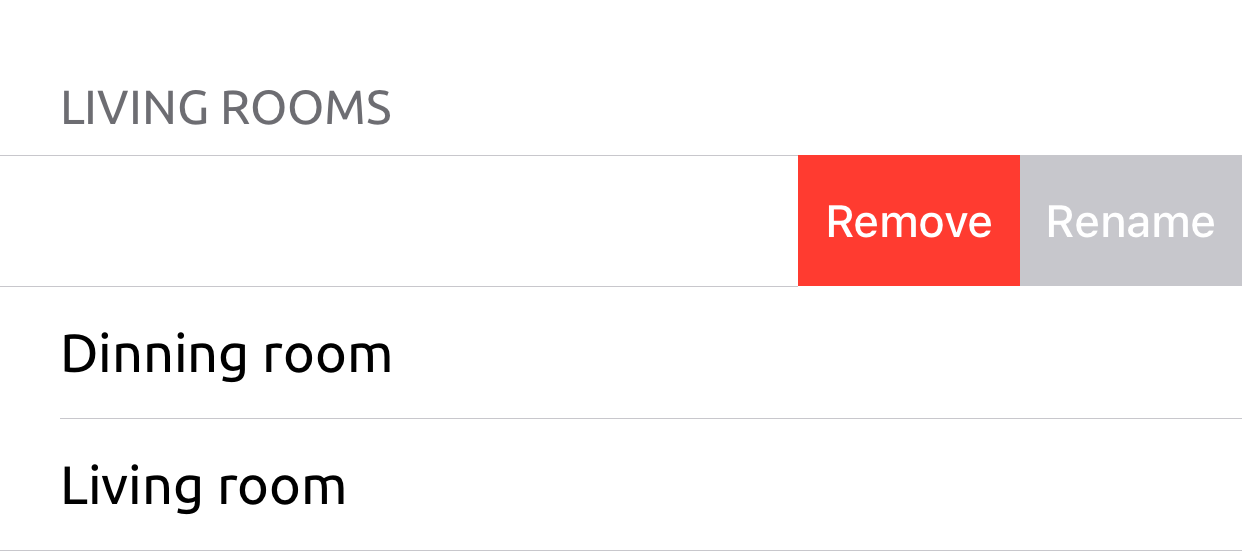
自定义字体(删除/重命名)
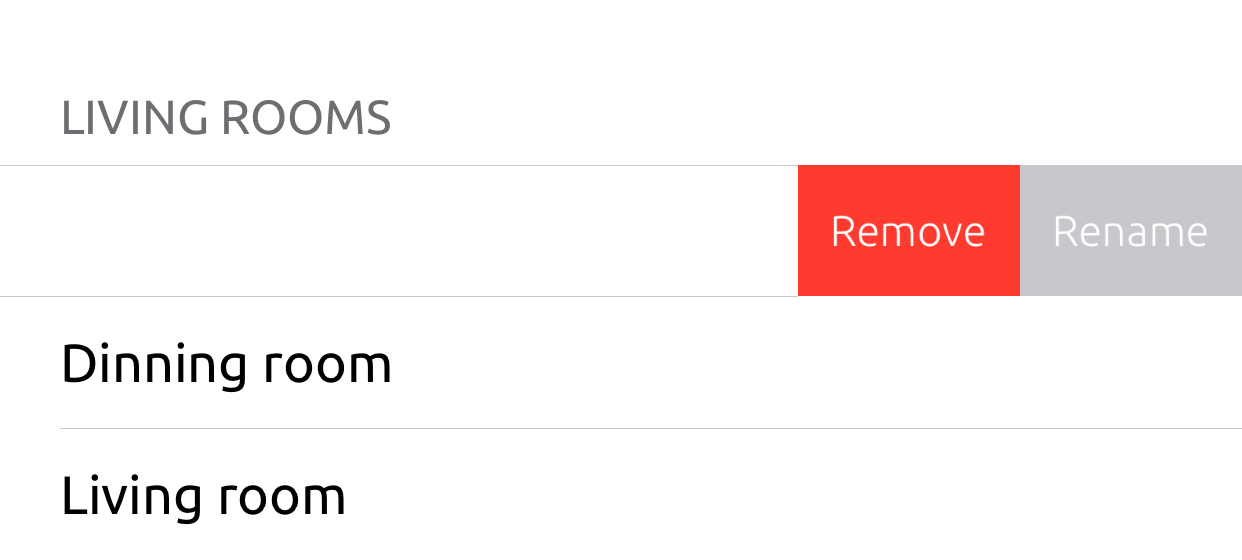
要创建标签的图像,我有以下扩展:
extension UIImage {

    /// This method creates an image of a view
    convenience init?(view: UIView) {

        // Based on https://stackoverflow.com/a/41288197/1118398
        let renderer = UIGraphicsImageRenderer(bounds: view.bounds)
        let image = renderer.image { rendererContext in
            view.layer.render(in: rendererContext.cgContext)
        }

        if let cgImage = image.cgImage {
            self.init(cgImage: cgImage, scale: UIScreen.main.scale, orientation: .up)
        } else {
            return nil
        }
    }
}
然后我简单地说:
override func tableView(_ tableView: UITableView, trailingSwipeActionsConfigurationForRowAt indexPath: IndexPath) -> UISwipeActionsConfiguration? {

    let action = UIContextualAction(style: .destructive, title: nil) { action, view, completion in
        // Your swipe action code!
    }
    let label = UILabel()
    label.text = // Your swipe action text!
    label.font = // Your custom font!
    label.sizeToFit()
    action.image = UIImage(view: label)

    return UISwipeActionsConfiguration(actions: [action])
}Stack Overflow用户
发布于 2020-04-01 10:43:32
我最近找到了一种通过使用按钮titleLabel而不是图像属性来实现这一点的方法,这样您就可以使用文本和图像进行操作了。
如你所见,我们需要做些尴尬的事情.
func tableView(_ tableView: UITableView, willBeginEditingRowAt indexPath: IndexPath) {

    if #available(iOS 13.0, *) {
        for subview in tableView.subviews {
            if NSStringFromClass(type(of: subview)) == "_UITableViewCellSwipeContainerView" {
                for swipeContainerSubview in subview.subviews {
                    if NSStringFromClass(type(of: swipeContainerSubview)) == "UISwipeActionPullView" {
                        for case let button as UIButton in swipeContainerSubview.subviews {
                            button.titleLabel?.font = .systemFont(ofSize: 12)
                        }
                    }
                }
            }
        }
    } else {
        for subview in tableView.subviews {
            if NSStringFromClass(type(of: subview)) == "UISwipeActionPullView" {
                for case let button as UIButton in subview.subviews {
                    button.titleLabel?.font = .systemFont(ofSize: 12)
                }
            }
        }
    }
}Stack Overflow用户
发布于 2021-03-05 13:39:18
为Swift 5和iOS 13更新
下面的函数允许您设置字体以及颜色的滑动动作。
要开始,向UITableView添加一个扩展。
extension UITableView {
    /// Iterates over all subviews of a `UITableView` instance and applies the supplied font to all labels withing the UISwipeAction's array.
    /// - Parameter font: The font that should be applied to the labels.
    /// - Parameter tintColor: The tint color that should be applied to image views and labels
    /// - Parameter ignoreFirst: Whether or not the first swipe action should be ignored when applying tints
    public func setSwipeActionFont(_ font: UIFont, withTintColor tintColor: UIColor? = nil, andIgnoreFirst ignoreFirst: Bool = false) {
        for subview in self.subviews {
            //Confirm that the view being touched is within a swipe container
            guard NSStringFromClass(type(of: subview)) == "_UITableViewCellSwipeContainerView" else {
                continue
            }

            //Re-iterate subviews and confirm that we are touching a swipe view
            for swipeContainerSubview in subview.subviews {
                guard NSStringFromClass(type(of: swipeContainerSubview)) == "UISwipeActionPullView" else {
                    continue
                }

                //Enumerate subviews and confirm that we are touching a button
                for (index, view) in swipeContainerSubview.subviews.filter({ $0 is UIButton }).enumerated() {
                    //Set Font
                    guard let button = view as? UIButton else {
                        continue
                    }
                    button.titleLabel?.font = font

                    //Set Tint Conditionally (based on index)
                    guard index > 0 || !ignoreFirst else {
                        continue
                    }
                    button.setTitleColor(tintColor, for: .normal)
                    button.imageView?.tintColor = tintColor
                }
            }
        }
    }
}在委托中,向UITableViewDataSource.WillBeginEditing(UITableView, IndexPath)方法添加以下功能。根据需要替换字体和颜色参数。颜色是可选的。
self?.tableView.setSwipeActionFont(.systemFont(ofSize: 24.0, withTintColor: .systemRed)页面原文内容由Stack Overflow提供。腾讯云小微IT领域专用引擎提供翻译支持
原文链接:
https://stackoverflow.com/questions/56588715
复制相关文章
相似问题
腾讯云开发者

Copyright © 2013 - 2026 Tencent Cloud. All Rights Reserved. 腾讯云 版权所有
深圳市腾讯计算机系统有限公司 ICP备案/许可证号:粤B2-20090059  粤公网安备44030502008569号
腾讯云计算(北京)有限责任公司 京ICP证150476号 | 京ICP备11018762号