
在构建过程中使用系统DevOps令牌时,Azure OAuth REST返回一个403
在构建过程中使用系统DevOps令牌时,Azure OAuth REST返回一个403
提问于 2019-06-12 21:08:44
我正在运行一个脚本:
# Variables
$organization = "****"
$project = "****"
$repositoryId = "****"
$pullRequestId = $env:BUILD_PULLREQUEST_ID

$pat = "Bearer $env:System_AccessToken"
$featureReleaseUrl = "http://" + $env:prSourceBranchName + ".azurewebsites.net"

$body = @"
    {
        "comments": [
            {
                "content": "Link naar feature release $featureReleaseUrl"
            }
        ]
    }
"@

$createThreadInPRUrl = "https://dev.azure.com/$organization/$project/_apis/git/repositories/$repositoryId/pullRequests/$pullRequestId/threads?api-version=5.0"
if ($pullRequestId) {
    Invoke-RestMethod -Uri $createThreadInPRUrl -Headers @{Authorization = $pat} -Body $body -Method Post -ContentType 'application/json'
}
当它运行时,它返回一个:
##errorThe远程服务器返回一个错误:(403)禁止。
我在个人设置中创建了一个Personal Access Tokens。
我还创建了这个脚本:
# Variables
$organization = "****"
$project = "****"
$buildId = $****

$pat = "Bearer $env:System_AccessToken"

if (!$env:Build_PullRequest_SourceBranchName) {
    $retrieveSourceBranchFromBuildURL = "https://dev.azure.com/$organization/$project/_apis/build/builds/$buildId" + "?api-version=5.0"
    $buildInformation = Invoke-RestMethod -Uri $retrieveSourceBranchFromBuildURL -Headers @{Authorization = $pat } -Method Get -ContentType 'application/json'
    $SourceBranchFromBuild = $buildInformation.sourceBranch.split('/')[-1]

    Write-Host "### no Build PullRequest SourceBranchName available ###"
    Write-Host "##vso[task.setvariable variable=prSourceBranchName;]"$SourceBranchFromBuild


}
这一切都很好。第一个脚本和第二个脚本之间的区别是,第一个脚本是POST,第二个脚本是GET。但是他们都使用$pat令牌。
回答 1
Stack Overflow用户
回答已采纳
发布于 2019-06-13 01:59:54
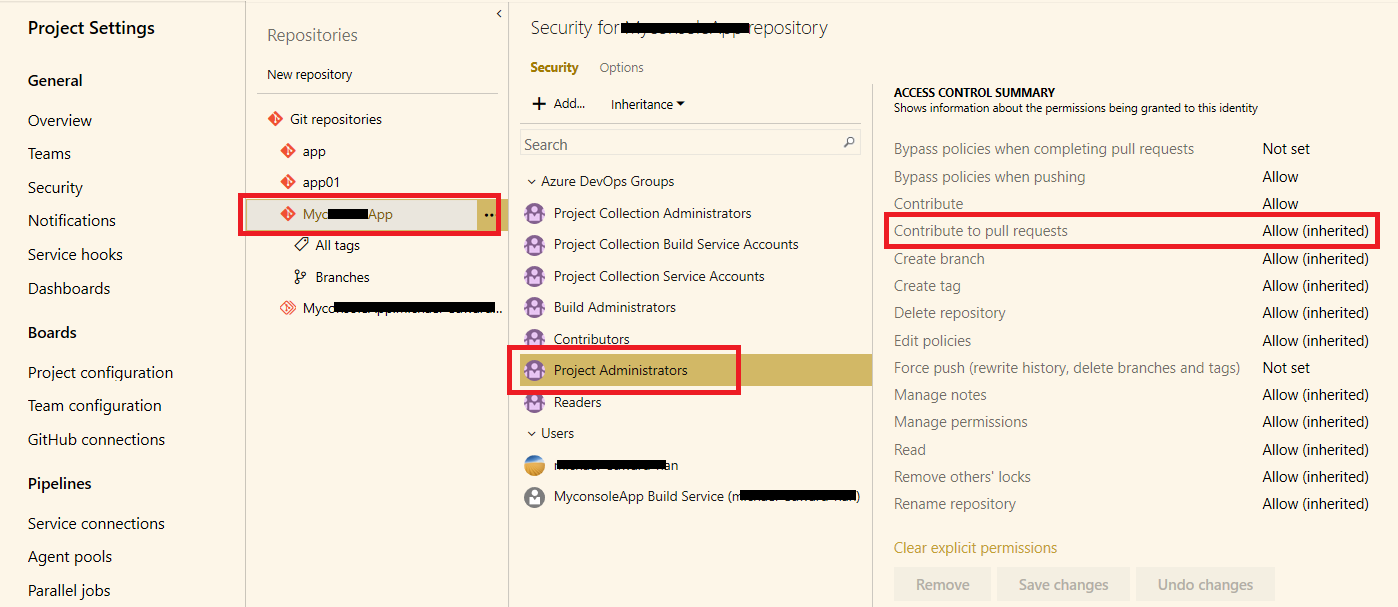
即使您使用的令牌是System.AccessToken,如果您没有对拉请求的访问权限,也将无法操作它。
Go项目设置-->存储库-->您想要访问的存储库,定位您的帐户或您所在的组。检查Contribute to pull requests.的权限状态
您必须允许此Contribute to pull requests权限,以便您可以将评论添加到PR中。
页面原文内容由Stack Overflow提供。腾讯云小微IT领域专用引擎提供翻译支持
原文链接:
https://stackoverflow.com/questions/56570394
复制相关文章
相似问题
腾讯云开发者

Copyright © 2013 - 2026 Tencent Cloud. All Rights Reserved. 腾讯云 版权所有
深圳市腾讯计算机系统有限公司 ICP备案/许可证号:粤B2-20090059  粤公网安备44030502008569号
腾讯云计算(北京)有限责任公司 京ICP证150476号 | 京ICP备11018762号