
使用vs代码设置nuxt/vue调试时语法错误
我试图在vs代码中设置在win 10上的nuxt/vue项目的调试。我在用吉特巴什。我找到了https://medium.com/@justin.ramel/nuxt-js-debugging-in-visual-studio-code-822ff9d51c77
按照指示,我已经将package.json更改为
{
  "name": "nuxt4",
  "version": "1.0.0",
  "description": "My classy Nuxt.js project",
  "author": "hh",
  "private": true,
  "scripts": {
    "dev": "nuxt",
    "build": "nuxt build",
    "start": "nuxt start",
    "dev-debug": "node --inspect node_modules/.bin/nuxt",
    "generate": "nuxt generate"
  },
  "dependencies": {
    "cross-env": "^5.2.0",
    "glob": "^7.1.3",
    "nuxt": "^2.0.0",
    "vue2-google-maps": "^0.10.6",
    "vuetify": "^1.2.4",
    "vuex": "^3.0.1"
  },
  "devDependencies": {
    "nodemon": "^1.11.0",
    "stylus": "^0.54.5",
    "stylus-loader": "^3.0.2"
  }
}
Launch.json:
{
 "configurations": [
{
  "type": "node",
  "request": "attach",
  "name": "Attach to Nuxt",
  "port": 9229
  }
]

}
然而:
$ npm run dev-debug

> nuxt4@1.0.0 dev-debug E:\ENVS\js\nuxt4
> node --inspect=0.0.0.0 node_modules/.bin/nuxt

Debugger listening on ws://0.0.0.0:9229/4eda468d-39a4-4ddb-9a73-23e4fa60ed8e
For help, see: https://nodejs.org/en/docs/inspector
E:\ENVS\js\nuxt4\node_modules\.bin\nuxt:2
basedir=$(dirname "$(echo "$0" | sed -e 's,\\,/,g')")
          ^^^^^^^

SyntaxError: missing ) after argument list
    at new Script (vm.js:83:7)
    at createScript (vm.js:267:10)
    at Object.runInThisContext (vm.js:319:10)
    at Module._compile (internal/modules/cjs/loader.js:684:28)
    at Object.Module._extensions..js (internal/modules/cjs/loader.js:732:10)
    at Module.load (internal/modules/cjs/loader.js:620:32)
    at tryModuleLoad (internal/modules/cjs/loader.js:560:12)
    at Function.Module._load (internal/modules/cjs/loader.js:552:3)
    at Function.Module.runMain (internal/modules/cjs/loader.js:774:12)
    at executeUserCode (internal/bootstrap/node.js:342:17)
npm ERR! code ELIFECYCLE
npm ERR! errno 1
npm ERR! nuxt4@1.0.0 dev-debug: `node --inspect=0.0.0.0 node_modules/.bin/nuxt`
npm ERR! Exit status 1
npm ERR!
npm ERR! Failed at the nuxt4@1.0.0 dev-debug script.
npm ERR! This is probably not a problem with npm. There is likely additional logging output above.
给出错误的nuxt文件是:
    #!/bin/sh
    basedir=$(dirname "$(echo "$0" | sed -e 's,\\,/,g')")

    case $(uname) in
        *CYGWIN*) basedir=$(cygpath -w "$basedir");;
    esac

    if [ -x "$basedir/node" ]; then
    "$basedir/node"  "$basedir/../nuxt/bin/nuxt.js" "$@"
    ret=$?
    else
    node  "$basedir/../nuxt/bin/nuxt.js" "$@"
    ret=$?
    fi
    exit $ret
我该怎么做呢?
编辑:
我最终发现
"dev-debug": "node --inspect ./node_modules/nuxt/bin/nuxt",让我克服了那个错误。然而,我有一个新的问题:当我尝试调试时,我得到:
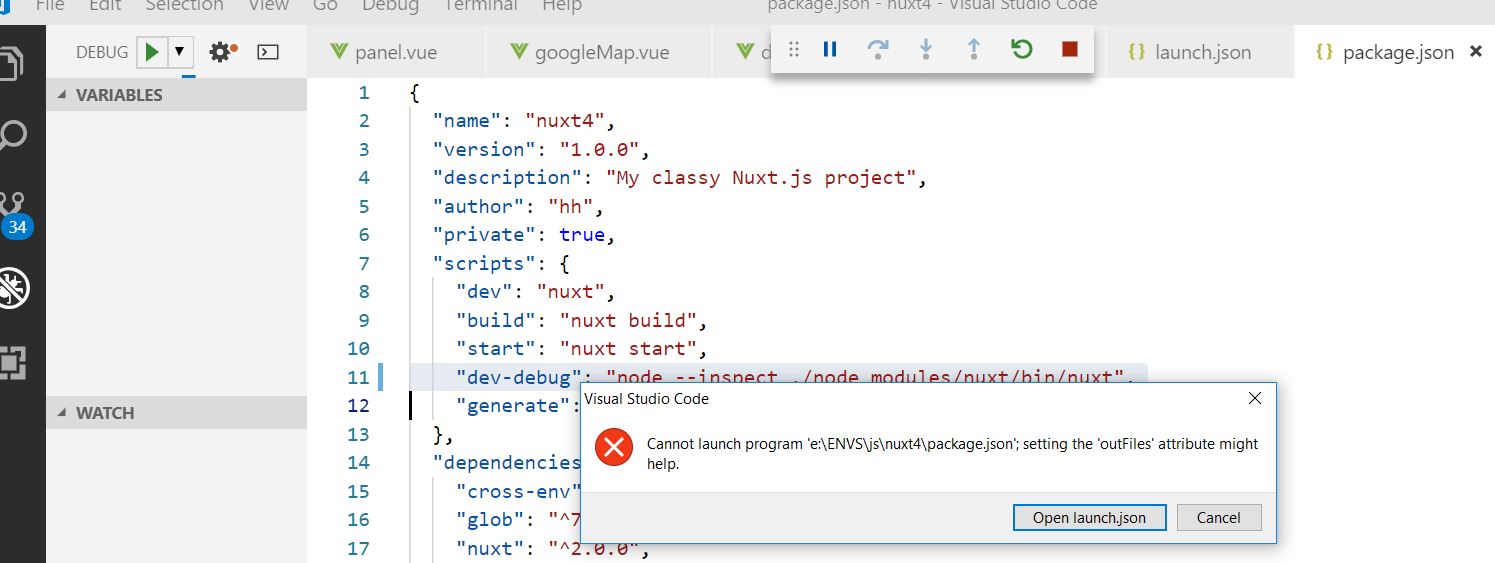
看起来我想运行package.json。知道怎么解决这个问题吗?
edit2:
在编辑发布json之后,根据以下文章进行如下操作:
{
  "type": "node",
  "request": "launch",
  "name": "Launch via NPM",
  "runtimeExecutable": "npm",
  "runtimeArgs": [
    "run-script",
    "dev-debug"
  ],

  "program": "${workspaceFolder}\\node_modules\\.bin\\nuxt",
  "args": [
    "invoke",
    "local",
    "-f",
    "<function-name>",
    "--data",
    "{}" // You can use this argument to pass data to the function to help with the debug
],
  // "program": "E:\\ENVS\\js\\nuxt4\\node_modules\\.bin\\nuxt",
  "port": 9229
}
我得到了
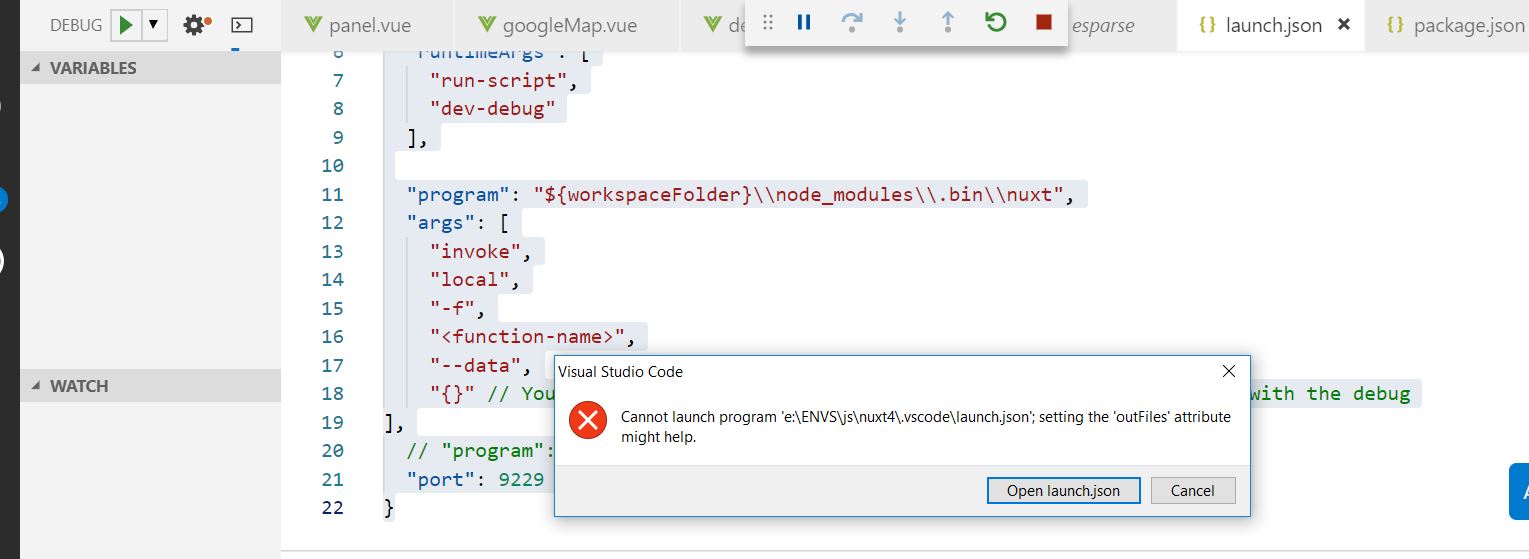
有什么想法吗?
编辑:
与launch.json的关系变得更近一些,改为:
{
  "version": "0.2.0",
  "configurations": [
    {
      "type": "node",
      "request": "launch",
      "name": "npm run dev",
      "runtimeExecutable": "npm",
      "windows": {
        "runtimeExecutable": "npm.cmd"
      },
      "runtimeArgs": [
        "run",
        "dev-debug"
      ],
      "port": 9229
    },
    {
      "type": "node",
      "request": "launch",
      "name": "Launch Program",
      "program": "${workspaceRoot}/start"
    },
    {
      "type": "node",
      "request": "attach",
      "name": "Attach to Port",
      "address": "localhost",
      "port": 9229
    }
  ]
}
不过,我现在可以将调试器附加到process.it,而不是停留在断点处。
回答 1
Stack Overflow用户
发布于 2019-06-15 04:51:11
您所引用的文章提到:
我可以通过将行更改为: "dev-debug":“node_modules/..bin/nuxt--检查”
看看这是否足够。
同样,第2528期包括:
目前,它是通过跟随那篇文章来工作的。
{
        "type": "node",
        "request": "launch",
        "name": "Launch via NPM",
        "runtimeExecutable": "npm",
        "runtimeArgs": [
          "run-script",
          "dev-debug"
        ],
        "port": 9229
      }

"dev-debug": "node --inspect node_modules/.bin/nuxt"windows平台的正确命令应该如下所示
"dev-debug": "node --inspect node_modules/nuxt/bin/nuxt",“任择议定书”提到:
"dev-debug": "node --inspect ./node_modules/nuxt/bin/nuxt",关于错误消息“无法启动程序outFiles…设置‘无法在Visual代码中调试无服务器应用程序’属性可能有帮助”,"无法在Visual代码中调试无服务器应用程序“问题包括:
如果我把矛头指向
node_modules/serverless/bin,事情就会如期而至: “节目”:"${workspaceFolder}\node_modules\serverless\bin\serverless",
您在文章"使用Serverless框架和VS代码在本地运行和调试AWS Lambda函数“的评论中还有其他线索。
OP指向一个在第260期中演示的技巧
debugger // eslint-disable-line

or:

/* eslint-disable no-debugger */另外,在Google的上下文中,在这里看到的支持调试器命令作为在代码中设置断点的工具。
也见"如何在需要时禁用eslint规则“。
https://stackoverflow.com/questions/56569793
复制相似问题
腾讯云开发者

Copyright © 2013 - 2026 Tencent Cloud. All Rights Reserved. 腾讯云 版权所有
深圳市腾讯计算机系统有限公司 ICP备案/许可证号:粤B2-20090059  粤公网安备44030502008569号
腾讯云计算(北京)有限责任公司 京ICP证150476号 | 京ICP备11018762号