
无法解析JSONParser
无法解析JSONParser
提问于 2019-06-10 14:39:47
我正在开发selenium,我已经创建了一个JSON文件,但是当我使用JSONParser从该文件读取数据时,eclipse显示错误"JSONParser无法解析为类型“,屏幕截图是

我的密码是给你的-
import java.io.File;
import java.io.FileNotFoundException;
import java.io.FileReader;
import java.io.FileWriter;
import java.io.IOException;
import java.text.ParseException;
import java.util.Scanner;
import org.json.JSONException;
import org.json.JSONObject;
import org.json.simple.parser.JSONParser;
import org.openqa.selenium.By;
import org.openqa.selenium.WebDriver;
import org.openqa.selenium.WebElement;
import org.openqa.selenium.chrome.ChromeDriver;
import ru.sbtqa.tag.parsers.JsonParser;


public class First {


 static void user_auth()throws JSONException
{
        Scanner in = new Scanner ( System.in) ;
        String username , password ;
        System.out.println ("Enter username(reg. no.):-");
        username = in.next();
        System.out.println (" Enter password:-");
        password = in.next();
        JSONObject obj = new JSONObject() ;
        obj.put("USERNAME" ,username  ) ;
        obj.put("PASSWORD" ,password  ) ;
        try (FileWriter file = new FileWriter("data.json"))
        {
            file.write(obj.toString());
        }
        catch ( IOException ex )
        {
            System.out.println(ex);
        }


}
public static void main ( String args [ ] )
{
    // checking if the file exists or not
    // If it is first time
    File f = new File("./data.json");
    if(f.exists() == false && f.isDirectory()== false ) {
        System.out.println("It's your first time...");
        user_auth();
    }


    System.setProperty("webdriver.chrome.driver","/usr/bin/chromedriver");
    WebDriver driver = new ChromeDriver();
    String url = "http://14.139.108.229/W27/login.aspx?ReturnUrl=%2fw27%2fMyInfo%2fw27MyInfo.aspx" ;
    driver.get(url);
    int attempt = 2 ;

    while ( attempt > 0  )
    {
            if ( attempt != 2 )
                user_auth();
            String name , password ;
            try
            {
                FileReader file = new FileReader ( "data.json") ;
                JSONParser parser = new JSONParser (file);
                Object obj = new Object (parser) ;
                JSONObject jsonobj = (JSONObject) obj ;
                name = (String)jsonobj.get("USERNAME");
                password = (String)jsonobj.get("PASSWORD");
            }
            catch(FileNotFoundException e ) { e.printStackTrace();}
            catch(IOException e ) { e.printStackTrace();}
            catch(ParseException e ) { e.printStackTrace();}
            catch(Exception e ) { e.printStackTrace();}
            driver.findElement(By.xpath("//*[@id=\"txtUserName\"]")).sendKeys(name);
            driver.findElement(By.xpath("//*[@id=\"Password1\"]")).sendKeys(password);
            WebElement button =  driver.findElement(By.xpath("//*[@id=\"Submit1\"]"));
            button.click();
            if ( driver.getCurrentUrl() == url )
            {
                attempt -- ;
                driver.findElement(By.xpath("//*[@id=\\\"txtUserName\\\"]")).clear();
                try
                {
                    FileReader file = new FileReader ( "data.json") ;
                    JSONParser parser = new JSONParser (file);
                    Object obj = new Object (parser) ;
                    JSONObject jsonobj = (JSONObject) obj ;
                    jsonobj .remove(jsonobj.toString());
                    if ( attempt == 0 )
                    {
                        System.out.println("Wrong UserName or Password");
                        driver.close();
                        System.exit(0);
                    }
                    System.out.println("ry Re-Login");

                }
                catch(FileNotFoundException e ) { e.printStackTrace();}
                catch(IOException e ) { e.printStackTrace();}
                catch(ParseException e ) { e.printStackTrace();}
                catch(Exception e ) { e.printStackTrace();}
            }
            else break ;
    }

}
}
回答 2
Stack Overflow用户
发布于 2019-06-10 14:58:20
似乎您缺少了一个依赖关系json-简单。
1)这里是链接 JSON.simple 1.1.1 ,您可以在这里下载缺失的依赖项.
2)添加下载的依赖项
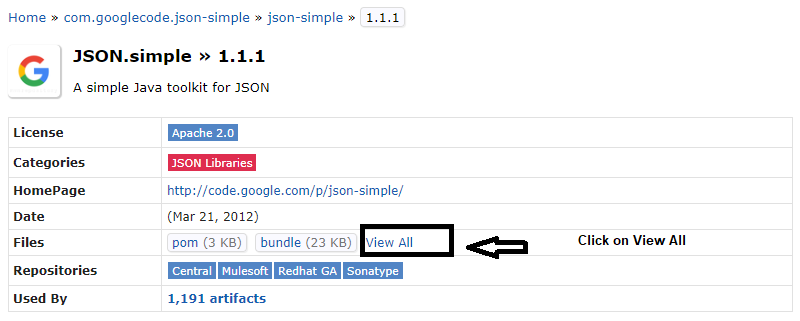

3)如果您有maven或gradle项目,那么复制依赖关系行.

4)然后清理构建项目并看到魔术.
Stack Overflow用户
发布于 2019-06-11 06:35:55
在这里,当您面临像;JSONParser这样的错误时,它显示了“构造函数JSONParser()是不推荐的”,因为您没有正确地使用它来获取我在示例代码下面发布的JSON文件数据。
import java.io.FileReader;
import org.json.simple.JSONObject;
import org.json.simple.parser.JSONParser;

public class JsonFileReader {
    public static void main(String[] args) {
        try {
            JSONParser parser = new JSONParser();
            JSONObject obj = (JSONObject)parser.parse(new FileReader("L:/data.json"));
            String name = (String) obj.get("USERNAME");
            String password = (String) obj.get("PASSWORD");
            System.out.println("Name: " + name);
            System.out.println("Password: " + password);
        } catch (Exception ex) {
            System.out.println("Exception: "+ ex.getMessage());
        }
    }
}
注意:这里我使用了相同的“json-Simpl-1.1.1.jar”文件。
文件: data.json
{
      "USERNAME": "abc",
      "PASSWORD": "xyz"
}页面原文内容由Stack Overflow提供。腾讯云小微IT领域专用引擎提供翻译支持
原文链接:
https://stackoverflow.com/questions/56528525
复制相关文章
相似问题
腾讯云开发者

Copyright © 2013 - 2026 Tencent Cloud. All Rights Reserved. 腾讯云 版权所有
深圳市腾讯计算机系统有限公司 ICP备案/许可证号:粤B2-20090059  粤公网安备44030502008569号
腾讯云计算(北京)有限责任公司 京ICP证150476号 | 京ICP备11018762号