
如何自动将46个名称随机化,以在Google中创建46x6行和列?
我正在谷歌工作表中使用自动化技术。你能帮帮我吗?
这个问题是为了向46人发送调查报告。每个人需要对这46个人中的5人进行评分。
Requirements:

1. 1 rater, for 5 uniques ratees
2. No duplicate name per row (it should be 6 unique names in a row)
3. No duplicate name per column (it should be 46 unique names per column)
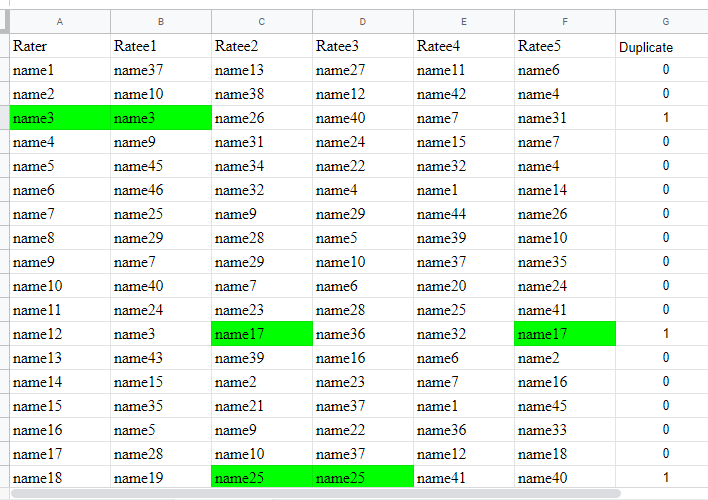
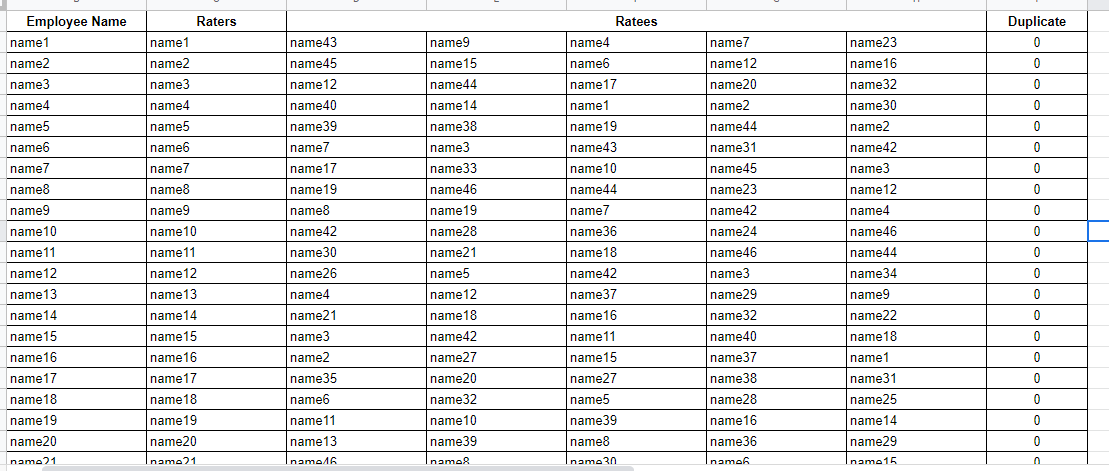
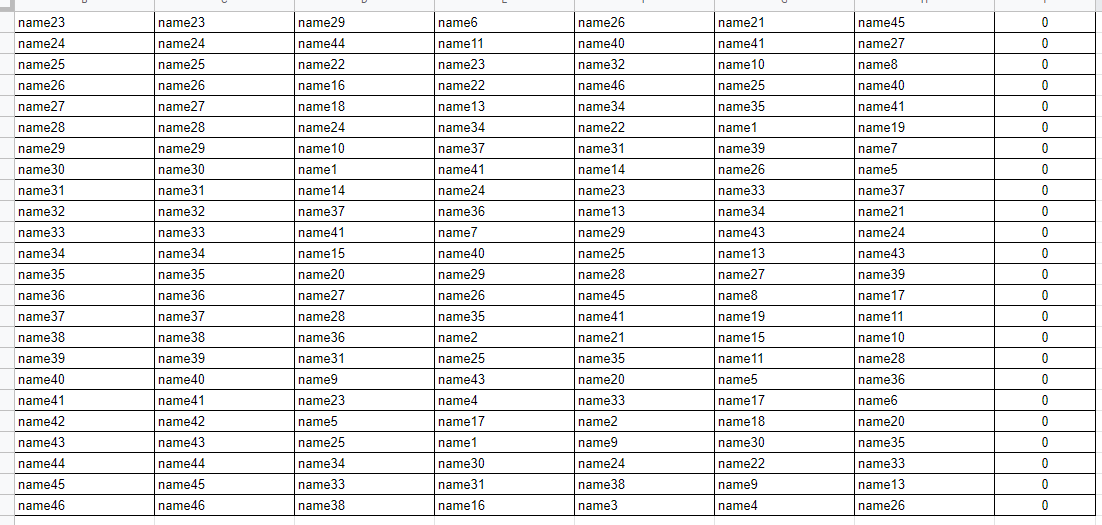
预期的输出是让我们创建46x6随机名称,没有重复的行和列。
-
-
回答 3
Stack Overflow用户
发布于 2019-06-13 21:08:05
流动:
如果可以创建跨和下面的唯一矩阵,则可以将其值用作实际名称数组的键。
- 创建长度=行数的2D数字数组
- 循环遍历所需的列和行数。
- 创建一个临时数组(
tempCol)来存储当前列数据 - 用随机数填充数组
- 使用
indexOf来计算当前行/当前列中是否已经存在任何随机数,如果是,则获得一个新的随机数。 - 在随机情况下,不可能用唯一的随机数填充临时列,删除临时列并重做此迭代。
片段:
function getRandUniqMatrix(numCols, numRows) {
  var maxIter = 1000; //Worst case number of iterations, after which the loop and tempCol resets
  var output = Array.apply(null, Array(numRows)).map(function(_, i) {
return [i++]; //[[0],[1],[2],...]
  });
  var currRandNum;
  var getRandom = function() {
currRandNum = Math.floor(Math.random() * numRows);
  }; //get random number within numRows
  while (numCols--) {//loop through columns
getRandom();
for (
  var row = 0, tempCol = [], iter = 0;
  row < numRows;
  ++row, getRandom()
) {//loop through rows
  if (//unique condition check
    !~output[row].indexOf(currRandNum) &&
    !~tempCol.indexOf(currRandNum)
  ) {
    tempCol.push(currRandNum);
  } else {
    --row;
    ++iter;
    if (iter > maxIter) {//reset loop
      iter = 0;
      tempCol = [];
      row = -1;
    }
  }
}
output.forEach(function(e, i) {//push tempCol to output
  e.push(tempCol[i]);
});
  }
  return output;
}
console.info(getRandUniqMatrix(6, 46));
var data1d = data.map(function(e){return e[0]});
var finalArr = getRandUniqMatrix(6, 46).map(function(row){return row.map(function(col){return data1d[col]})});
destSheet.getRange(1,1,finalArr.length, finalArr[0].length).setValues(finalArr);Stack Overflow用户
发布于 2019-06-11 03:02:00
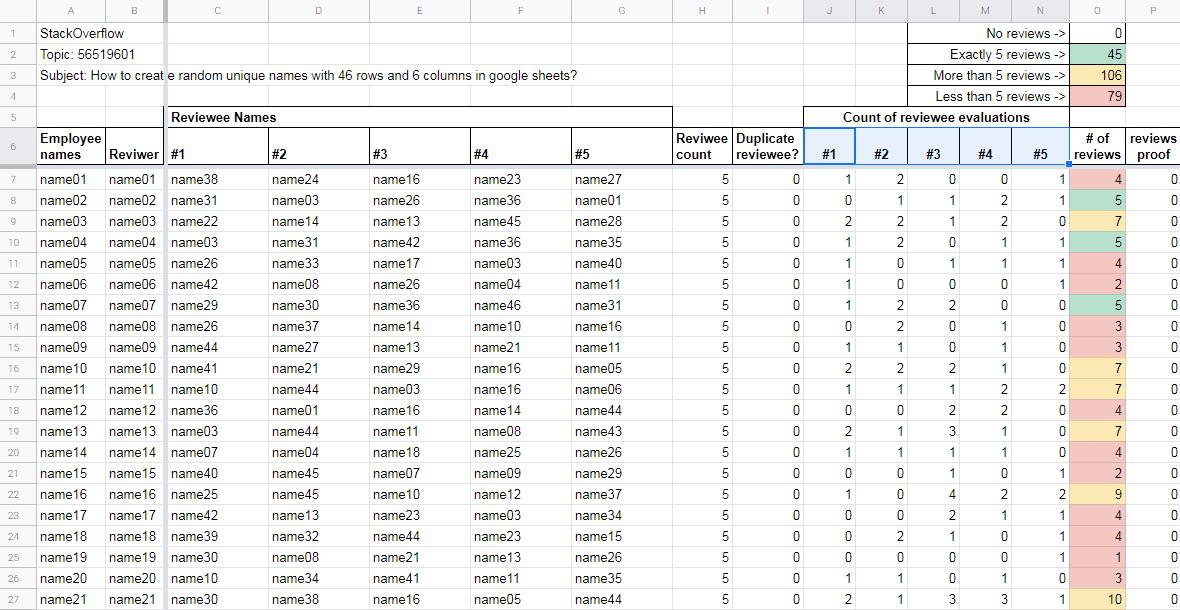
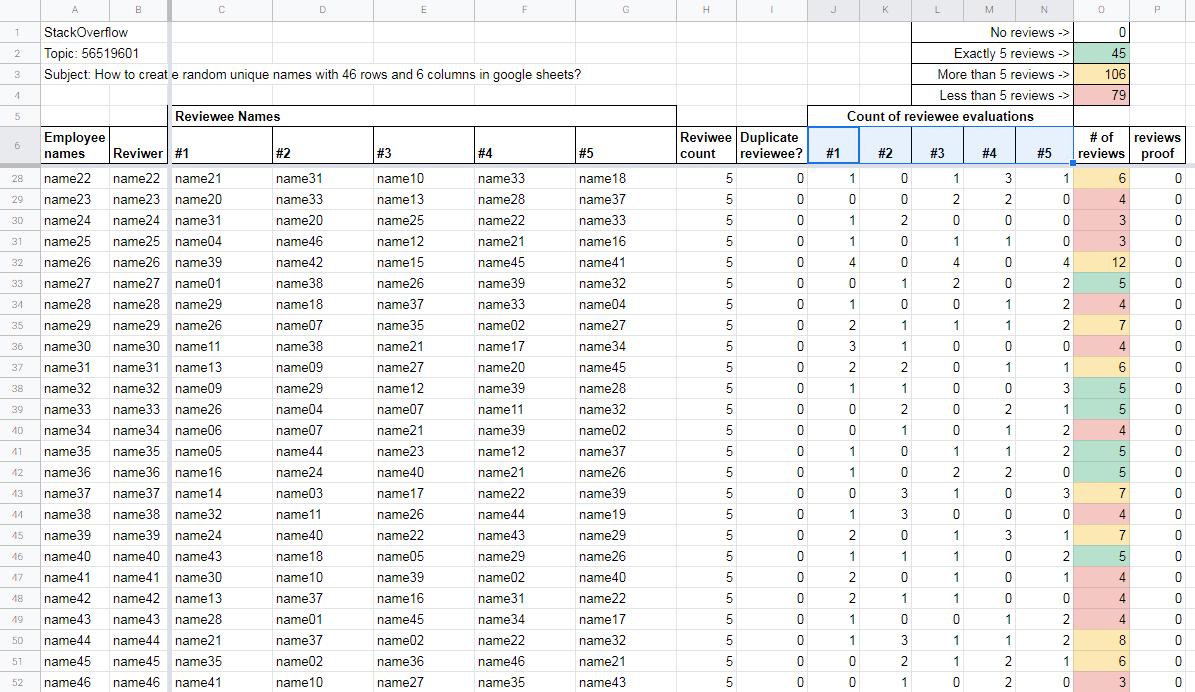
OP想要创建一个评审矩阵,其中随机选择被审查员工的姓名,审阅者不能自我审查,并且对46名员工完成该矩阵。
基于以前的代码,此版本为每一行构建一个员工名称数组,其中不包括审阅者的名称。随机选择了五个名字,并将其应用于审查员。然后,循环通过46名雇员中的每一人重复。
例如,在第一轮评审中,"name01“被从随机选择的员工数组中省略。在第二轮中,"name01“被包括在内,但是"name02”被排除在员工数组之外。以此类推,在每种情况下,用于随机选择五个评论的员工数组总是长度为45个,并且不包括审阅者的姓名。
随机选择要评分的姓名并不能确保在员工之间进行平等和均匀的评价。虽然每个员工将进行5次评审,但有些员工会接受5次以上的审查,有些则少于5次,而且(取决于太阳、月亮和恒星的排列),有可能有些员工可能不会被选中进行评审。
function s05648755803(){

  var ss = SpreadsheetApp.getActiveSpreadsheet();
  var sheetname = "Sheet3";
  var sheet = ss.getSheetByName(sheetname);

  // some variables
  var randomcount = 30; // how many random names
  var rowstart = 7; // ignore row 1 - the header row
  var width = 5;    // how many names in each row - 1/rater plus 5/ratee
  var thelastrow = sheet.getLastRow();
  //Logger.log("DEBUG:last row = "+thelastrow)

  // get the employee names
  var employeecount = thelastrow-rowstart+1;
  //Logger.log("DEBUG: employee count = "+employeecount);//DEBUG

  // get the data
  var datarange = sheet.getRange(rowstart, 1, thelastrow - rowstart+1);
  //Logger.log("DEBUG: range = "+datarange.getA1Notation());//DEBUG
  var data = datarange.getValues();
  //Logger.log("data length = "+data.length);
  //Logger.log(data);

  var counter = 0;
  var newarray = [];
  for (c = 0;c<46;c++){
    counter = c;

    for (i=0;i<data.length;i++){
      if(i!=counter){
        newarray.push(data[i]);
      }
    }

    //Logger.log(newarray);
    var rowdata = [];
    var results = selectRandomElements(newarray, 5);
    Logger.log(results)
    rowdata.push(results);
    var newrange = sheet.getRange(rowstart+c, 3, 1, 5);
    newrange.setValues(rowdata);

    // clear the arrays for the next loop
    var newarray=[];
    var rowdata = []
  }
}

/*
// selectRandomElements and getRandomInt
// Credit: Vidar S. Ramdal
// https://webapps.stackexchange.com/a/102666/196152
*/


function selectRandomElements(fromValueRows, count) {
  var pickedRows = []; // This will hold the selected rows
  for (var i = 0; i < count && fromValueRows.length > 0; i++) {
    var pickedIndex = getRandomInt(0, fromValueRows.length);
    // Pick the element at position pickedIndex, and remove it from fromValueRows. See https://developer.mozilla.org/en-US/docs/Web/JavaScript/Reference/Global_Objects/Array/splice
    var pickedRow = fromValueRows.splice(pickedIndex, 1)[0];
    // Add the selected row to our result array
    pickedRows.push(pickedRow);
  }
  return pickedRows;
}

function getRandomInt(min,
max) { // From https://developer.mozilla.org/en-US/docs/Web/JavaScript/Reference/Global_Objects/Math/random
  min = Math.ceil(min);
  max = Math.floor(max);
  return Math.floor(Math.random() * (max - min)) + min;
}
Screenshot#1
Screenshot#2
Stack Overflow用户
发布于 2019-06-13 08:14:38
尝尝这个。满足这三项要求。
HTML/JS:
<html>
<title>Unique Employees</title>

<head>
    <script src="https://ajax.googleapis.com/ajax/libs/jquery/3.4.0/jquery.min.js"></script>
</head>
<table id="survey_table" border="1" width="85%" cellspacing="0">
    <thead>
        <th>Rater</th>
        <th>Ratee1</th>
        <th>Ratee2</th>
        <th>Ratee3</th>
        <th>Ratee4</th>
        <th>Ratee5</th>
    </thead>
    <tbody id="table_body">

    </tbody>
</table>

<script type="text/javascript">
    function arrayRemove(arr, value) {

        return arr.filter(function(ele) {
            return ele != value;
        });

    }

    function getRandomInt(rm_row, rm_col) {
        var temp_arr = [];
        for (var k = 1; k <= 46; k++) {
            temp_arr.push(k);
        }

        for (var k = 0; k < rm_row.length; k++) {
            temp_arr = arrayRemove(temp_arr, rm_row[k]);
        }

        for (var k = 0; k < rm_col.length; k++) {
            temp_arr = arrayRemove(temp_arr, rm_col[k]);
        }

        var rand = temp_arr[Math.floor(Math.random() * temp_arr.length)];

        return rand;

    }

    function exclude_num(row_unq, col_unq) {
        var rand_int = getRandomInt(row_unq, col_unq);

        if (!row_unq.includes(rand_int) && !col_unq.includes(rand_int)) {

            arr_row.push(rand_int);
            return rand_int;
        } else {
            return exclude_num(arr_row, arr_cols);
        }
    }

    for (var i = 1; i <= 46; i++) {
        var arr_row = [];
        arr_row.push(i);

        var table_html = '<tr id="Row' + i + '">';

        for (var j = 1; j <= 6; j++)

        {
            if (j == 1) {
                table_html += '<td class="Column' + j + ' cells_unq">' + i + '</td>';
            } else {
                var arr_cols = []
                $('.Column' + j).each(function() {
                    arr_cols.push(Number($(this).text()));
                });
                var num = exclude_num(arr_row, arr_cols);
                table_html += '<td class="Column' + j + ' cells_unq">' + num + '</td>';
            }

        }

        table_html += '</tr>';
        var row_html = $('#table_body').html();
        $('#table_body').html(row_html + table_html);
    }
    $('.cells_unq').each(function() {
        temp_text = $(this).text();
        $(this).text('Name' + temp_text);
    });
</script>
<style type="text/css">
    td {
        text-align: center;
    }
</style>

</html>https://stackoverflow.com/questions/56519601
复制相似问题
腾讯云开发者

Copyright © 2013 - 2026 Tencent Cloud. All Rights Reserved. 腾讯云 版权所有
深圳市腾讯计算机系统有限公司 ICP备案/许可证号:粤B2-20090059  粤公网安备44030502008569号
腾讯云计算(北京)有限责任公司 京ICP证150476号 | 京ICP备11018762号