
如何以编程方式创建和管理macOS Safari书签?
我正在制作一个脚本,它更新我的macOS Safari上的书签,使我所有订阅的subreddits都作为一个特定文件夹中的单独书签。在Python中,我已经将所有的subreddits作为元组的排序列表,第一个元素是想要的书签名,第二个元素是书签url:
bookmarks = [
     ('r/Android', 'https://www.reddit.com/r/Android/'),
     ('r/Apple', 'https://www.reddit.com/r/Apple/'),
     ('r/Mac', 'https://www.reddit.com/r/Mac/'),
     ('r/ProgrammerHumor', 'https://www.reddit.com/r/ProgrammerHumor/')
]
如何清除Safari中的subreddit书签文件夹并在该文件夹中创建这些新书签?
到目前为止,我一直使用Python,但是从Python程序调用外部AppleScript或Shell脚本是没有问题的。
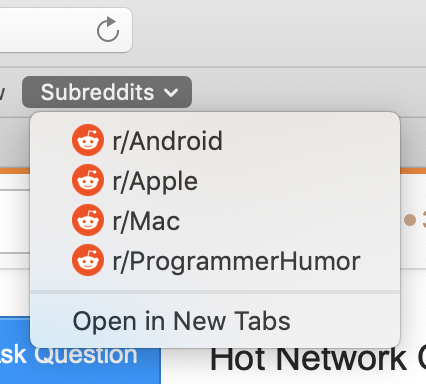
下面是想要的结果的图像,每个书签链接到各自的subreddit url:
回答 1
Stack Overflow用户
发布于 2019-06-10 19:34:51
我从未在Safari中找到用于管理书签的AS命令(不在字典中)。所以我建立了自己的例程来玩Safari书签plist文件。然而,它们会受到苹果公司在未来处理书签方式上的意外改变!到目前为止,它还在工作,但我还没有使用10.14
首先,您必须得到这个plist文件来更改它。这部分必须在你的主要代码中。它为您提供了对plist文件的修补程序:
 set D_Lib to ((path to library folder from user domain) as string) & "Safari"
 set SafariPlistFile to D_Lib & ":Bookmarks.plist"
这里有两个子例程来管理书签.第一个检查书签是否存在。
on Exist_BM(FPlist, BM_Name) -- Search bookmark named BM_Name in Plist file. returns number or 0 if not found. This search is limited to main bar, not sub menus
    tell application "System Events"
        set numBM to 0
        set Main_Bar to property list item "Children" of property list item 2 of property list item "Children" of property list file FPlist
        tell Main_Bar
            set myBM to every property list item of Main_Bar
            repeat with I from 1 to (count of myBM)
                set myType to value of property list item "WebBookmarkType" of (item I of myBM)
                if (myType = "WebBookmarkTypeLeaf") then
                    if (value of property list item "title" of property list item "URIDictionary" of (item I of myBM)) = BM_Name then
                        set numBM to I
                        exit repeat
                    end if
                end if
            end repeat
        end tell
    end tell
    return numBM
end Exist_BM
您可以像下面这样调用这个处理程序:
Set myAndroid to  Exist_BM(SafariPlistFile,"r/Android")
if myAndroid >0 then -- set here the code to update : the bookmark already exists
        else -- set here the code to add new bookmark "r/Android"
        end if
第二个处理程序创建一个新的书签:
on New_BM(FPlist, BM_Name, N_URL) -- create new bookmark at right end side of bookmarks and return its number
    tell application "System Events"
        set Main_Bar to property list item "Children" of property list item 2 of property list item "Children" of property list file FPlist
        set numBM to count of property list item of Main_Bar
        tell Main_Bar
            set my_UUID to do shell script "uuidgen" -- create unique Apple UID
            set myNewBM to make new property list item at the end with properties {kind:record}
            tell myNewBM
                set URIDict to make new property list item with properties {kind:record, name:"URIDictionary"}
                tell URIDict to make new property list item with properties {name:"title", kind:string, value:BM_Name}
                make new property list item with properties {name:"URLString", kind:string, value:N_URL}
                make new property list item with properties {name:"WebBookmarkType", kind:string, value:"WebBookmarkTypeLeaf"}
                make new property list item with properties {name:"WebBookmarkUUID", kind:string, value:my_UUID}
            end tell -- myNewBM
        end tell
    end tell
    return (numBM + 1)
end New_BM
我使用这些例程添加、检查和更改书签右侧的书签。在您的情况下,您需要使用书签子菜单,然后您必须调整这段代码,但主要的概念是相同的。
为了简化操作,我建议您开始查看plist文件(Library/Safari/Bookmarks.plist),以便在子菜单中有书签时查看其结构。
希望能帮上忙!
https://stackoverflow.com/questions/56517403
复制相似问题
腾讯云开发者

Copyright © 2013 - 2026 Tencent Cloud. All Rights Reserved. 腾讯云 版权所有
深圳市腾讯计算机系统有限公司 ICP备案/许可证号:粤B2-20090059  粤公网安备44030502008569号
腾讯云计算(北京)有限责任公司 京ICP证150476号 | 京ICP备11018762号