
带有下拉菜单的多行交互绘图
我试图创造一个类似于这个的情节:
我想添加一个下拉菜单来选择不同的对象。
我修改了我的代码以创建一个示例来说明:
import altair as alt
import pandas as pd
import numpy as np

np.random.seed(42)
source = pd.DataFrame(np.cumsum(np.random.randn(100, 3), 0).round(2),
                    columns=['A', 'B', 'C'], index=pd.RangeIndex(100, name='x'))
source = source.reset_index().melt('x', var_name='category', value_name='y')
source['Type'] = 'First'

source_1 = source.copy()
source_1['y'] = source_1['y'] + 5
source_1['Type'] = 'Second'

source_2 = source.copy()
source_2['y'] = source_2['y'] - 5
source_2['Type'] = 'Third'

source = pd.concat([source, source_1, source_2])

input_dropdown = alt.binding_select(options=['First', 'Second', 'Third'])
selection = alt.selection_single(name='Select', fields=['Type'],
                                   bind=input_dropdown)

# color = alt.condition(select_state,
#                       alt.Color('Type:N', legend=None),
#                       alt.value('lightgray'))

# Create a selection that chooses the nearest point & selects based on x-value
nearest = alt.selection(type='single', nearest=True, on='mouseover',
                        fields=['x'], empty='none')

# The basic line
base = alt.Chart(source).encode(
    x='x:Q',
    y='y:Q',
    color='category:N'
)

# add drop-down menu
lines = base.mark_line(interpolate='basis').add_selection(selection
).transform_filter(selection)

# Transparent selectors across the chart. This is what tells us
# the x-value of the cursor
selectors = alt.Chart(source).mark_point().encode(
    x='x:Q',
    opacity=alt.value(0),
).add_selection(
    nearest
)

# Draw points on the line, and highlight based on selection
points = base.mark_point().encode(
    opacity=alt.condition(nearest, alt.value(1), alt.value(0))
)

# Draw text labels near the points, and highlight based on selection
text = base.mark_text(align='left', dx=5, dy=-5).encode(
    text=alt.condition(nearest, 'y:Q', alt.value(' '))
)

# Draw a rule at the location of the selection
rules = alt.Chart(source).mark_rule(color='gray').encode(
    x='x:Q',
).transform_filter(
    nearest
)

#Put the five layers into a chart and bind the data
alt.layer(
    lines, selectors, points, rules, text
).properties(
    width=500, height=300
)
正如您所看到的,每次我选择一种类型(“第一”、“第二”或“第三种”),交互情节仍然显示所有三种类型的点,而不仅仅是一种,尽管只显示一种类型的线条。
原题:
我试图创造一个类似于这个的情节:
出口,进口和赤字。我想添加一个下拉菜单来选择不同的状态(所以每个州都会有这样的情节)。
我的数据如下:
    State           Year    Category        Trade, in Million Dollars
0   Texas           2008     Export         8970.979210
1   California      2008    Export          11697.850116
2   Washington      2008    Import          8851.678608
3   South Carolina  2008     Deficit        841.495319
4   Oregon          2008     Import         2629.939168
我试过几种不同的方法,但都失败了。如果我只想绘制“线条”对象,我可以做得很好。但我不能把“线”和“点”结合起来。
import altair as alt

states = list(df_trade_china.State.unique())
input_dropdown = alt.binding_select(options=states)
select_state = alt.selection_single(name='Select', fields=['State'],
                                   bind=input_dropdown)

# Create a selection that chooses the nearest point & selects based on x-value
nearest = alt.selection(type='single', nearest=True, on='mouseover',
                        fields=['Year'], empty='none')

# The basic line
line = alt.Chart(df_trade_china).mark_line().encode(
    x='Year:O',
    y='Trade, in Million Dollars:Q',
    color='Category:N'
).add_selection(select_state
).transform_filter(select_state
)

# Transparent selectors across the chart. This is what tells us
# the x-value of the cursor
selectors = alt.Chart(df_trade_china).mark_point().encode(
    x='Year:O',
    opacity=alt.value(0),
).add_selection(
    nearest
)

# Draw points on the line, and highlight based on selection
points = line.mark_point().encode(
    opacity=alt.condition(nearest, alt.value(1), alt.value(0))
)

# Draw text labels near the points, and highlight based on selection
text = line.mark_text(align='left', dx=5, dy=-5).encode(
    text=alt.condition(nearest, 'Trade, in Million Dollars:Q', alt.value(' '))
)

# Draw a rule at the location of the selection
rules = alt.Chart(df_trade_china).mark_rule(color='gray').encode(
    x='Year:Q',
).transform_filter(
    nearest
)

#Put the five layers into a chart and bind the data
alt.layer(
    line
).properties(
    width=500, height=300
)
这是我收到的错误信息。
JavaScript Error: Duplicate signal name: "Select_tuple"

This usually means there's a typo in your chart specification. See the javascript console for the full traceback.回答 1
Stack Overflow用户
发布于 2019-06-05 05:55:10
新问题的新答案:
您的筛选器转换只应用于行数据,因此它只过滤行。如果要过滤每一层,请确保每一层都有过滤器转换。
下面是您的代码的外观:
import altair as alt
import pandas as pd
import numpy as np

np.random.seed(42)
source = pd.DataFrame(np.cumsum(np.random.randn(100, 3), 0).round(2),
                    columns=['A', 'B', 'C'], index=pd.RangeIndex(100, name='x'))
source = source.reset_index().melt('x', var_name='category', value_name='y')
source['Type'] = 'First'

source_1 = source.copy()
source_1['y'] = source_1['y'] + 5
source_1['Type'] = 'Second'

source_2 = source.copy()
source_2['y'] = source_2['y'] - 5
source_2['Type'] = 'Third'

source = pd.concat([source, source_1, source_2])

input_dropdown = alt.binding_select(options=['First', 'Second', 'Third'])
selection = alt.selection_single(name='Select', fields=['Type'],
                                   bind=input_dropdown, init={'Type': 'First'})

# color = alt.condition(select_state,
#                       alt.Color('Type:N', legend=None),
#                       alt.value('lightgray'))

# Create a selection that chooses the nearest point & selects based on x-value
nearest = alt.selection(type='single', nearest=True, on='mouseover',
                        fields=['x'], empty='none')

# The basic line
base = alt.Chart(source).encode(
    x='x:Q',
    y='y:Q',
    color='category:N'
).transform_filter(
    selection
)

# add drop-down menu
lines = base.mark_line(interpolate='basis').add_selection(selection
)

# Transparent selectors across the chart. This is what tells us
# the x-value of the cursor
selectors = alt.Chart(source).mark_point().encode(
    x='x:Q',
    opacity=alt.value(0),
).add_selection(
    nearest
)

# Draw points on the line, and highlight based on selection
points = base.mark_point().encode(
    opacity=alt.condition(nearest, alt.value(1), alt.value(0))
)

# Draw text labels near the points, and highlight based on selection
text = base.mark_text(align='left', dx=5, dy=-5).encode(
    text=alt.condition(nearest, 'y:Q', alt.value(' '))
)

# Draw a rule at the location of the selection
rules = alt.Chart(source).mark_rule(color='gray').encode(
    x='x:Q',
).transform_filter(
    nearest
)

#Put the five layers into a chart and bind the data
alt.layer(
    lines, selectors, points, rules, text
).properties(
    width=500, height=300
)
原来问题的答案:
个人选择只能添加到图表一次。当你写这样的东西时:
line = alt.Chart(...).add_selection(selection)

points = line.mark_point()在line和points中都添加了相同的选择(因为points是从line派生的)。当您对它们进行分层时,每个层都声明一个相同的选择,这将导致重复的信号名错误。
若要解决此问题,请避免向单个图表的多个组件添加相同的选择。
例如,您可以这样做(切换到示例数据集,因为您没有在问题中提供数据):
import altair as alt
from vega_datasets import data

stocks = data.stocks()
stocks.symbol.unique().tolist()

input_dropdown = alt.binding_select(options=stocks.symbol.unique().tolist())
selection = alt.selection_single(fields=['symbol'], bind=input_dropdown,
                                 name='Company', init={'symbol': 'GOOG'})
color = alt.condition(selection,
                      alt.Color('symbol:N', legend=None),
                      alt.value('lightgray'))


base = alt.Chart(stocks).encode(
    x='date',
    y='price',
    color=color
)

line = base.mark_line().add_selection(
    selection
)

point = base.mark_point()

line + point
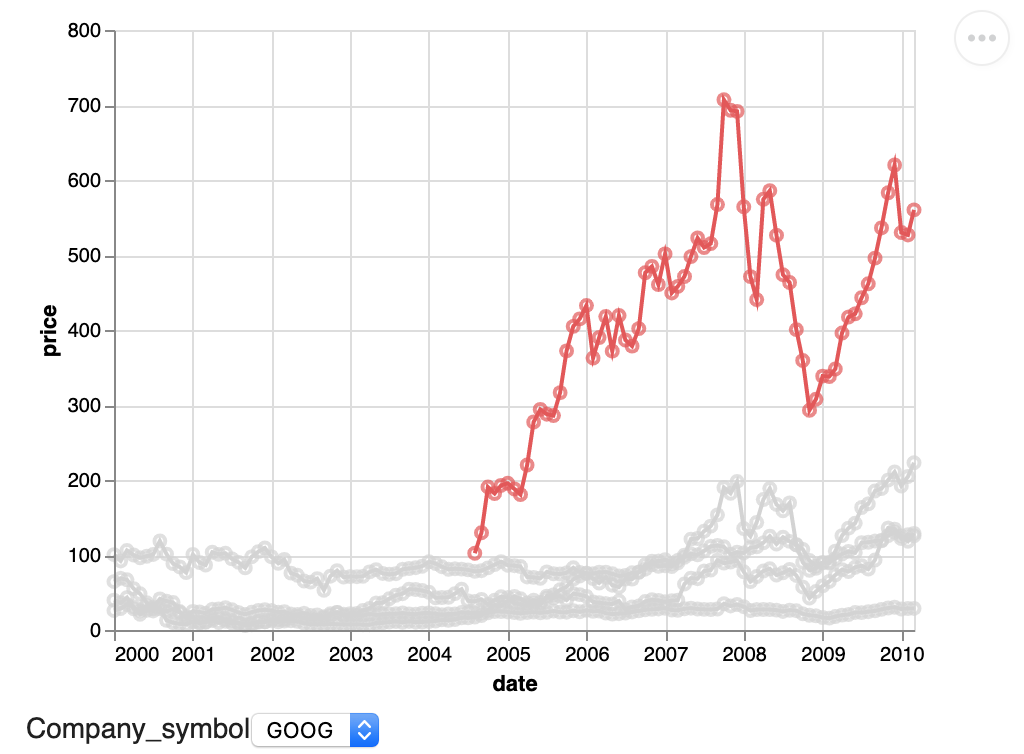
请注意,通过add_selection()的选择声明只能在图表的单个组件上调用,而选择的效果(这里是颜色条件)可以添加到图表的多个组件中。
https://stackoverflow.com/questions/56454473
复制相似问题
腾讯云开发者

Copyright © 2013 - 2026 Tencent Cloud. All Rights Reserved. 腾讯云 版权所有
深圳市腾讯计算机系统有限公司 ICP备案/许可证号:粤B2-20090059  粤公网安备44030502008569号
腾讯云计算(北京)有限责任公司 京ICP证150476号 | 京ICP备11018762号