
OCR预处理:删除跨越字符的线条
我目前正在努力提高GoogleCloud愿景的识别率,所以我正在构建一个预处理管道。
我目前可以创建一个掩码,它覆盖了图像中的字符,但正如您在下面的示例中所看到的,它也显示了线条。现在,由于这些线可以跨越字符,我想删除他们从面具,如果可能的话,不破坏字符。
目前的步骤:
直线检测: InputImage -> Gray比例尺-> Blackhat -> GaussianBlur ->阈值(OTSU) -> HoughLinesP
面具制作: InputImage -> Gray比例尺-> Blackhat -> GaussianBlur ->阈值(OTSU)-> ConnectedComponents
ImageExamples:(由于隐私保护,无法共享完整的图像)
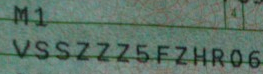
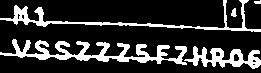
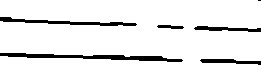
图像显示原始图像、掩码和识别的线条。下面的代码用于生成掩码并查找行
Mat picture = Imgcodecs.imread(path);
Imgproc.cvtColor(picture, picture, Imgproc.COLOR_BGR2GRAY);
Imgcodecs.imwrite("/home/meik/Pictures/asdfGray.png", picture);
Mat blackhatElement = Imgproc.getStructuringElement(Imgproc.CV_SHAPE_RECT, new Size(7, 7));

Imgproc.morphologyEx(picture, picture, Imgproc.MORPH_BLACKHAT, blackhatElement);
Imgproc.GaussianBlur(picture, picture, new Size(5, 3), 0);
Imgproc.threshold(picture, picture, 0, 255, Imgproc.THRESH_BINARY | Imgproc.THRESH_OTSU);

/**
 * Line Detection with Canny and HoughLines(P)
 */
Mat lines = new Mat();
Mat linesResult = Mat.zeros(picture.rows(),picture.cols(), CvType.CV_8UC1);
Imgproc.HoughLinesP(picture, lines,1, Math.PI/180,100, 20, 0);
System.out.println("lines rows:" + lines.rows());
for (int x = 0; x < lines.rows(); x++) {
    double[] l = lines.get(x, 0);
    Imgproc.line(linesResult, new Point(l[0], l[1]), new Point(l[2], l[3]), new Scalar(255, 255, 255), 1, Imgproc.LINE_8, 0);
}
/**End of line detection*/
Mat kernel = Imgproc.getStructuringElement(Imgproc.CV_SHAPE_CROSS, new Size(3,3));
Imgproc.dilate(linesResult,linesResult,kernel);
Core.bitwise_not(linesResult,linesResult);我发现本论文在谈论这个问题,但我很难理解他们的方法。
从现在开始,我如何在不破坏字符的情况下移除线条?
回答 2
Stack Overflow用户
发布于 2019-06-04 13:56:07
我真的不认为你需要参考文件来做这件事。
只需使用颜色信息或hough线来找出一条真正长的直线
使用该信息创建一个掩码图像。
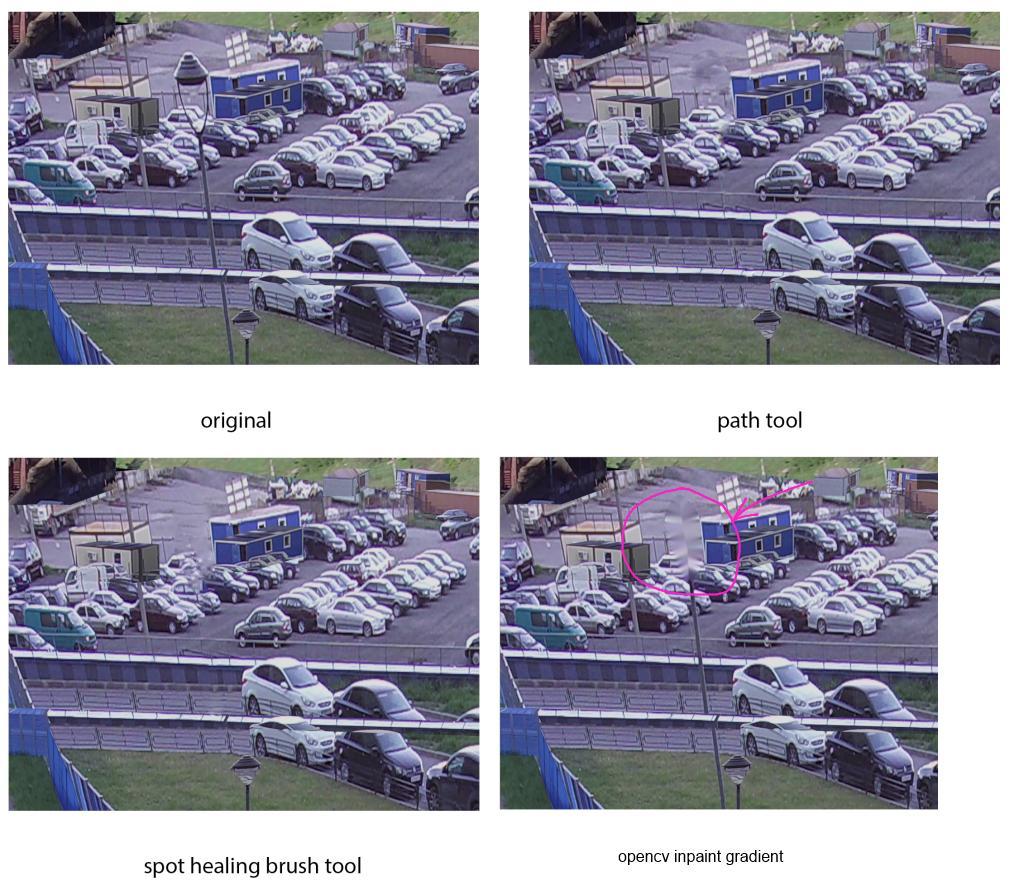
然后使用opencv内画删除它。
https://docs.opencv.org/2.4/modules/photo/doc/inpainting.html
你想要的和下面的图像很相似。它要求移除交通灯杆。你想要删除写作指南。本质上,这是一回事
Stack Overflow用户
发布于 2019-06-04 13:30:09
简单的图像预处理怎么样?
例如,使用阈值只维持一定的颜色范围(而不是直接将图像转换为灰度)。
在GIMP中集成了类似的内容,请参阅https://docs.gimp.org/2.8/en/gimp-tool-threshold.html
您可能希望尝试各种阈值。
https://stackoverflow.com/questions/56444119
复制相似问题
腾讯云开发者

Copyright © 2013 - 2026 Tencent Cloud. All Rights Reserved. 腾讯云 版权所有
深圳市腾讯计算机系统有限公司 ICP备案/许可证号:粤B2-20090059  粤公网安备44030502008569号
腾讯云计算(北京)有限责任公司 京ICP证150476号 | 京ICP备11018762号