
在`jss_article()` of **rticles**包中格式化问题
我正在准备我的手稿根据JSS模板在R工作室。间接地,我使用的是来自rticles包的。现在,按照日记提交的说明,我使用精确的LaTex命令准备好了我的文章。
但是,我遇到了以下格式化问题。
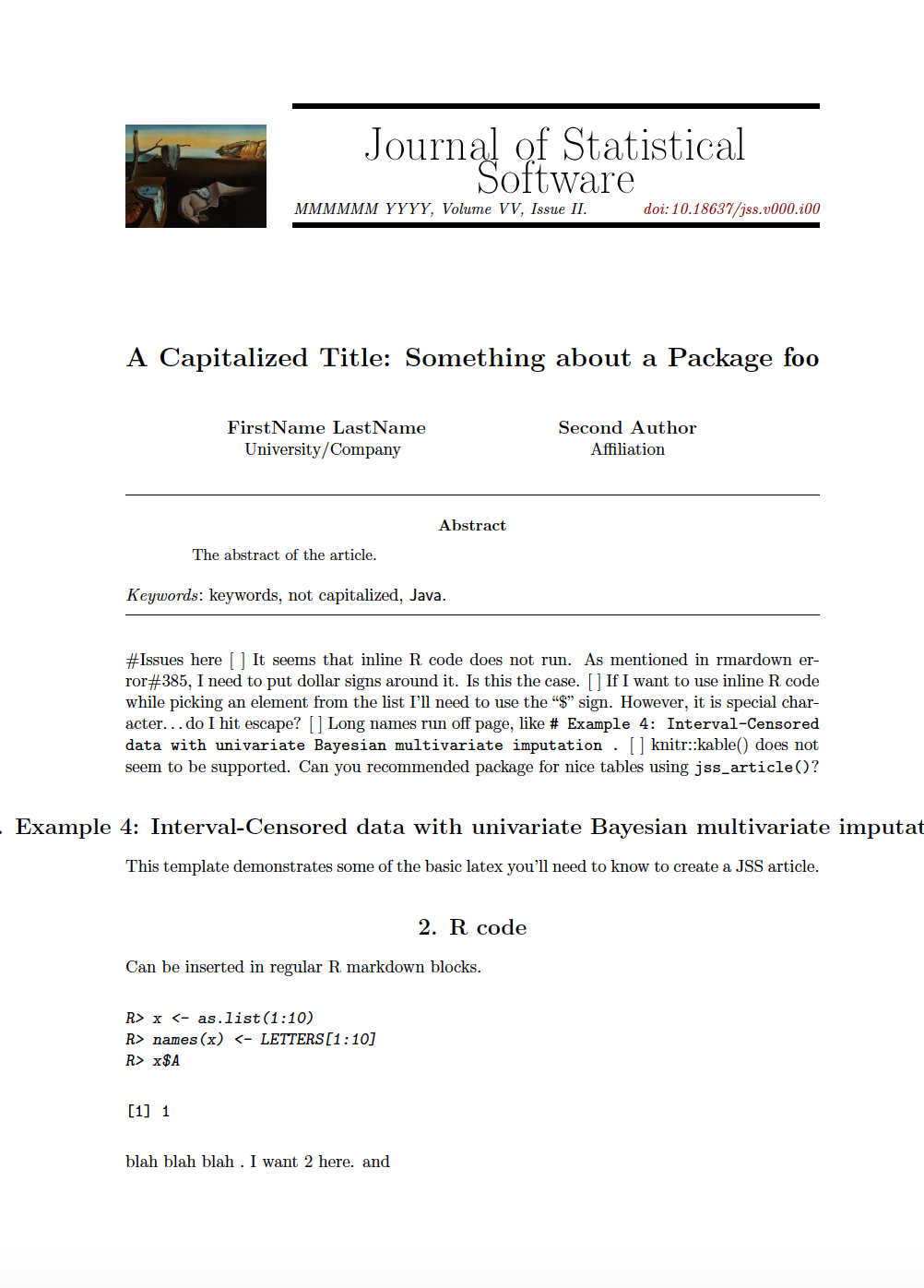
我希望jss_article()执行像r print(x)这样的内联代码命令。如果保持不变,它就无法像在Rmarkdown错误#385 (与其他错误一起)中那样编译。按照解决方案,我在它周围贴上了美元标志。但是,内联代码没有执行,而是打印到屏幕上。在JSS格式中,内联命令是否没有在rticles::jss_article()中执行?通常,我希望使用内联代码从列表中提取元素,比如r print(x$B)。因为"$“是LaTex符号,所以我需要使用"\”。执行$r print(x\$B)$将导致

像# Example 4: Interval-Censored data with univariate Bayesian multivariate imputation .这样的长名称从页面上运行,在JSS模板中似乎忽略了编织机的tidy和tidy.opts选项的使用。
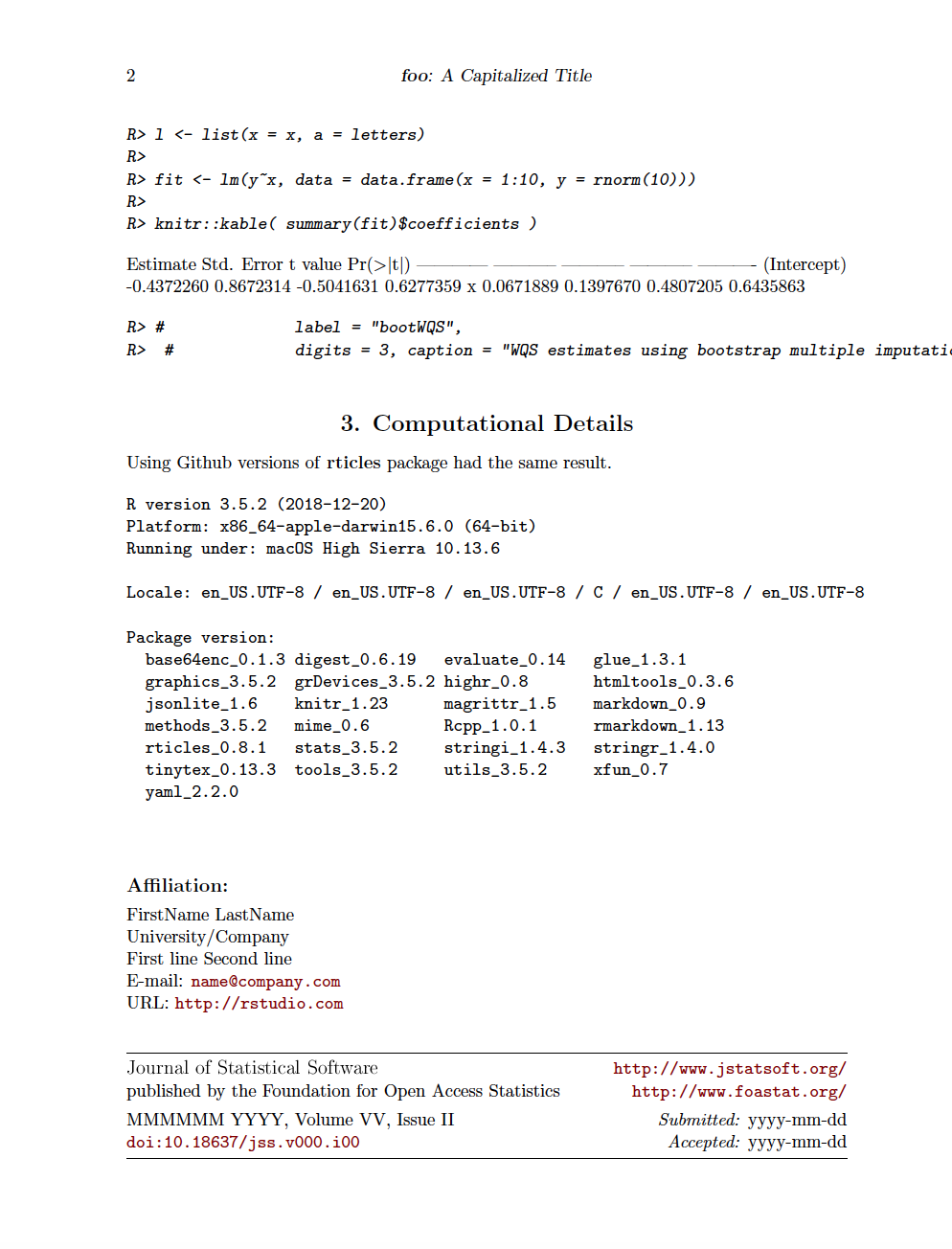
针织品::kable()功能在jss_article()中似乎不支持。您能推荐一个函数来构造具有发布价值的表(类似于kable()的输出)吗?
编辑了RStudio模板以反映以下问题:
---
documentclass: jss
author:
  - name: FirstName LastName
    affiliation: University/Company
    address: >
      First line
      Second line
    email: \email{name@company.com}
    url: http://rstudio.com
  - name: Second Author
    affiliation: Affiliation
title:
  formatted: "A Capitalized Title: Something about a Package \\pkg{foo}"
  # If you use tex in the formatted title, also supply version without
  plain:     "A Capitalized Title: Something about a Package foo"
  # For running headers, if needed
  short:     "\\pkg{foo}: A Capitalized Title"
abstract: >
  The abstract of the article.
keywords:
  # at least one keyword must be supplied
  formatted: [keywords, not capitalized, "\\proglang{Java}"]
  plain:     [keywords, not capitalized, Java]
preamble: >
  \usepackage{amsmath}
output: rticles::jss_article
---

#Issues here
[ ] It seems that inline R code does not run. As mentioned in rmardown error#385, I need to put dollar signs around it.  <!--  $ r print(x)$  --> Is this the case.
[ ] If I want to use inline R code while picking an element from the list I'll need to use the "$" sign. However, it is a special character; do I hit escape?
[ ] Long names run off the page, like `# Example 4: Interval-Censored data with univariate Bayesian multivariate imputation .`
[ ] `knitr::kable()` does not seem to be supported. Can you recommend a function that provides publication-worthy tables using `jss_article()`?

# Example 4: Interval-Censored data with univariate Bayesian multivariate imputation

This template demonstrates some of the basic latex you'll need to know to create a JSS article.

```{r echo = FALSE}
Knitr::opts_chunk$set(整洁= "styler“)
tidy.opts = list(blank = FALSE, width.cutoff = 40))
# options for tidy to remove blank lines [blank = FALSE] and set the approximate line width to be 80.# R code
Can be inserted in regular R markdown blocks.
```{r}X <- as.list(1:10)
名称(X) <- LETTERS1 1:10
x$A
blah blah blah $`r print(x)`.$ I want 2 here.
and <!--$ r print(x). $  I want to print element B of x, or 2. -->

```{r}
L <-列表(x= x,a=字母)
fit <- lm(y~x,data = data.frame(x = 1:10,y=rnorm(10)
针织品::kable(简介(Fit)$coefficients)
标签= "bootWQS",
位数= 3,标题= "WQS估计使用引导多重计算。在两个数据集执行WQS回归后的统计汇总“)。
# Computational Details
Using Github versions of **rticles** package had the same result.

```{r, echo =FALSE}
xfun::session_info('rticles')
回答 1
Stack Overflow用户
发布于 2019-06-07 16:46:12
“rticles”一书的作者黄祥云通过以下方式解决了这些问题:
- 使用输出选项。
- 将
tidy选项设置为"formatR",而不是"styler“。
关于这些问题的进一步说明:
- 要执行内联R代码,不要使用美元符号并使用常规的
r ...语法。 - 主标题
#的长标题仍然在页面上运行。该行为由日志文档类(jss.cls)定义。最简单的解决方案:避免使用过长的第一级标题。 - 长的辅助标头
##保持在行上,并且没有从页面上运行,这要归功于书签包。 - 要制作漂亮的表,仍然使用
kable(),但是添加format和booktabs参数:
knitr::kable(summary(fit)$coefficients, digits = 3,
label = "demo-table" caption = " A CAPTION HERE ",
format = "latex", booktabs = TRUE
)documentclass: jss
author:
- name: FirstName LastName
affiliation: University/Company
address: >
First line
Second line
email: \email{name@company.com}
url: http://rstudio.com
- name: Second Author
affiliation: Affiliation
title:
formatted: "A Capitalized Title: Something about a Package \\pkg{foo}"
# If you use tex in the formatted title, also supply version without
plain: "A Capitalized Title: Something about a Package foo"
# For running headers, if needed
short: "\\pkg{foo}: A Capitalized Title"
abstract: >
The abstract of the article.
keywords:
# at least one keyword must be supplied
formatted: [keywords, not capitalized, "\\proglang{Java}"]
plain: [keywords, not capitalized, Java]
preamble: >
\usepackage{amsmath}
\usepackage{booktabs}
output:
bookdown::pdf_book:
base_format: rticles::jss_article
---knitr::opts_chunk$set(
整洁= "formatR",
tidy.opts =list(空白=假,width.cutoff = 40)
)
## Example 4: Interval-Censored data with univariate Bayesian multivariate imputation

1. Executing R commands. Dollar signs are not needed.
blah blah blah `r x$B`.

1. A pretty table

```r
fit <- lm(y ~ x,data = data.frame(x = 1:10,y=rnorm(10)
针织品::kable(简介(Fit)$coefficients,
label = "demo-table",位数= 3,标题=“这里的标题",格式=”胶乳“,书签=真
)
demo table \@ref(tab:demo-table)https://stackoverflow.com/questions/56434067
复制相似问题
腾讯云开发者

Copyright © 2013 - 2026 Tencent Cloud. All Rights Reserved. 腾讯云 版权所有
深圳市腾讯计算机系统有限公司 ICP备案/许可证号:粤B2-20090059  粤公网安备44030502008569号
腾讯云计算(北京)有限责任公司 京ICP证150476号 | 京ICP备11018762号