
移除簇后悬挂盘
作为大学课程的一部分,我不得不将一个应用程序部署到IBM。我有随付即付的账户,我的信用卡附在上面。
我将应用程序部署到集群(带有公共IP的付费层),几天后,演示不再需要集群。集群被配置为通过ibmcloud-块存储插件使用具有持久存储的动态配置。
问题是集群提供了几十个磁盘,然后当我使用IBM (可以选择删除所有持久性卷)删除它时,这些光盘仍然显示为活动的。
调用ibmcloud sl block volume-list的结果
77394321   SL02SEL1854117-1    dal13        endurance_block_storage   20            -            161.26.114.100   0       1
78180815   SL02SEL1854117-2    dal10        endurance_block_storage   20            -            161.26.98.107    0       1
78180817   SL02SEL1854117-3    dal10        endurance_block_storage   20            -            161.26.98.107    1       1
78180827   SL02SEL1854117-4    dal10        endurance_block_storage   20            -            161.26.98.106    3       1
78180829   SL02SEL1854117-5    dal10        endurance_block_storage   20            -            161.26.98.108    2       1
78184235   SL02SEL1854117-6    dal10        endurance_block_storage   20            -            161.26.98.88     4       1
78184249   SL02SEL1854117-7    dal10        endurance_block_storage   20            -            161.26.98.86     5       1
78184285   SL02SEL1854117-8    dal10        endurance_block_storage   20            -            161.26.98.107    6       1
78184289   SL02SEL1854117-9    dal10        endurance_block_storage   20            -            161.26.98.105    7       1
78184457   SL02SEL1854117-10   dal10        endurance_block_storage   20            -            161.26.98.85     9       1
78184465   SL02SEL1854117-11   dal10        endurance_block_storage   20            -            161.26.98.88     8       1
78184485   SL02SEL1854117-12   dal10        endurance_block_storage   20            -            161.26.98.86     10      1
78184521   SL02SEL1854117-13   dal10        endurance_block_storage   20            -            161.26.98.106    0       1
78184605   SL02SEL1854117-14   dal10        endurance_block_storage   20            -            161.26.98.87     1       1
78184643   SL02SEL1854117-15   dal10        endurance_block_storage   20            -            161.26.98.85     2       1
78184689   SL02SEL1854117-16   dal10        endurance_block_storage   20            -            161.26.98.87     3       1
78184725   SL02SEL1854117-17   dal10        endurance_block_storage   20            -            161.26.98.108    11      1

[ ... more entries there ... ]所有这些光盘都是使用默认的用于Kubernetes集群的IBM铜块存储类创建的,并且具有标准的Remove策略集(因此应该自动删除)。
当我试图删除ibmcloud sl block volume-cancel --immediate --force 77394321中的任何一个时,我得到了:
Failed to cancel block volume: 77394321.
No billing item is found to cancel.
此外,IBM将这些光盘显示为活动的,并且没有删除它们的选项(菜单中的选项是灰色的):
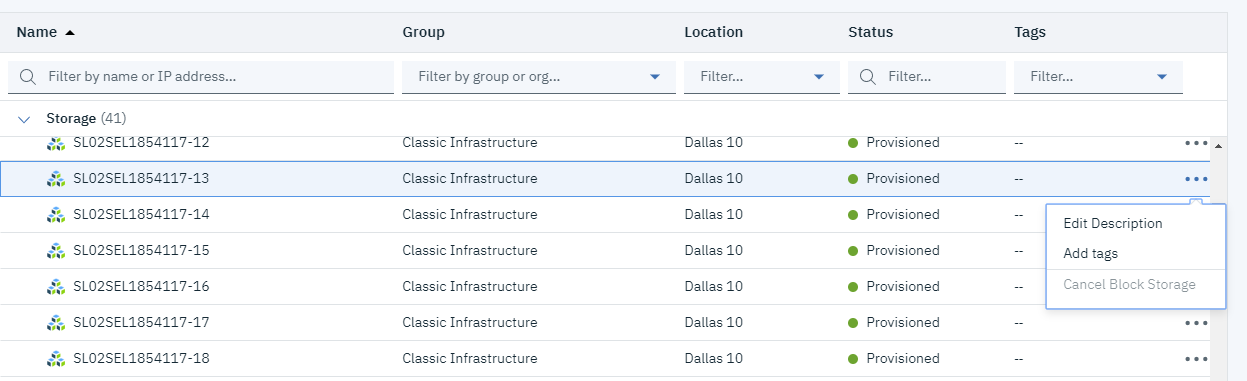
我不想获得超过40×20 in的光盘的账单,因为集群甚至不需要那么多资源(错误在于定义不好的Kubernetes吐露)。
删除光盘的正确方法是什么,还是仅仅是对IBM的延迟,而我的账单将一切正常(我的账单只显示集群的公共IP,仅此而已)?
编辑似乎在问题解决了一段时间后(我创建了一张罚单,但不知道销售团队是否解决了这个问题。也许就像@Sandip在评论中建议的那样,等待就足够了。
回答 1
Stack Overflow用户
发布于 2019-06-03 19:08:49
打开一个支持案例可能是最好的行动方针,因为我们可能需要一些帐户信息从您了解发生了什么(或者更确切地说,为什么预期的行动没有发生)。
登录到云中并访问https://cloud.ibm.com/unifiedsupport/supportcenter (或单击页面masthead中的支持链接)。如果你在这里评论你的案件号码,我会帮你跟进。
https://stackoverflow.com/questions/56432576
复制相似问题
腾讯云开发者

Copyright © 2013 - 2026 Tencent Cloud. All Rights Reserved. 腾讯云 版权所有
深圳市腾讯计算机系统有限公司 ICP备案/许可证号:粤B2-20090059  粤公网安备44030502008569号
腾讯云计算(北京)有限责任公司 京ICP证150476号 | 京ICP备11018762号