
使背景透明
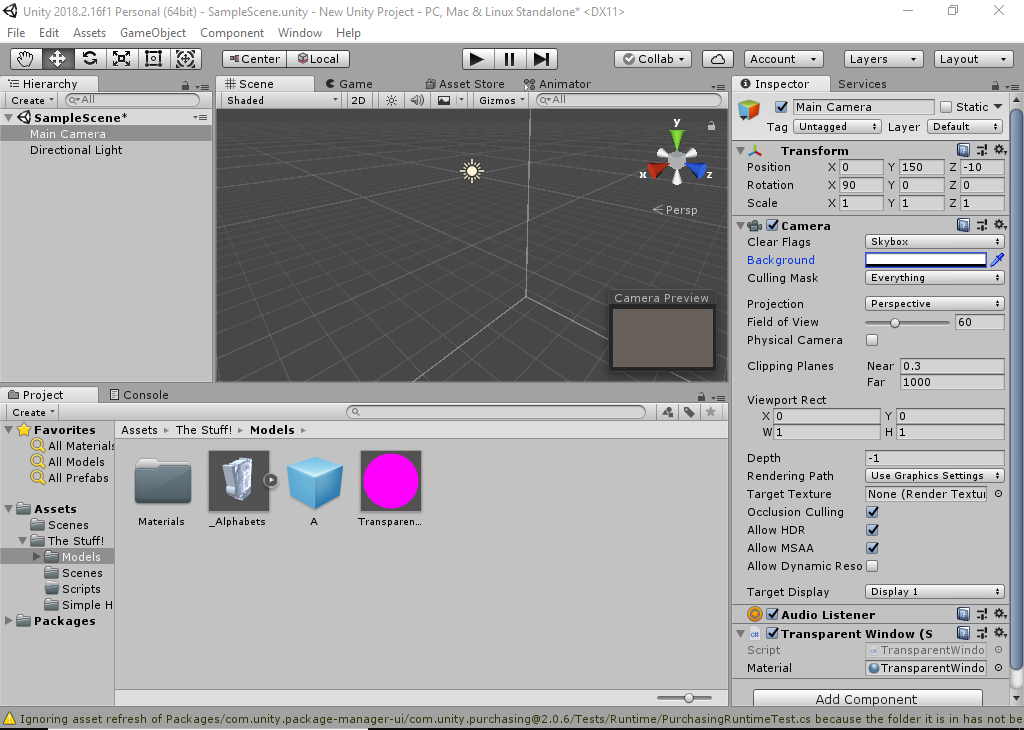
我正在尝试为Windows 10制作一个临时的屏幕键盘,并且需要背景透明,以使用户更方便(键已经透明)。然而,我不知道如何使背景透明。
任何帮助都将不胜感激。
我相信我基本上是在寻找这条线代码的更新版本,如下所示:
using System;
using System.Runtime.InteropServices;
using UnityEngine;

public class TransparentWindow : MonoBehaviour
{
    [SerializeField]
    private Material m_Material;

    private struct MARGINS
    {
        public int cxLeftWidth;
        public int cxRightWidth;
        public int cyTopHeight;
        public int cyBottomHeight;
    }

    [DllImport("user32.dll")]
    private static extern IntPtr GetActiveWindow();

    [DllImport("user32.dll")]
    private static extern int SetWindowLong(IntPtr hWnd, int nIndex, uint dwNewLong);

    [DllImport("user32.dll")]
    static extern bool ShowWindowAsync(IntPtr hWnd, int nCmdShow);

    [DllImport("user32.dll", EntryPoint = "SetLayeredWindowAttributes")]
    static extern int SetLayeredWindowAttributes(IntPtr hwnd, int crKey, byte bAlpha, int dwFlags);

    [DllImport("user32.dll", EntryPoint = "SetWindowPos")]
    private static extern int SetWindowPos(IntPtr hwnd, int hwndInsertAfter, int x, int y, int cx, int cy, int uFlags);

    [DllImport("Dwmapi.dll")]
    private static extern uint DwmExtendFrameIntoClientArea(IntPtr hWnd, ref MARGINS margins);

    const int GWL_STYLE = -16;
    const uint WS_POPUP = 0x80000000;
    const uint WS_VISIBLE = 0x10000000;
    const int HWND_TOPMOST = -1;

    void Start()
    {
 // You really don't want to enable this in the editor, but it works there..

    int fWidth = Screen.width;
    int fHeight = Screen.height;
    var margins = new MARGINS() { cxLeftWidth = -1 };
    var hwnd = GetActiveWindow();

    SetWindowLong(hwnd, GWL_STYLE, WS_POPUP | WS_VISIBLE);

    // Transparent windows with click through
    SetWindowLong(hwnd, -20, 524288 | 32);//GWL_EXSTYLE=-20; WS_EX_LAYERED=524288=&h80000, WS_EX_TRANSPARENT=32=0x00000020L
    SetLayeredWindowAttributes(hwnd, 0, 255, 2);// Transparency=51=20%, LWA_ALPHA=2
    SetWindowPos(hwnd, HWND_TOPMOST, 0, 0, fWidth, fHeight, 32 | 64); //SWP_FRAMECHANGED = 0x0020 (32); //SWP_SHOWWINDOW = 0x0040 (64)
    DwmExtendFrameIntoClientArea(hwnd, ref margins);


    }

    void OnRenderImage(RenderTexture from, RenderTexture to)
    {
        Graphics.Blit(from, to, m_Material);
    }
}
所给出的代码不起作用,所以我认为它已经过时了。我不知道如何自己更新,因为它有点超出了我的技能范围。当我将代码上传到Unity时,它只是说代码中有错误,并且它不是一个有效的脚本。但是,当我打开脚本时,不会出现错误。
我希望能对键盘后面的任何东西有一个相对好的视图,就像我的桌面,但实际上我只看到了一个黑色的平面。
更新:因此,很明显,错误消息是由我的脚本不具有与我的类相同的名称引起的。昨天我花了4个多小时试图修复这个错误信息,而这个命名事件就是原因。谢谢鲁兹姆。不管怎么说,现在错误信息已经消失了,当我运行或构建程序时,我的透明窗口材料就出现了:一个深粉色。然后,我将统一版本更改为2018.2.16f1,但没有成功。然后,我删除了#if !Unity行,以使透明度在编辑器中完美地工作,但在我构建它时不是这样。注意,当我构建它和在编辑器中运行它时,单击“通过”确实有效。
回答 1
Stack Overflow用户
发布于 2019-06-04 20:43:54
正如在评论中发现的那样,当相机的清晰标志设置为solid color和粉红色透明窗口材料被替换为白色透明材料时,问题就解决了。
https://stackoverflow.com/questions/56431991
复制相似问题
腾讯云开发者

Copyright © 2013 - 2026 Tencent Cloud. All Rights Reserved. 腾讯云 版权所有
深圳市腾讯计算机系统有限公司 ICP备案/许可证号:粤B2-20090059  粤公网安备44030502008569号
腾讯云计算(北京)有限责任公司 京ICP证150476号 | 京ICP备11018762号