
使用Find函数在不同工作表中查找、复制和粘贴
使用Find函数在不同工作表中查找、复制和粘贴
提问于 2019-06-03 06:06:39
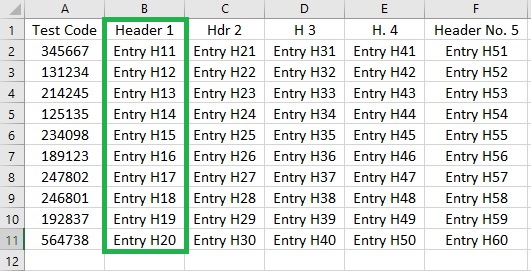
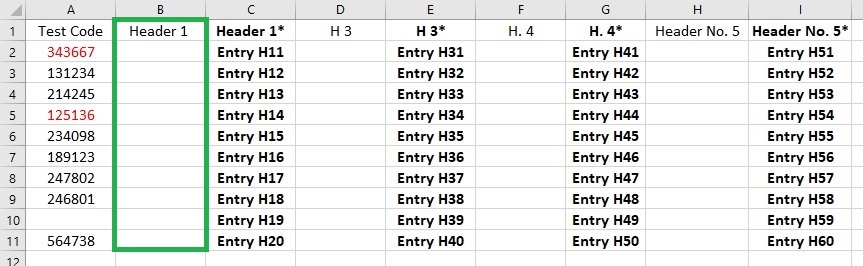
使用下面的宏,我试图在worksheet ("Sheet11")中搜索某个标头,使用loop (x = 0 to 10)复制其下面的行,在不同的worksheet ("Sheet22")中搜索相同的标头,并将复制的内容粘贴在完全相同的标题下。
Sub FindCopyPasteV8()

Dim FindH1 As Range

Dim TestR1 As Range
Dim TestR2 As Range

Dim StartRow1 As Long
Dim StartColumn1 As Long
Dim StartRow2 As Long
Dim StartColumn2 As Long

Dim x As Long

   With Sheets("Sheet11").Range("A:FF")

      Set FindH1 = .Find(What:="Header 1", LookAt:=xlWhole, MatchCase:=True, SearchFormat:=False)

   End With

   With Sheets("Sheet22").Range("A:FF")

      Set TestR1 = .Find(What:="Header 1", LookAt:=xlWhole, MatchCase:=True, SearchFormat:=False)

      For x = 0 To 10

         StartColumn1 = TestR1.Column
         StartColumn2 = FindH1.Column

         StartRow1 = TestR1.Row + x
         StartRow2 = FindH1.Row + x

         Set TestR1 = Sheets("Sheet22").Cells(StartRow1, StartColumn1)
         Set TestR2 = Sheets("Sheet11").Cells(StartRow2, StartColumn2)

         TestR2.Copy TestR1

     Next x

  End With

End Sub不管用,我也不知道为什么。我在行StartColumn1 = TestR1.Column中得到一个错误,错误消息是“运行时error 91对象变量或块变量未设置”。
我知道,同样的结果可以通过更简单的编程来实现,但对于我的预期用途,它必须与上面用循环和查找函数显示的完全一样地工作。
回答 2
Stack Overflow用户
回答已采纳
发布于 2019-06-03 06:23:11
这仅仅说明范围TestR1尚未设置,因此您无法访问它的属性。
在使用Find方法时,请始终检查以确保正在搜索的范围在进一步进行之前被找到。
你可以这样做..。
With Sheets("Sheet22").Range("A:FF")
    Set TestR1 = .Find(What:="Header 1", LookAt:=xlWhole, MatchCase:=True, SearchFormat:=False)
    If Not TestR1 Is Nothing Then
        For x = 0 To 10
            StartColumn1 = TestR1.Column
            StartColumn2 = FindH1.Column

            StartRow1 = TestR1.Row + x
            StartRow2 = FindH1.Row + x

            Set TestR1 = Sheets("Sheet22").Cells(StartRow1, StartColumn1)
            Set TestR2 = Sheets("Sheet11").Cells(StartRow2, StartColumn2)

            TestR2.Copy TestR1
        Next x
    Else
        MsgBox "Header 1 was not found on Sheet22.", vbExclamation
        Exit Sub
    End If
End WithStack Overflow用户
发布于 2019-06-03 07:43:24
您也可以使用复制粘贴。
Option Explicit

Sub FindCopyPasteV8()

    Dim FindH1 As Range, TestR1 As Range
    Dim LastRow11 As Long, lastRow22 As Long

    Dim ws11 As Worksheet, ws22 As Worksheet

    With ThisWorkbook
        Set ws11 = .Worksheets("Sheet11")
        Set ws22 = .Worksheets("Sheet22")
    End With

    'Eliminate searching range to search in the first row only
    Set FindH1 = ws11.Range("A1:FF1").Find(What:="Header 1", LookAt:=xlWhole, MatchCase:=True, SearchFormat:=False)

    'If Header 1 found in Sheet11
    If Not FindH1 Is Nothing Then

        Set TestR1 = ws22.Range("A1:FF1").Find(What:="Header 1", LookAt:=xlWhole, MatchCase:=True, SearchFormat:=False)

        'If Header 1 found in Sheet22
        If Not TestR1 Is Nothing Then
            'Find last row of the column where Header 1 found in Sheet11
            LastRow11 = ws11.Cells(ws11.Rows.Count, FindH1.Column).End(xlUp).Row
            'Find last row of the column where Header 1 found in Sheet22
            lastRow22 = ws22.Cells(ws11.Rows.Count, FindH1.Column).End(xlUp).Row
            'Copy range from sheet11
            ws11.Range(ws11.Cells(2, FindH1.Column), ws11.Cells(LastRow11, FindH1.Column)).Copy
            'Paste range to sheet22
            ws22.Cells(lastRow22 + 1, TestR1.Column).PasteSpecial Paste:=xlPasteValues
        Else
            'If Header not found in Sheet22
            MsgBox "Header 1 was not found on Sheet22.", vbExclamation
        End If

    Else
        'If Header 1 not found in Sheet11
        MsgBox "Header 1 was not found on Sheet11.", vbExclamation
    End If

End Sub页面原文内容由Stack Overflow提供。腾讯云小微IT领域专用引擎提供翻译支持
原文链接:
https://stackoverflow.com/questions/56421897
复制相关文章
相似问题
腾讯云开发者

Copyright © 2013 - 2026 Tencent Cloud. All Rights Reserved. 腾讯云 版权所有
深圳市腾讯计算机系统有限公司 ICP备案/许可证号:粤B2-20090059  粤公网安备44030502008569号
腾讯云计算(北京)有限责任公司 京ICP证150476号 | 京ICP备11018762号