
弹簧引导2:达不到控制器方法
我有一些春季靴休息教程。当我调用:
http://localhost:8090/customers/stam
Tomcat日志:
o.s.b.w.embedded.tomcat.TomcatWebServer : Tomcat从端口8090 (http)启动,具有上下文路径'‘ t.s.SpringbootRestDemoApplication :在2.696秒内启动SpringbootRestDemoApplication (JVM运行4.042)
我得到的回应是:
{
    "timestamp": "2019-06-02T12:25:03.400+0000",
    "status": 404,
    "error": "Not Found",
    "message": "No message available",
    "path": "/customers/stam"
}
你能帮忙吗?
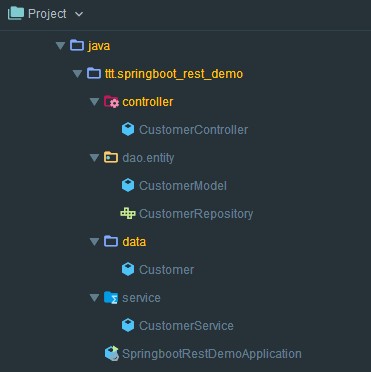
package ttt.springboot_rest_demo;
import ...

@SpringBootApplication
@ComponentScan({"springboot_rest_demo.controller", "springboot_rest_demo.data"})
public class SpringbootRestDemoApplication {

    public static void main(String[] args) {
        SpringApplication.run(SpringbootRestDemoApplication.class, args);
    }

}package ttt.springboot_rest_demo.controller;
import ...
@RestController
@RequestMapping("/customers")
public class CustomerController {
@RequestMapping(value = "/stam", method = RequestMethod.GET)
public ResponseEntity < Customer > getCustomer() {
return new ResponseEntity < >(new Customer(), HttpStatus.OK);
}
}package ttt.springboot_rest_demo.data;
public class Customer {
private String name;
private int age;
private String email;
private Long id;
//getters and setters
}这只是项目的一部分。我也使用服务类,但由于失败,我添加了一个简单的控制器方法,暂时不需要服务类,只是为了简化示例。
回答 1
Stack Overflow用户
发布于 2019-06-02 12:49:46
您的ComponentScan不正确,请检查包(这些包名不存在):
@ComponentScan({"springboot_rest_demo.controller", "springboot_rest_demo.data"})您的控制器在ttt.springboot_rest_demo.controller包中。将ComponentScan中的包名更改为此包。
@ComponentScan({"ttt.springboot_rest_demo.controller", "springboot_rest_demo.data"})或者,仅仅省略ComponentScan也适用于您,因为您将依赖Spring的默认行为来扫描SpringBootApplication下的所有包。
注意,如果您的控制器不是托管bean (例如,没有被ComponentScan扫描),则忽略您添加的任何Spring注释(如RequestMapping、RestController)。
https://stackoverflow.com/questions/56414956
复制相似问题
腾讯云开发者

Copyright © 2013 - 2026 Tencent Cloud. All Rights Reserved. 腾讯云 版权所有
深圳市腾讯计算机系统有限公司 ICP备案/许可证号:粤B2-20090059  粤公网安备44030502008569号
腾讯云计算(北京)有限责任公司 京ICP证150476号 | 京ICP备11018762号