
未能用CreateObject设置FSO = ExceltoWord!加载项
我正在使用Excel外接程序ExceltoWord从Excel工作表自动填充Word文档。我遵循了原始开发人员这里的说明。
我使用“我创建了通用书签指示器,在Word”和“我把书签指示符直接放在单元格-左”选项和“删除单词doc”的结尾。当我保存设置时,我得到一个MS Visual错误
运行时错误“429:”ActiveX组件无法创建对象.
我尝试过转换Excel表格、Word文档和Word模板的不同格式,并在保存配置时将Word Doc关闭并打开。
Public Function validateFileFolderSelection(ByVal fName As String, fType As String, src As String, bFolderOnly As Boolean) As Boolean

'Dim FSO As FileSystemObject 'early binding
Dim FSO As Object 'late binding


    'Set FSO = New FileSystemObject 'early binding
    Set FSO = CreateObject("Scripting.FileSystemObject") 'late binding

    validateFileFolderSelection = True

    'Test for word or excel filename & that the file exists
    If Trim(fName) = vbNullString Then
        validateFileFolderSelection = False
    ElseIf bFolderOnly Then
        If Not FSO.FolderExists(fName) Then
            validateFileFolderSelection = False
        End If
    ElseIf Not FSO.fileExists(fName) Then
            validateFileFolderSelection = False
    End If

End FunctionVBA在Set FSO = CreateObject("Scripting.FileSystemObject") 'late binding上显示一个错误。
回答 1
Stack Overflow用户
发布于 2019-05-31 15:09:37
如果您添加了对的引用,微软脚本运行时 (VBE >>引用)然后启用您当前注释掉的“早期绑定”代码,您的代码就可以工作了。
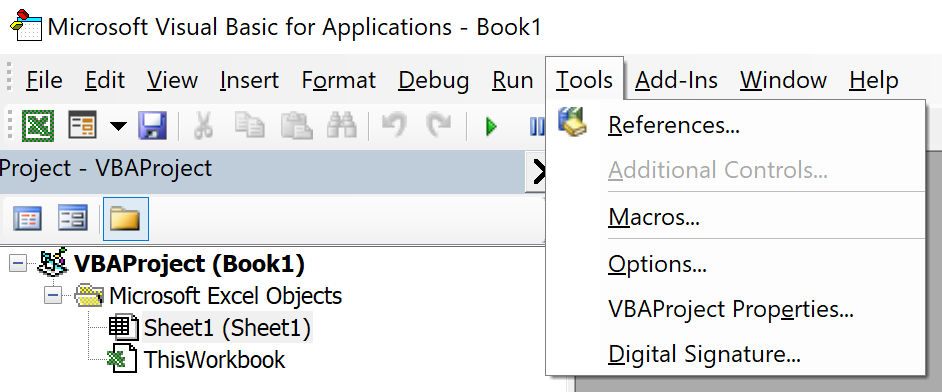
若要在(VBE)中设置引用,请转到“工具”菜单并选择“引用”。函数。
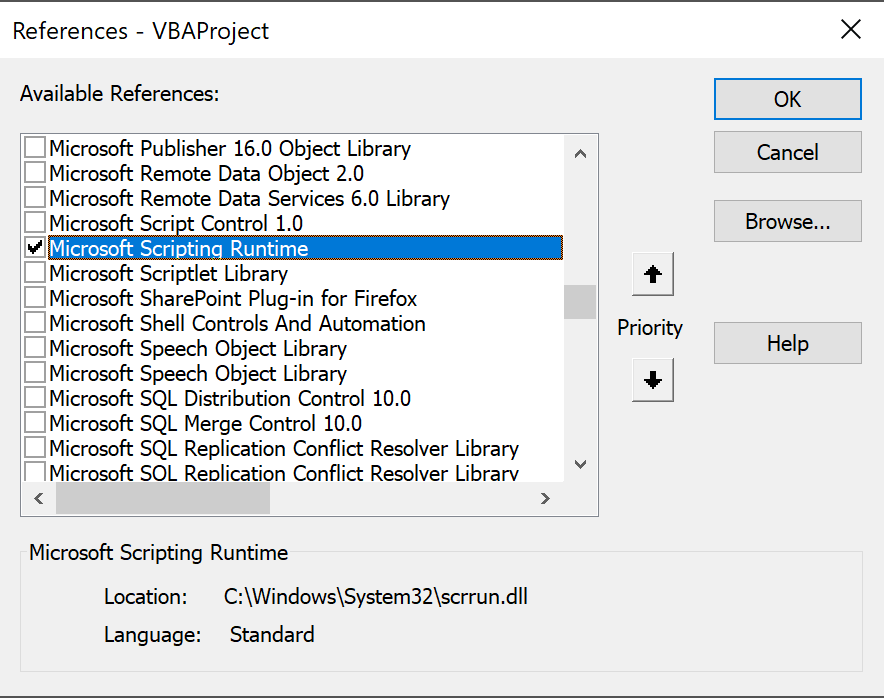
然后从打开的“引用”对话框中滚动到找到,并标记它,然后单击“确定”。
在当前代码中,删除标记为“早期绑定”的两行上的注释标记,并在标记为“延迟绑定”的两行上应用注释标记。
下面是对原始答案的编辑,因为根据注释,您在系统上使用FSO (文件系统对象)代码时仍然有问题。
下面的VBA例程将确定指定的目录或文件是否存在,而不是使用FSO。这个例程名为"DoesItExist“,我已经包含了一个示例例程,演示了如何调用"DoesItExist”例程。
Sub MyTestRoutine()
    'this first example tests if a specific file exists
    'including a "False" setting for the dirOnly variable is optional
    If DoesItExist("C:\Users\<userID>\Documents\Test\Mydoc.docx") Then
        Debug.Print "File Exists"
    Else
        Debug.Print "File Does Not Exist"
    End If
    'the next example tests if a directory exists,
    'the "True" setting for the dirOnly variable is required for directories
    If DoesItExist("C:\Users\<userID>\Documents\Test", True) Then
        Debug.Print "Directory Exists"
    Else
        Debug.Print "Directory Does Not Exist"
    End If
End Sub

Public Function DoesItExist(ByRef pathName As String, Optional ByRef dirOnly As Boolean) As Boolean
    'this routine checks if a file or folder exists on the system
    'it runs on either a Windows based version of Office or a Mac version
    'if Mac Office then only for the Office 365, 2016, 2019, or later)
    Select Case dirOnly
        Case True
            If Dir(pathName, vbDirectory) = vbNullString Then
                DoesItExist = False
            Else
                DoesItExist = True
            End If
        Case False
            If Dir(pathName, vbNormal) = vbNullString Then
                DoesItExist = False
            Else
                DoesItExist = True
            End If
    End Select
End Functionhttps://stackoverflow.com/questions/56396335
复制相似问题
腾讯云开发者

Copyright © 2013 - 2026 Tencent Cloud. All Rights Reserved. 腾讯云 版权所有
深圳市腾讯计算机系统有限公司 ICP备案/许可证号:粤B2-20090059  粤公网安备44030502008569号
腾讯云计算(北京)有限责任公司 京ICP证150476号 | 京ICP备11018762号