
使用opencv LineSegmentDetector查找图像的线条
使用opencv LineSegmentDetector查找图像的线条
提问于 2019-05-31 05:31:50
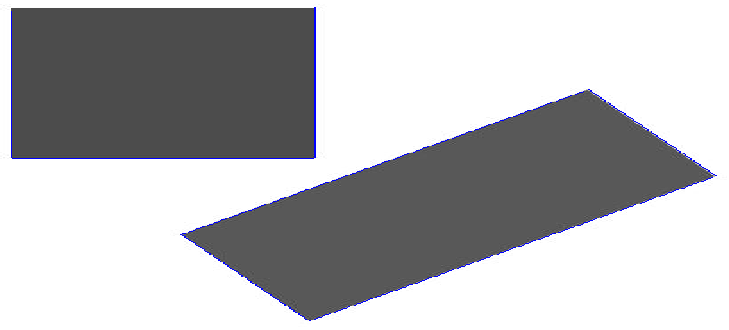
我有一个彩色图像,我应该使用opencv LineSegmentDetector算法来检测图像中矩形的线条。
这是我的形象:

我用的是这个代码:
import cv2
img = cv2.imread("rectangles.jpg",0)

#Create default parametrization LSD
lsd = cv2.createLineSegmentDetector(0)

#Detect lines in the image
lines = lsd.detect(img)[0]

#Draw detected lines in the image
drawn_img = lsd.drawSegments(img,lines)

#Show image
cv2.imshow("LSD",drawn_img )
cv2.waitKey(0)
我得到了这个差事:
<ipython-input-18-93ae667b0648> in <module>()
      3
      4 #Create default parametrization LSD
----> 5 lsd = cv2.createLineSegmentDetector(0)
      6
      7 #Detect lines in the image

error: OpenCV(4.1.0) C:\projects\opencv-python\opencv\modules\imgproc\src\lsd.cpp:143: error: (-213:The function/feature is not implemented) Implementation has been removed due original code license issues in function 'cv::LineSegmentDetectorImpl::LineSegmentDetectorImpl'
我检查了Open-cvVersion4.1文档来使用这个方法,这是页面,但是我不明白该如何使用这个方法。
任何帮助都是非常感谢的。
回答 2
Stack Overflow用户
回答已采纳
发布于 2019-05-31 05:42:03
你读过错误信息了吗?
错误: C:\projects\opencv-python\opencv\modules\imgproc\src\lsd.cpp:143:错误:(-213:函数/特性未实现) 函数'cv::LineSegmentDetectorImpl::LineSegmentDetectorImpl‘中的原代码许可问题已被删除。
由于许可证问题,该类不可用。
您可以在原始源中看到这个这里。
Stack Overflow用户
发布于 2019-09-08 11:30:40
您还可以使用OpenCV 4.1中提供的快速线路检测器。
import cv2
img = cv2.imread("rectangles.jpg",0)

#Create default Fast Line Detector (FSD)
fld = cv2.ximgproc.createFastLineDetector()

#Detect lines in the image
lines = fld.detect(img)

#Draw detected lines in the image
drawn_img = fld.drawSegments(img,lines)

#Show image
cv2.imshow("FLD", drawn_img)
cv2.waitKey(0)
结果:
页面原文内容由Stack Overflow提供。腾讯云小微IT领域专用引擎提供翻译支持
原文链接:
https://stackoverflow.com/questions/56389167
复制相关文章
相似问题
腾讯云开发者

Copyright © 2013 - 2026 Tencent Cloud. All Rights Reserved. 腾讯云 版权所有
深圳市腾讯计算机系统有限公司 ICP备案/许可证号:粤B2-20090059  粤公网安备44030502008569号
腾讯云计算(北京)有限责任公司 京ICP证150476号 | 京ICP备11018762号