
Not本机:":CFBundleIdentifier",不存在
似乎这个错误对于每一种情况都是非常具体的,因为我已经尝试过这篇文章中的所有内容:Print: Entry, ":CFBundleIdentifier", Does Not Exist
我也在这篇文章中尝试过几乎所有的东西,我在2018年5月22日停了下来,在那里我推荐了一个符号链接:https://github.com/facebook/react-native/issues/7308。
在我做一个符号链接之前,我要联系你们所有人。
升级“我的反应本机”不是一种选择。
我有以下几点:
"react": "16.2.0",
"react-native": "0.53.3",
"react-native-xcode-packager": "^0.1.0",

"detox": {
    "configurations": {
      "ios.sim.debug": {
        "binaryPath": "ios/build/Build/Products/Debug-iphonesimulator/NFIBEngage.app",
        "build": "xcodebuild -workspace ios/NFIBEngage.xcworkspace -configuration Debug -scheme NFIBEngage -sdk iphonesimulator -derivedDataPath ios/build",
        "type": "ios.simulator",
        "name": "iPhone 6"
      }
},这个错误指的是我的ios/AppName-tvOS/Info.plist
<key>CFBundleIdentifier</key>
    <string>org.reactjs.native.example.$(PRODUCT_NAME:rfc1034identifier)</string>
实际错误如下:
fatal error: 'SplashScreen.h' file not found
#import "SplashScreen.h"
        ^~~~~~~~~~~~~~~~
1 error generated.


** BUILD FAILED **


The following build commands failed:
    CompileC build/Build/Intermediates.noindex/NFIBEngage.build/Debug-iphonesimulator/PROD.build/Objects-normal/x86_64/AppDelegate.o NFIBEngage/AppDelegate.m normal x86_64 objective-c com.apple.compilers.llvm.clang.1_0.compiler
(1 failure)

Installing build/Build/Products/Debug-iphonesimulator/NFIBEngage.app
An error was encountered processing the command (domain=NSPOSIXErrorDomain, code=22):
Failed to install the requested application
The bundle identifier of the application could not be determined.
Ensure that the application's Info.plist contains a value for CFBundleIdentifier.
Print: Entry, ":CFBundleIdentifier", Does Not Exist

Command failed: /usr/libexec/PlistBuddy -c Print:CFBundleIdentifier build/Build/Products/Debug-iphonesimulator/NFIBEngage.app/Info.plist
Print: Entry, ":CFBundleIdentifier", Does Not Existscreen错误引用了AppDelegate.m中的这一行。
#import "SplashScreen.h"但我不知道这有什么关系。我使用的模拟器为XCode 10.1和高塞拉利昂OSX。此外,如果我转到文件 -> 项目设置
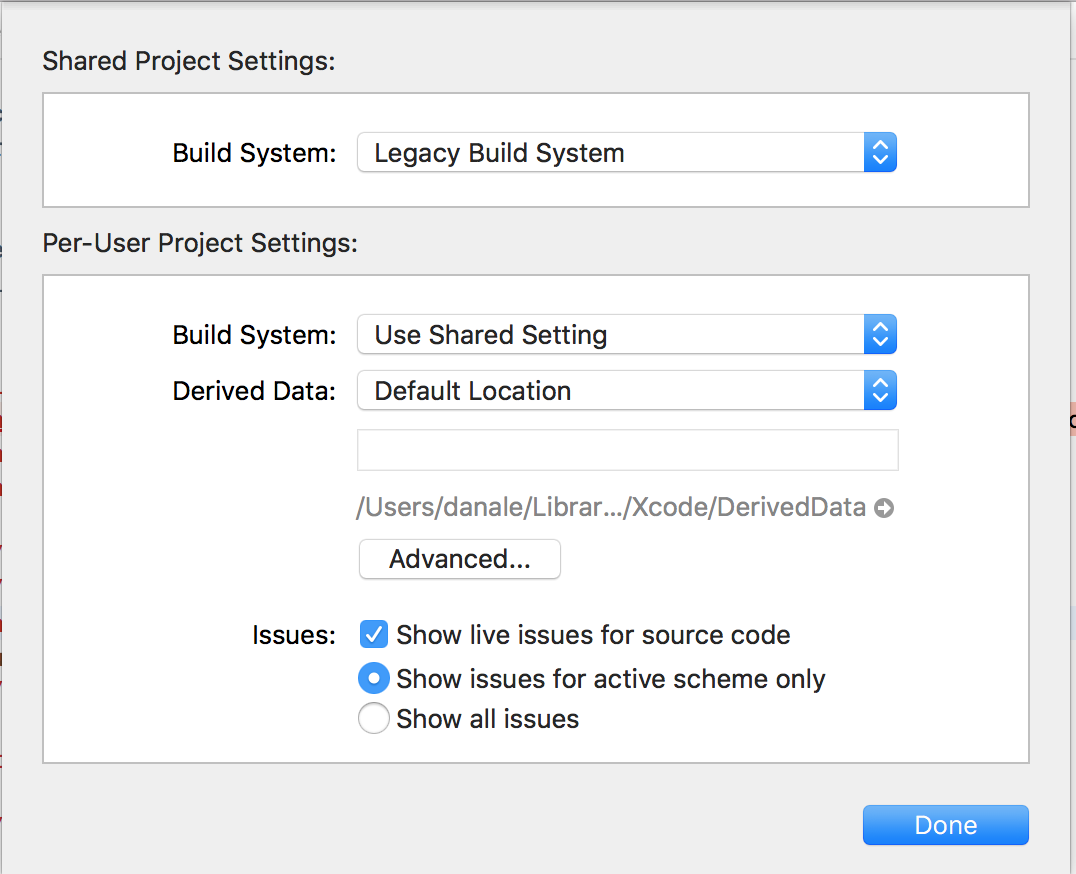
在高级选项卡中,我有:
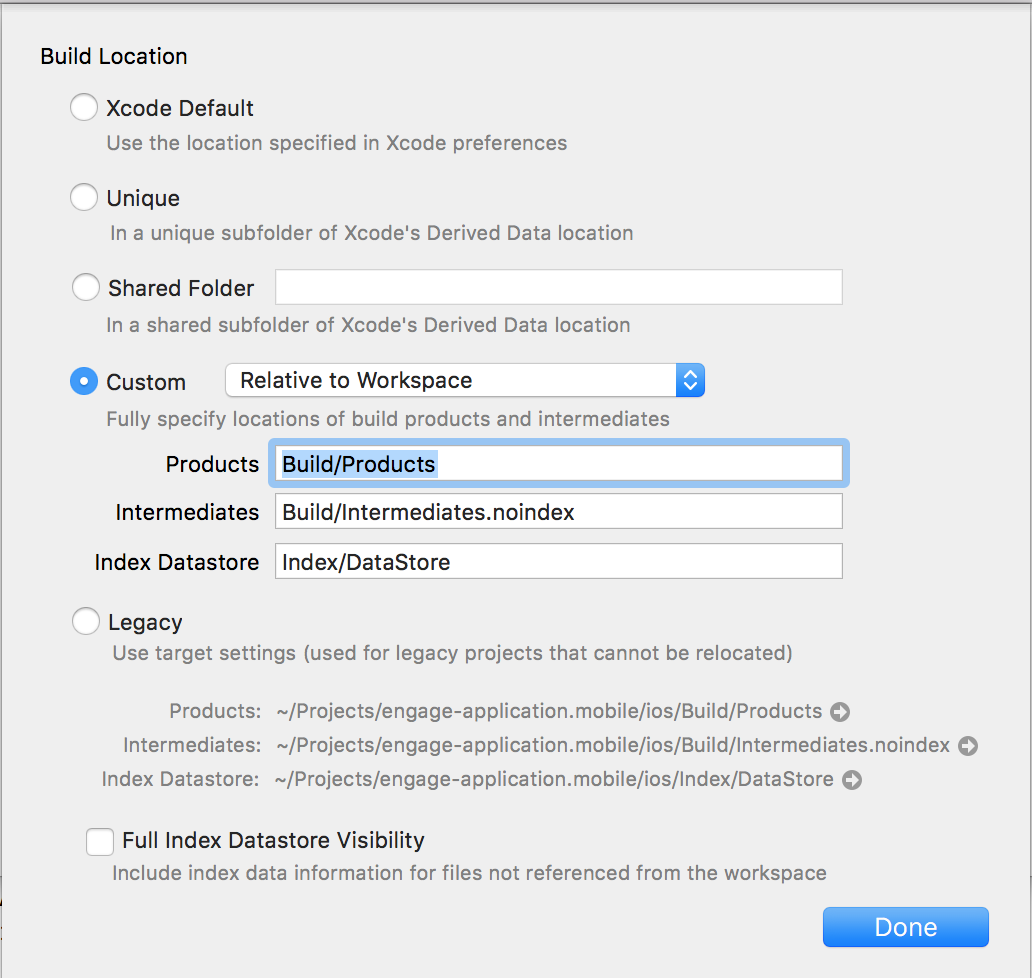
我最后一次尝试遵循这里的一个建议:https://github.com/facebook/react-native/issues/21382
给了我这个:
cd ios
➜  ios git:(release/3.6.2_build) ✗ pod install
zsh: command not found: pod凭直觉,在重新安装相同版本并运行react-native link react-native-splash-screen之后,我想我应该尝试删除和重新安装react本机启动屏幕,然后运行caused by: sentry reported an error: You do not have permission to perform this action. (http status: 403),而不是得到关于启动屏幕的错误:caused by: sentry reported an error: You do not have permission to perform this action. (http status: 403)。
这是否意味着飞溅屏幕的错误已经解决了,现在我要谈的是其他一些问题,比如Sentry和令牌问题?
上面的错误是否意味着我需要一个auth.token?如果是的话,这与安全令牌有什么不同吗?
回答 1
Stack Overflow用户
发布于 2019-05-31 13:25:01
因此,根据我从一位在这里发表评论的同事那里得到的线索,我找到了这篇文章:https://medium.com/handlebar-labs/how-to-add-a-splash-screen-to-a-react-native-app-ios-and-android-30a3cec835ae
我决定卸载react-native-splash-screen@3.0.6并按如下方式重新安装:
npm install react-native-splash-screen@3.0.6
react-native link react-native-splash-screen
果然,闪屏错误消失了。
https://stackoverflow.com/questions/56383771
复制相似问题
腾讯云开发者

Copyright © 2013 - 2026 Tencent Cloud. All Rights Reserved. 腾讯云 版权所有
深圳市腾讯计算机系统有限公司 ICP备案/许可证号:粤B2-20090059  粤公网安备44030502008569号
腾讯云计算(北京)有限责任公司 京ICP证150476号 | 京ICP备11018762号