
如何在没有控制台/本机应用程序的交互式登录屏幕的情况下为Graph生成Azure Active (AAD)身份验证令牌?
如何在没有控制台/本机应用程序的交互式登录屏幕的情况下为Graph生成Azure Active (AAD)身份验证令牌?
详细信息:我使用图形API来读取带有“委托”权限的Azure Active Directory (AAD)的电子邮件。
“应用程序”权限允许用户读取其他邮箱,由于安全问题,这种方法没有管理员同意,所以我使用‘委托’权限。
我的控制台/本机应用程序已注册到AAD。
由于AAD使用以下方式为特定帐户生成OAuth身份验证令牌: 1.客户端ID 2.租户ID 3.客户端秘密(应用程序的密钥/密码) 4.特定帐户的登录凭据。
我可以使用交互式登录屏幕生成令牌。
但是,我想要一种机制,可以在代码中使用C# or.NET生成图API (资源)的AAD令牌,而无需交互登录屏幕
回答 2
Stack Overflow用户
发布于 2019-05-29 07:21:06
似乎你想要得到你的令牌,而不提示页面中的标记。
是的,您可以使用client_credentials授予身份验证流在C#.Net中完成这一任务。
请参见以下代码片段:
访问令牌类:
 public  class AccessTokenClass
        {
            public string access_token { get; set; }
            public string token_type { get; set; }
            public long expires_in { get; set; }
        }
令牌请求方法:
private async Task<string> GetYourTokenWithClientCredentialsFlow()
        {
            string tokenUrl = $"https://login.microsoftonline.com/YourTenant/oauth2/token";
            var tokenRequest = new HttpRequestMessage(HttpMethod.Post, tokenUrl);

            tokenRequest.Content = new FormUrlEncodedContent(new Dictionary<string, string>
            {
                ["grant_type"] = "client_credentials",
                ["client_id"] = "5f14dea0-5cd---Your_Client_Id----8950-4f646829f870",
                ["client_secret"] = "031Fnwih---Your_Client_Secret----Fx+Ase3V65lpWQ=",
                ["resource"] = "https://graph.microsoft.com" // https://management.azure.com/ Or Any Resource You Want
            });

            dynamic json;
            dynamic token;
            HttpClient client = new HttpClient();

            var tokenResponse = await client.SendAsync(tokenRequest);

            json = await tokenResponse.Content.ReadAsStringAsync();
            token = JsonConvert.DeserializeObject<AccessTokenClass>(json);
            Console.WriteLine("Your Access Token {0}",token.access_token);
            return token;
        }
生成的令牌响应:
一旦设置了所有必需的凭据,您就会得到相应的令牌。见下面的屏幕截图:
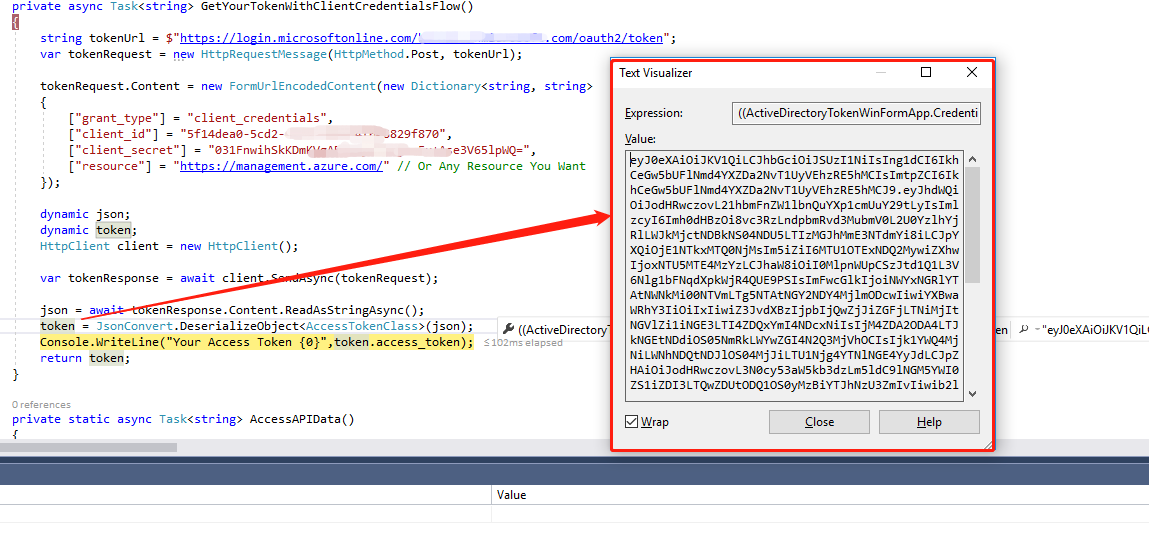
注意:这个身份验证流将为您生成令牌,而无需交互的登录屏幕。如果您仍然有任何查询,请在评论中随意分享。感谢和快乐的编码!
更新:
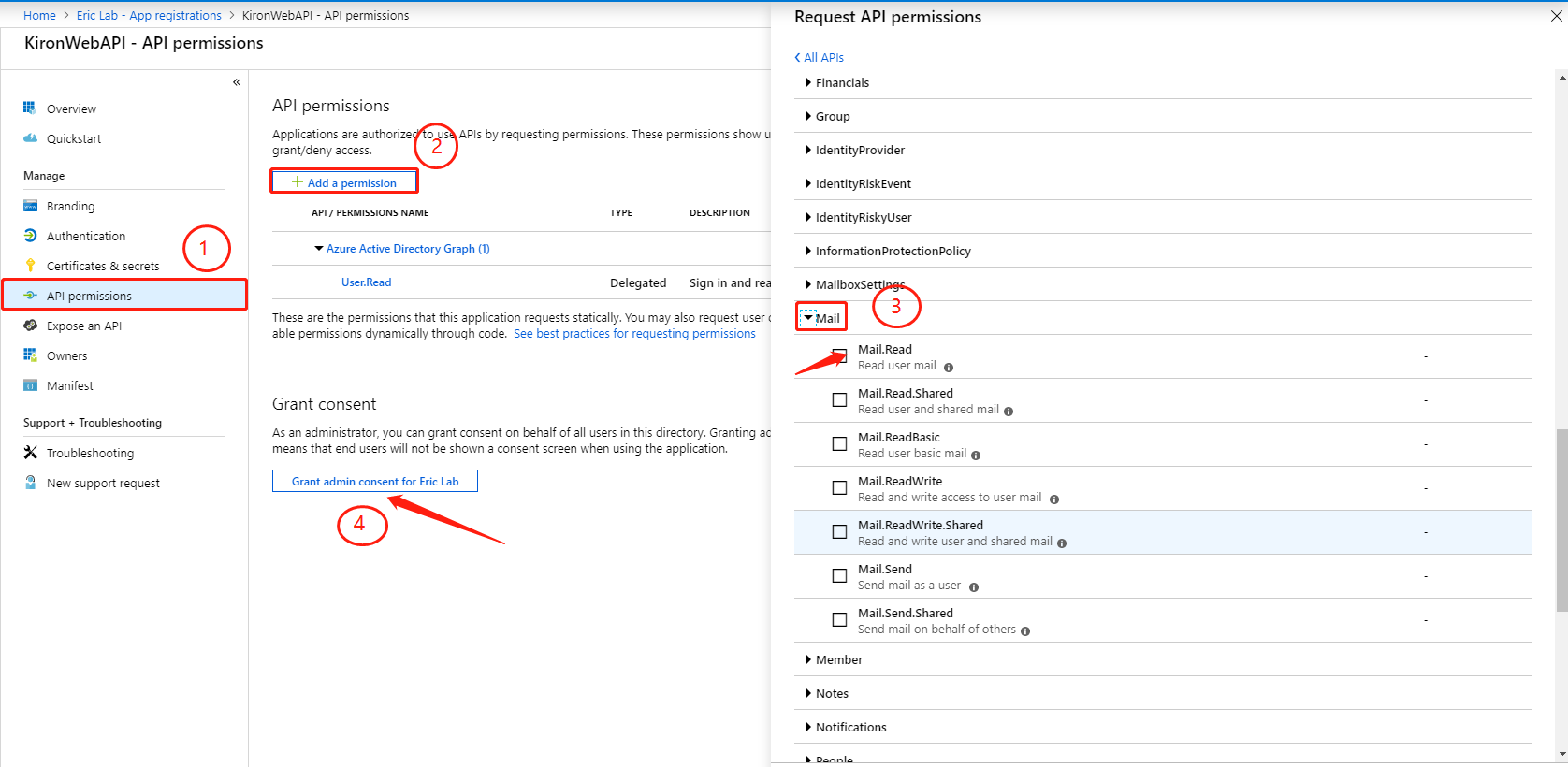
指定阅读邮件的专用权限。遵循以下步骤:
- Azure活动目录
- App注册
- 选择应用程序
- API权限
- 添加权限
- Microsoft图
- 委托权限
- 邮件
- Mail.Read (读取用户邮件)
- 添加权限
- 批准行政同意
看到屏幕截图:
Stack Overflow用户
发布于 2019-05-30 04:14:27
下面的代码对我有用。现在,我可以使用用户凭据接收令牌,并可以读取邮箱。
private static async Task<string> GetToken()
    {
        string authority = "https://login.microsoftonline.com/{tenantId}";
        string resource = "https://graph.microsoft.com";
        string userName = "xxxxxxxxx";
        string password = "xxxxxxx";
        string clientId = "Your Client ID (GUID)";

        UserPasswordCredential userPasswordCredential = new UserPasswordCredential(userName, password);

        AuthenticationContext authenticationContext = new AuthenticationContext(authority);
        var result = AuthenticationContextIntegratedAuthExtensions.AcquireTokenAsync(authenticationContext, resource, clientId, userPasswordCredential).Result;

        return result.AccessToken;
}https://stackoverflow.com/questions/56353142
复制相似问题
腾讯云开发者

Copyright © 2013 - 2026 Tencent Cloud. All Rights Reserved. 腾讯云 版权所有
深圳市腾讯计算机系统有限公司 ICP备案/许可证号:粤B2-20090059  粤公网安备44030502008569号
腾讯云计算(北京)有限责任公司 京ICP证150476号 | 京ICP备11018762号