
带有按钮的自定义TabbedPage
带有按钮的自定义TabbedPage
提问于 2019-05-28 18:34:47
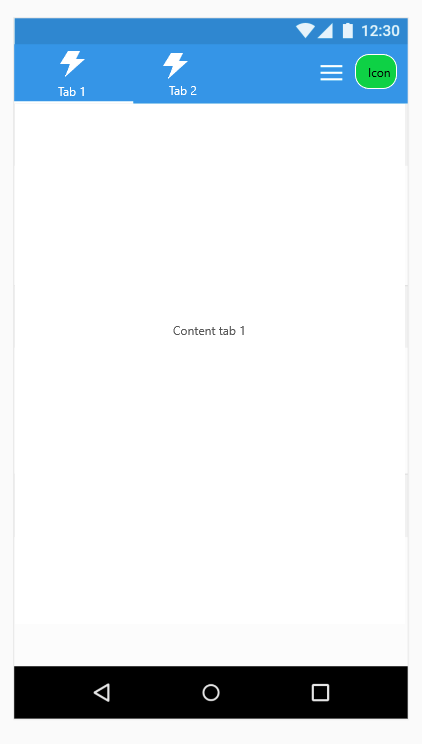
我需要创建一个带有“TabbedPage”的导航,并添加2个按钮(图标)以在我的应用程序中执行其他操作,类似于下面的图像:
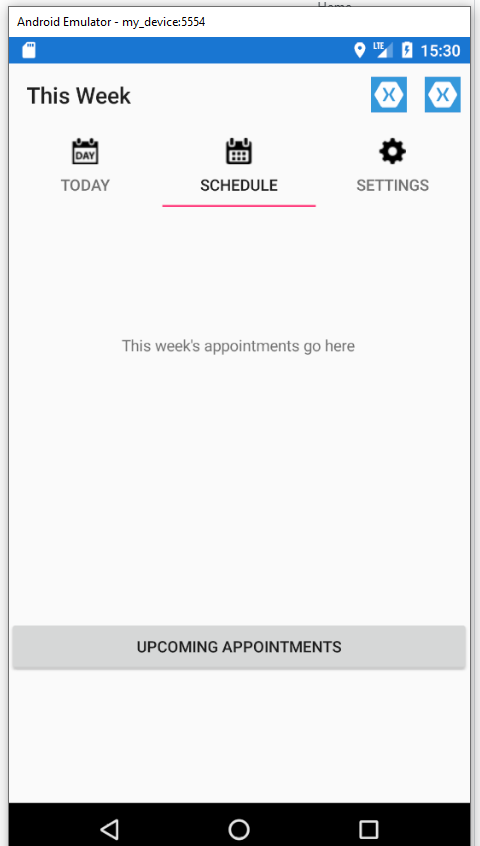
在一次测试中,我得出了下面的结果,但我不知道如何将标签保持在与图标相同的水平上。
MainPage.xaml
<?xml version="1.0" encoding="UTF-8"?>
<TabbedPage xmlns="http://xamarin.com/schemas/2014/forms" xmlns:x="http://schemas.microsoft.com/winfx/2009/xaml" xmlns:local="clr-namespace:TabbedPageWithNavigationPage;assembly=TabbedPageWithNavigationPage" x:Class="TabbedPageWithNavigationPage.MainPage">
        <local:TodayPage />

        <TabbedPage.ToolbarItems>
            <ToolbarItem Name="MenuItem1" Order="Primary" Icon="icon.png" Text="Item 1" Priority="0" />
            <ToolbarItem Name="MenuItem2" Order="Primary" Icon="icon.png" Text="Item 2" Priority="1" />
        </TabbedPage.ToolbarItems>

        <NavigationPage Title="Schedule" Icon="schedule.png">
            <x:Arguments>
                <local:SchedulePage />
            </x:Arguments>
        </NavigationPage>
        <local:SettingsPage />

</TabbedPage>回答 1
Stack Overflow用户
回答已采纳
发布于 2019-05-29 10:38:51
您可以使用我在这里创建的Tabs控件:
https://github.com/roubachof/Sharpnado.Presentation.Forms
在这里可以找到解释组件的帖子:
https://www.sharpnado.com/pure-xamarin-forms-tabs/
它是用网格实现的,所以您完全可以用如下方式实现您的设计:
<Grid>
    <Grid.RowDefinitions>
        <RowDefinition Height="50 />
        <RowDefinition Height="*" />
    </Grid.RowDefinitions>
    <Grid.ColumnDefinitions>
        <ColumnDefinition Width="*" />
        <ColumnDefinition Width="50" />
        <ColumnDefinition Width="50" />
    </Grid.ColumnDefinitions>


    <tabs:TabHostView Grid.Row="0"
                      Grid.Column="0"
                      SelectedIndex="{Binding Source={x:Reference Switcher}, Path=SelectedIndex, Mode=TwoWay}">
        <tabs:BottomTabItem
            IconImageSource="flash.png"
            SelectedTabColor="{StaticResource White}"
            UnselectedLabelColor="{StaticResource White}"
            UnselectedIconColor="{StaticResource White}"
            Label="Tab 1" />
        <tabs:BottomTabItem
            IconImageSource="flash.png"
            SelectedTabColor="{StaticResource White}"
            UnselectedLabelColor="{StaticResource White}"
            UnselectedIconColor="{StaticResource White}"
            Label="Tab 2" />
    </tabs:TabHostView>
    <ImageButton Grid.Column="1" ImageSource="hamburger.png" />
    <ImageButton Grid.Column="2" ImageSource="icon.png" />

    <ScrollView Grid.Row="1" Grid.ColumnSpan="3">
        <tabs:ViewSwitcher x:Name="Switcher"
                           Animate="True"
                           SelectedIndex="{Binding SelectedViewModelIndex, Mode=TwoWay}">
            <details:Tab1View Animate="True" BindingContext="{Binding Tab1ViewModel}" />
            <details:Tab2View Animate="True" BindingContext="{Binding Tab2ViewModel}" />
        </tabs:ViewSwitcher>
    </ScrollView>

</Grid>页面原文内容由Stack Overflow提供。腾讯云小微IT领域专用引擎提供翻译支持
原文链接:
https://stackoverflow.com/questions/56348220
复制相关文章
相似问题
腾讯云开发者

Copyright © 2013 - 2026 Tencent Cloud. All Rights Reserved. 腾讯云 版权所有
深圳市腾讯计算机系统有限公司 ICP备案/许可证号:粤B2-20090059  粤公网安备44030502008569号
腾讯云计算(北京)有限责任公司 京ICP证150476号 | 京ICP备11018762号