
回收视图中的项目重叠
回收视图中的项目重叠
提问于 2019-05-28 10:48:03
我想重叠第一项在第二项在回收商的看法。
--这就是我想要实现的:
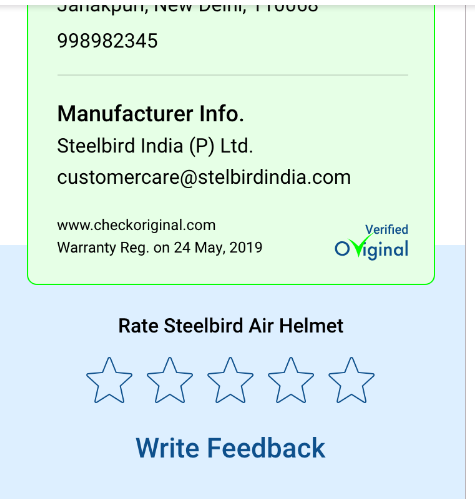
,这就是我的回收商现在的看法:
[
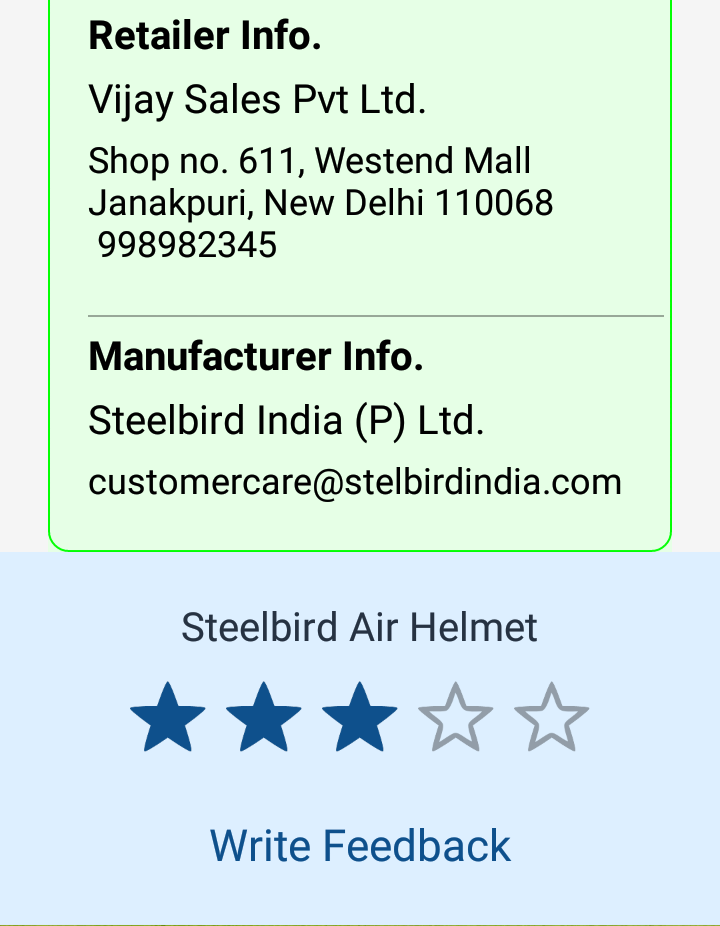
]
绿色边框内的内容实际上是一个recyclerView,是家长回收器视图中的第一个项目,而评等栏布局是家长回收视图中的第二个项目。请建议我如何将第一项与我尝试过的第二项this重叠
item_rating_layout:
 <?xml version="1.0" encoding="utf-8"?>
    <LinearLayout xmlns:android="http://schemas.android.com/apk/res/android"
        style="@style/LayoutHeightWrapWidthMatchStyling"
        android:layout_width="match_parent"
        android:gravity="center_horizontal"
        android:orientation="vertical"
        android:padding="@dimen/padding_large">

        <TextView
            android:id="@+id/tvRatingMessage"
            style="@style/TextStyleNormal.XXLarge"
            android:text="@string/rating_exp" />

        <RatingBar
            android:id="@+id/ratingBar"
            android:layout_width="wrap_content"
            android:layout_height="wrap_content"
            android:layout_margin="@dimen/margin_medium"
            android:numStars="5"
            android:progressBackgroundTint="@color/gray"
            android:stepSize="1.0"
            android:progressTint="@color/primaryColor"
            android:rating="2.5" />

        <TextView
            android:id="@+id/tvWriteFeedBack"
            style="@style/TextStyleNormal.XXXLarge.primary"
            android:padding="@dimen/padding_medium"
            android:text="Write Feedback"
            android:visibility="gone" />

    </LinearLayout>
item_recycler_view:
 <?xml version="1.0" encoding="utf-8"?>
    <LinearLayout xmlns:android="http://schemas.android.com/apk/res/android"
        xmlns:app="http://schemas.android.com/apk/res-auto"
        xmlns:tool="http://schemas.android.com/tools"
        android:layout_width="match_parent"
        android:layout_height="wrap_content"
        android:layout_marginStart="@dimen/margin_24dp"
        android:layout_marginEnd="@dimen/margin_24dp"
        android:background="@color/warranty_card_background">

        <androidx.core.widget.NestedScrollView
            android:layout_width="match_parent"
            android:layout_height="match_parent"
            android:fillViewport="true">

            <LinearLayout
                android:layout_width="match_parent"
                android:layout_height="match_parent"
                android:background="@drawable/btn_shap_without_solid_green"
                android:gravity="center_horizontal"
                android:orientation="vertical">


                <ImageView
                    android:id="@+id/ivProductImage"
                    android:layout_width="100dp"
                    android:layout_height="100dp"
                    android:layout_marginTop="@dimen/margin_medium"
                    android:scaleType="fitXY"
                    app:srcCompat="@drawable/ic_original_placeholder" />

                <TextView
                    android:id="@+id/tvName"
                    style="@style/TextStyleNormal.XXLarge.black"
                    android:textStyle="bold"
                    tool:text="Steelbird Air" />

                    <TextView
                        android:id="@+id/tvModel"
                        style="@style/TextStyleNormal.XXLarge"
                        tool:text="SBA-2 Horn Matt Black With Red " />

                <TextView
                    android:id="@+id/tvId"
                    style="@style/TextStyleNormal.XXLarge.gray"
                    android:text="@string/product_id" />

                <TextView
                    android:id="@+id/tvViewProductDetails"
                    style="@style/TextStyleNormal.XLarge.primary"
                    android:text="View product Details" />

                <androidx.recyclerview.widget.RecyclerView
                    android:id="@+id/rvWarrantyCard"
                    android:layout_width="match_parent"
                    android:layout_height="wrap_content"
                    android:layout_marginStart="@dimen/margin_medium"
                    android:layout_marginBottom="@dimen/margin_medium">

                </androidx.recyclerview.widget.RecyclerView>
            </LinearLayout>
        </androidx.core.widget.NestedScrollView>
</LinearLayout>回答 2
Stack Overflow用户
回答已采纳
发布于 2019-05-29 07:11:59
我以某种方式解决了我的问题,只是在第一项的底部添加了一些与评级栏背景颜色相同的颜色。
下面是最后一个类似的xml:
item_recycler_view:
<?xml version="1.0" encoding="utf-8"?>

<FrameLayout xmlns:android="http://schemas.android.com/apk/res/android"
    xmlns:app="http://schemas.android.com/apk/res-auto"
    xmlns:tool="http://schemas.android.com/tools"
    android:layout_width="match_parent"
    android:layout_height="wrap_content">

    <LinearLayout
        android:id="@+id/llOverlapView"
        android:layout_width="match_parent"
        android:layout_height="50dp"
        android:layout_gravity="bottom"
        android:background="@color/rating_bar"
        android:orientation="vertical"/>

        <androidx.core.widget.NestedScrollView
            android:layout_width="match_parent"
            android:layout_height="match_parent"
            android:layout_marginStart="@dimen/margin_24dp"
            android:layout_marginEnd="@dimen/margin_24dp"
            android:fillViewport="true">

            <LinearLayout
                android:layout_width="match_parent"
                android:layout_height="match_parent"
                android:background="@drawable/btn_shap_without_solid_green"
                android:gravity="center_horizontal"
                android:orientation="vertical">


                <ImageView
                    android:id="@+id/ivProductImage"
                    android:layout_width="100dp"
                    android:layout_height="100dp"
                    android:layout_marginTop="@dimen/margin_medium"
                    android:scaleType="fitXY"
                    app:srcCompat="@drawable/ic_original_placeholder" />

                <TextView
                    android:id="@+id/tvName"
                    style="@style/TextStyleNormal.XXLarge.black"
                    android:textStyle="bold"
                    tool:text="Steelbird Air" />

                <TextView
                    android:id="@+id/tvModel"
                    style="@style/TextStyleNormal.XXLarge"
                    tool:text="SBA-2 Horn Matt Black With Red " />

                <TextView
                    android:id="@+id/tvId"
                    style="@style/TextStyleNormal.XXLarge.gray"
                    android:text="@string/product_id" />

                <TextView
                    android:id="@+id/tvViewProductDetails"
                    style="@style/TextStyleNormal.XLarge.primary"
                    android:text="View product Details" />

                <androidx.recyclerview.widget.RecyclerView
                    android:id="@+id/rvWarrantyCard"
                    android:layout_width="match_parent"
                    android:layout_height="wrap_content"
                    android:layout_marginStart="@dimen/margin_medium"
                    android:layout_marginBottom="@dimen/margin_medium">

                </androidx.recyclerview.widget.RecyclerView>
            </LinearLayout>
        </androidx.core.widget.NestedScrollView>
</FrameLayout>
大感谢@Pawel
Stack Overflow用户
发布于 2019-05-28 12:53:38
使用主布局相对否则帧布局
页面原文内容由Stack Overflow提供。腾讯云小微IT领域专用引擎提供翻译支持
原文链接:
https://stackoverflow.com/questions/56340525
复制相关文章
相似问题
腾讯云开发者

Copyright © 2013 - 2026 Tencent Cloud. All Rights Reserved. 腾讯云 版权所有
深圳市腾讯计算机系统有限公司 ICP备案/许可证号:粤B2-20090059  粤公网安备44030502008569号
腾讯云计算(北京)有限责任公司 京ICP证150476号 | 京ICP备11018762号