
与按钮的JS相关的错误
与按钮的JS相关的错误
提问于 2019-05-28 02:16:18
我已经在我的<div>中声明了ID,不管出现什么错误,如何解决这个错误。
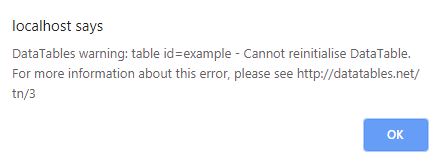
以下是我的代码供参考
<div class="row">
 <div>
  <input type="checkbox" data-column="0" class="toggle-vis" data-label-text="No" checked/>
  <input type="checkbox" data-column="1" class="toggle-vis" data-label-text="Region" checked>
  <input type="checkbox" data-column="2" class="toggle-vis" data-label-text="IBSE Node" checked/>
 </div>
<div>
 <table class="data-table stripe hover multiple-select-row nowrap" id="example">
  <thead>
   <tr>
    <th class="table-plus datatable-nosort">No</th>
    <th>Region</th>
    <th>IBSE Node</th>
   </tr>
  </thead>
 </table>
</div>
JS
<script>
    $(function(){
        $.fn.bootstrapSwitch.defaults.onColor = 'success';
        $.fn.bootstrapSwitch.defaults.offColor = 'danger';
        $.fn.bootstrapSwitch.defaults.size = 'mini';
        $.fn.bootstrapSwitch.defaults.state = 'false';
        $.fn.bootstrapSwitch.defaults.inverse = 'true';
        $(".toggle-vis").bootstrapSwitch();
            var table = $('#example').DataTable();
        $('.toggle-vis').on('switchChange.bootstrapSwitch', function(event, state) {
            event.preventDefault();
            var column = table.column($(this).attr('data-column'));
            column.visible( ! column.visible() );
        });
    });
</script>回答 1
Stack Overflow用户
回答已采纳
发布于 2019-05-28 03:01:41
您不能重新初始化datatable,您需要在再次初始化之前销毁它。在您的切换函数中添加这一行。
$("#example").dataTable().fnDestroy();页面原文内容由Stack Overflow提供。腾讯云小微IT领域专用引擎提供翻译支持
原文链接:
https://stackoverflow.com/questions/56334245
复制相关文章
相似问题
腾讯云开发者

Copyright © 2013 - 2026 Tencent Cloud. All Rights Reserved. 腾讯云 版权所有
深圳市腾讯计算机系统有限公司 ICP备案/许可证号:粤B2-20090059  粤公网安备44030502008569号
腾讯云计算(北京)有限责任公司 京ICP证150476号 | 京ICP备11018762号