
无法访问类com.sun.javafx.util.Utils (在模块javafx.graphics中)- JavaFX和Eclipse
我遵循这个指南将JavaFX安装到Linux机器上。首先,我安装了Java 11
asus@asus-pc:/usr/share/openjfx/lib$ java -version
openjdk version "11.0.3" 2019-04-16
OpenJDK Runtime Environment (build 11.0.3+7-Ubuntu-1ubuntu219.04.1)
OpenJDK 64-Bit Server VM (build 11.0.3+7-Ubuntu-1ubuntu219.04.1, mixed
mode, sharing)
asus@asus-pc:/usr/share/openjfx/lib$ 然后,我从命令OpenJFX安装了sudo apt-get install openjfx
 asus@asus-pc:/usr/share/openjfx/lib$ ls
 javafx.base.jar      javafx.graphics.jar  javafx.swing.jar
 javafx.controls.jar  javafx.media.jar     javafx.web.jar
 javafx.fxml.jar      javafx.properties    src.zip
 asus@asus-pc:/usr/share/openjfx/lib$
然后在Eclipse中创建了一个库。
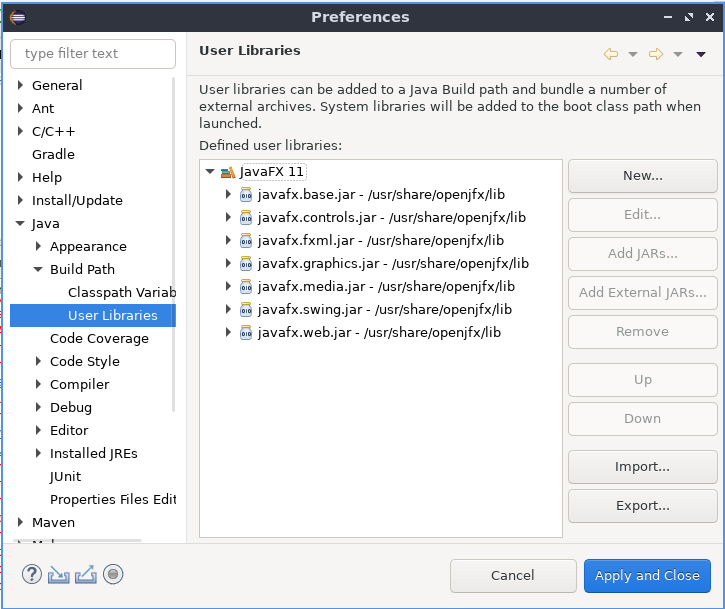
然后,我将它包含到我的java项目中。我试着运行以下代码:
package se.danielmartensson.start;

import javafx.application.Application;
import javafx.fxml.FXMLLoader;
import javafx.scene.Parent;
import javafx.scene.Scene;
import javafx.stage.Stage;

public class Main extends Application{

    /*
     * Start the start(Stage front)
     */
    public static void main(String[] args) {
        launch();
    }

    @Override
    public void start(Stage front) throws Exception {
        Parent root = FXMLLoader.load(getClass().getResource("/JUSBPlotter/src/se/danielmartensson/fxml/front.fxml"));
        Scene scene = new Scene(root);
        front.setScene(scene);
        front.setTitle("Fracken");
        front.show();
    }

}
我将运行配置更改为:
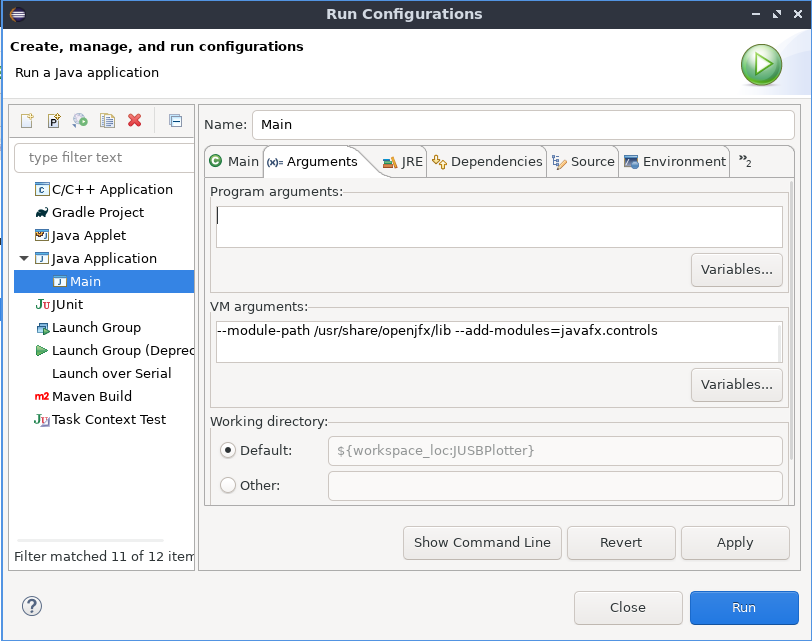
但当我编译代码的时候。我知道这些错误:
Exception in Application start method
java.lang.reflect.InvocationTargetException
    at java.base/jdk.internal.reflect.NativeMethodAccessorImpl.invoke0(Native Method)
    at java.base/jdk.internal.reflect.NativeMethodAccessorImpl.invoke(NativeMethodAccessorImpl.java:62)
    at java.base/jdk.internal.reflect.DelegatingMethodAccessorImpl.invoke(DelegatingMethodAccessorImpl.java:43)
    at java.base/java.lang.reflect.Method.invoke(Method.java:566)
    at javafx.graphics/com.sun.javafx.application.LauncherImpl.launchApplicationWithArgs(LauncherImpl.java:464)
    at javafx.graphics/com.sun.javafx.application.LauncherImpl.launchApplication(LauncherImpl.java:363)
    at java.base/jdk.internal.reflect.NativeMethodAccessorImpl.invoke0(Native Method)
    at java.base/jdk.internal.reflect.NativeMethodAccessorImpl.invoke(NativeMethodAccessorImpl.java:62)
    at java.base/jdk.internal.reflect.DelegatingMethodAccessorImpl.invoke(DelegatingMethodAccessorImpl.java:43)
    at java.base/java.lang.reflect.Method.invoke(Method.java:566)
    at java.base/sun.launcher.LauncherHelper$FXHelper.main(LauncherHelper.java:1051)
Caused by: java.lang.RuntimeException: Exception in Application start method
    at javafx.graphics/com.sun.javafx.application.LauncherImpl.launchApplication1(LauncherImpl.java:900)
    at javafx.graphics/com.sun.javafx.application.LauncherImpl.lambda$launchApplication$2(LauncherImpl.java:195)
    at java.base/java.lang.Thread.run(Thread.java:834)
Caused by: java.lang.IllegalAccessError: class com.sun.javafx.fxml.FXMLLoaderHelper (in unnamed module @0x1ff6d2c7) cannot access class com.sun.javafx.util.Utils (in module javafx.graphics) because module javafx.graphics does not export com.sun.javafx.util to unnamed module @0x1ff6d2c7
    at com.sun.javafx.fxml.FXMLLoaderHelper.<clinit>(FXMLLoaderHelper.java:38)
    at javafx.fxml.FXMLLoader.<clinit>(FXMLLoader.java:2056)
    at se.danielmartensson.start.Main.start(Main.java:20)
    at javafx.graphics/com.sun.javafx.application.LauncherImpl.lambda$launchApplication1$9(LauncherImpl.java:846)
    at javafx.graphics/com.sun.javafx.application.PlatformImpl.lambda$runAndWait$12(PlatformImpl.java:455)
    at javafx.graphics/com.sun.javafx.application.PlatformImpl.lambda$runLater$10(PlatformImpl.java:428)
    at java.base/java.security.AccessController.doPrivileged(Native Method)
    at javafx.graphics/com.sun.javafx.application.PlatformImpl.lambda$runLater$11(PlatformImpl.java:427)
    at javafx.graphics/com.sun.glass.ui.InvokeLaterDispatcher$Future.run(InvokeLaterDispatcher.java:96)
    at javafx.graphics/com.sun.glass.ui.gtk.GtkApplication._runLoop(Native Method)
    at javafx.graphics/com.sun.glass.ui.gtk.GtkApplication.lambda$runLoop$11(GtkApplication.java:277)
    ... 1 more
Exception running application se.danielmartensson.start.Main
问题:
有没有人知道如何解决这个错误?我以前安装过JavaFX,但这一次,它对我不起作用。
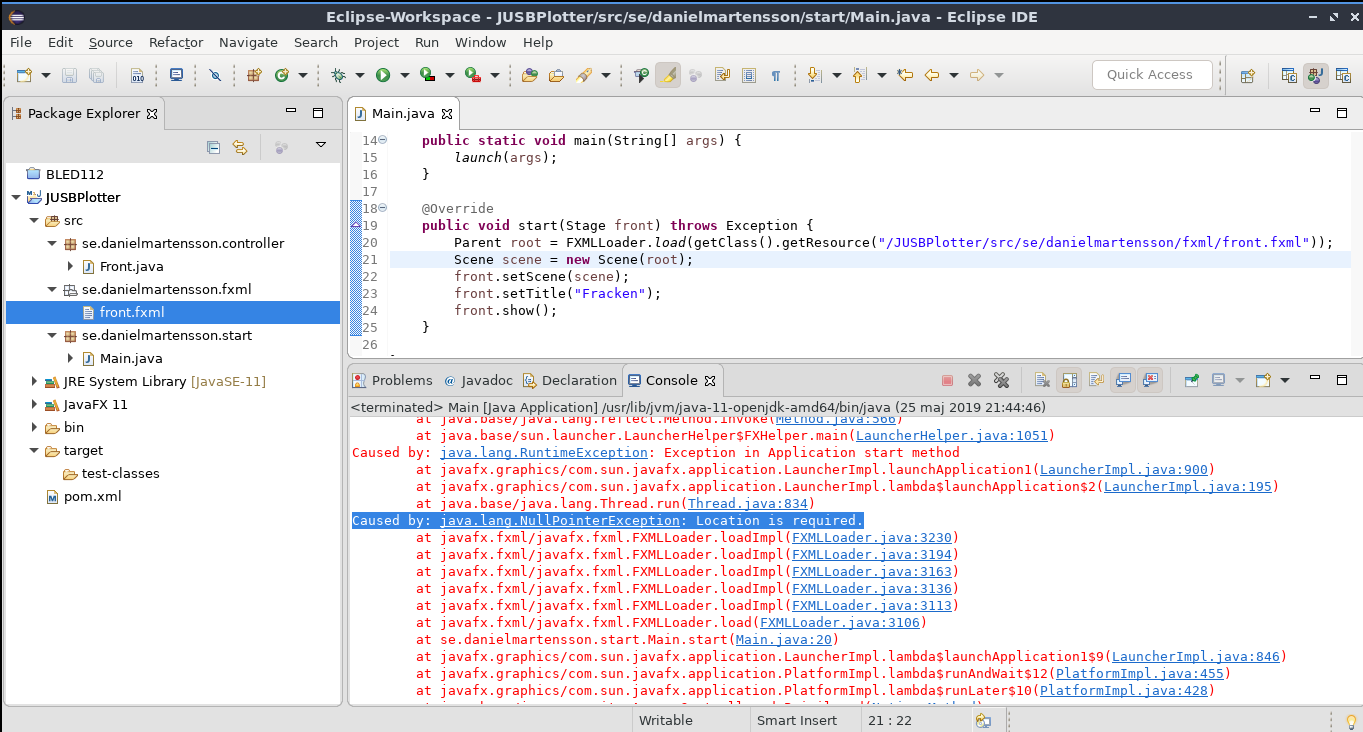
如果将运行配置更改为:编辑1::
--module-path="/usr/share/openjfx/lib" --add-modules=javafx.controls,javafx.fxml我知道这个错误
回答 5
Stack Overflow用户
发布于 2020-04-24 09:53:24
IntelliJ IDEA 2020.1与JDK 14有同样的问题。
如果您使用maven,最后通过在module-info.java下添加类似于此的src/main/java来解决问题:
module sample {
    requires javafx.controls;
    requires javafx.graphics;

    opens sample;
}Stack Overflow用户
发布于 2020-05-13 12:14:37
谢谢你,igonejack我照你说的做了,但在那之后我遇到了一些其他的例外,所以我想出了下面的代码:
module {pkg}{
   requires javafx.controls;
   requires javafx.graphics;
   requires javafx.fxml;

   exports {pkg of Application class};

   opens {pkg};
}
在此之后,您需要重新构建您的项目,可能是因为Kotlin的一些例外。然后我看到异常“位置没有设置”。要解决这个问题,必须使用"/“开头fxml位置,例如:
App.class.getResource("/form.fxml");编辑
我使用Gradle在HelloWorld上做了一个JavaFxHelloWorld项目。
Stack Overflow用户
发布于 2020-06-18 19:52:15
谢谢,我的工作如下
public void start(Stage primaryStage) throws Exception{
        Parent root = FXMLLoader.load(getClass().getResource("sample.fxml"));
模块-info.java:
module sample {
    requires javafx.controls;
    requires javafx.graphics;
    requires javafx.fxml;
    opens sample ;
}https://stackoverflow.com/questions/56307973
复制相似问题
腾讯云开发者

Copyright © 2013 - 2026 Tencent Cloud. All Rights Reserved. 腾讯云 版权所有
深圳市腾讯计算机系统有限公司 ICP备案/许可证号:粤B2-20090059  粤公网安备44030502008569号
腾讯云计算(北京)有限责任公司 京ICP证150476号 | 京ICP备11018762号