
如何指示fo:块跨页
我有一个fo:块,它可能跨越一个页面。我想把一些像“继续”这样的文本放在第一页的底部。
源文档在标记中包含一系列s。
我看到这样做的唯一方法是在正确的地方向源文档中添加下一页上的继续,但这需要在编写文档时不断地进行编辑。
是否有要测试的代码块是否跨页?
来源文件:
<recipe page-break="auto">
  <instructions>
    <step>The first thing to do</step>
    <step>The second thing to do</step>
  </instructions>
<recipe>
样式表的相关部分:
<xsl:template match="recipe">
  <xsl:variable name="pbi"><xsl:choose><xsl:when test="@page-break"><xsl:value-of select="@page-break"/></xsl:when><xsl:otherwise>avoid</xsl:otherwise></xsl:choose></xsl:variable>
  <xsl:variable name="pbb"><xsl:choose><xsl:when test="@page-break">always</xsl:when><xsl:otherwise>auto</xsl:otherwise></xsl:choose></xsl:variable>
  <fo:block page-break-inside="{$pbi}" page-break-before="{$pbb}" margin-bottom="1.5em">
    <xsl:apply-templates select="instructions/step" mode="plain"/>
  </fo:block>
</xsl:template>
谢谢。
回答 2
Stack Overflow用户
发布于 2019-05-23 17:37:07
虽然Tony的建议会奏效,但它只适用于支持该构造的格式化者。正如他所建议的那样,你也可以把纯粹的标记拉进页脚。在内容结束和页脚之间的垂直空间中,您可能没有那么多的控制,但这取决于您的内容。
您只需在页脚区域使用检索标记,例如:
    <fo:static-content flow-name="footer">
        <fo:block-container text-align="left" margin-left="1in">
            <fo:block><fo:retrieve-marker retrieve-class-name="continued" retrieve-boundary="page" retrieve-position="last-starting-within-page"/>
            </fo:block>
        </fo:block-container>
    </fo:static-content>
现在,在您的流中有一些块,当消息块破坏页面时,您希望在其中显示消息。你用这样的方法:
 <fo:block-container>
    <fo:marker marker-class-name="continued">I am continued on next page ...</fo:marker>
    <fo:block margin-top="6pt">I am some text that will break across the page somewhere. When I do break the footer should have continued. I am some text that will break across the page somewhere. When I do break the footer should have continued. </fo:block>
 <!-- More content here, whatever you need -->

 </fo:block-container>
 <fo:block-container keep-with-previous.within-page="always">
     <fo:marker marker-class-name="continued"></fo:marker>
 </fo:block-container>
块容器中的第一个标记将创建一个“标记”,其中包含您想要的连续文本。如果页面在该块内中断,则将标记拖到页脚区域。第二个标记有效地“清除”它,因为它没有内容。它被拉到页脚,但它是空白的,所以什么也没有出现。
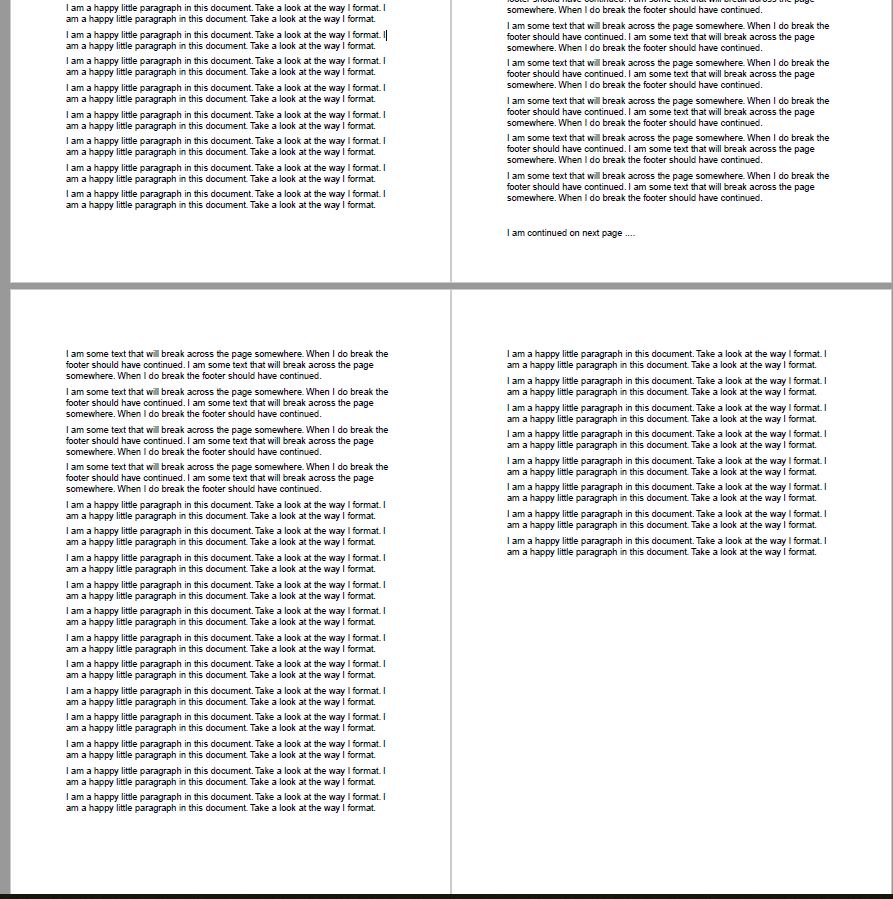
结果是,不存在连续文本(第1、3、4页),除非页面在标记为连续消息的区域内断裂(第2页)。
Stack Overflow用户
发布于 2019-05-23 08:04:06
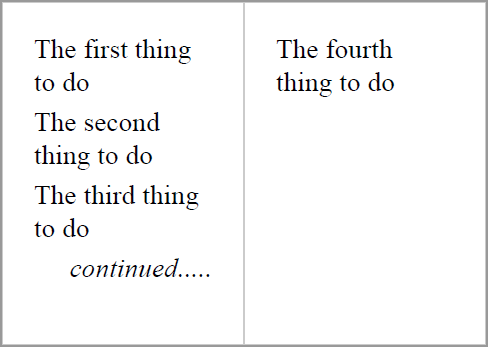
用记号笔。要么将所有内容放在fo:table中,然后在fo:table-footer中使用fo:retrieve-table-marker (参见retrieve-table-marker),要么在fo:static-content中为fo:region-after使用fo:retrieve-marker。区别在于,使用fo:table方法,“继续”指示可以立即出现在页面上的最后一个文本之后(如本例中),而不是使用fo:retrieve-marker方法在页脚中的固定位置出现。
<fo:table table-layout="fixed">
  <fo:table-footer>
    <fo:retrieve-table-marker
        retrieve-class-name="footer-continued"
        retrieve-position-within-table="last-ending"/>
  </fo:table-footer>
  <fo:table-body>
    <fo:table-row>
      <fo:marker marker-class-name="footer-continued">
        <fo:table-row>
          <fo:table-cell padding="3pt">
            <fo:block text-align="right"
                      font-style="italic">continued.....</fo:block>
          </fo:table-cell>
        </fo:table-row>
      </fo:marker>
      <fo:table-cell padding="3pt">
        <fo:block>The first thing to do</fo:block>
      </fo:table-cell>
    </fo:table-row>
    ...
    <fo:table-row>
      <fo:marker marker-class-name="footer-continued" />
      <fo:table-cell padding="3pt">
        <fo:block>The fourth thing to do</fo:block>
      </fo:table-cell>
    </fo:table-row>
  </fo:table-body>
</fo:table>如果您绕过fo:retrieve-table-marker的文档(固定的表布局,检索到的标记不能更改块-级数维度)和无文档的(对放置fo:retrieve-table-marker的位置过于挑剔,必须将fo:marker移动到fo:table-cell),就可以使用FOP方法:
<fo:table table-layout="fixed" width="100%">
<fo:table-footer>
<fo:table-row>
<fo:table-cell padding="3pt">
<fo:block text-align="right"
font-style="italic">
<fo:retrieve-table-marker
retrieve-class-name="footer-continued"
retrieve-position-within-table="last-ending"/>
</fo:block>
</fo:table-cell>
</fo:table-row>
</fo:table-footer>
<fo:table-body>
<fo:table-row>
<fo:table-cell padding="3pt">
<fo:marker marker-class-name="footer-continued">continued.....</fo:marker>
<fo:block>The first thing to do</fo:block>
</fo:table-cell>
</fo:table-row>
...
<fo:table-row>
<fo:table-cell padding="3pt">
<fo:marker marker-class-name="footer-continued"> </fo:marker>
<fo:block>The fourth thing to do</fo:block>
</fo:table-cell>
</fo:table-row>
</fo:table-body>
</fo:table>https://stackoverflow.com/questions/56267273
复制相似问题
腾讯云开发者

Copyright © 2013 - 2026 Tencent Cloud. All Rights Reserved. 腾讯云 版权所有
深圳市腾讯计算机系统有限公司 ICP备案/许可证号:粤B2-20090059  粤公网安备44030502008569号
腾讯云计算(北京)有限责任公司 京ICP证150476号 | 京ICP备11018762号