
如何为应用程序设置遥测通道Log4Net附录?
我将那些Nuget软件包添加到我的WPF应用程序中:
- Microsoft.ApplicationInsights.Log4NetAppender
- Microsoft.ApplicationInsights.WindowsServer.TelemetryChannel
记录器正在记录一个文件,这是可行的。但是没有数据被传输到Azure。我发现了一个错误:
- 未初始化服务器遥测通道。所以持久存储被关闭了。您需要调用ServerTelemetryChannel.Initialize()。目前,监测工作将继续进行,但如果无法发送遥测数据,则将放弃监测。
我的问题是:(在代码中)我应该在哪里初始化遥测通道?我为什么要这么做?如果我必须添加一个遥测客户端(配置),那么附件是什么呢?
回答 2
Stack Overflow用户
发布于 2019-05-21 07:52:39
更新0603:
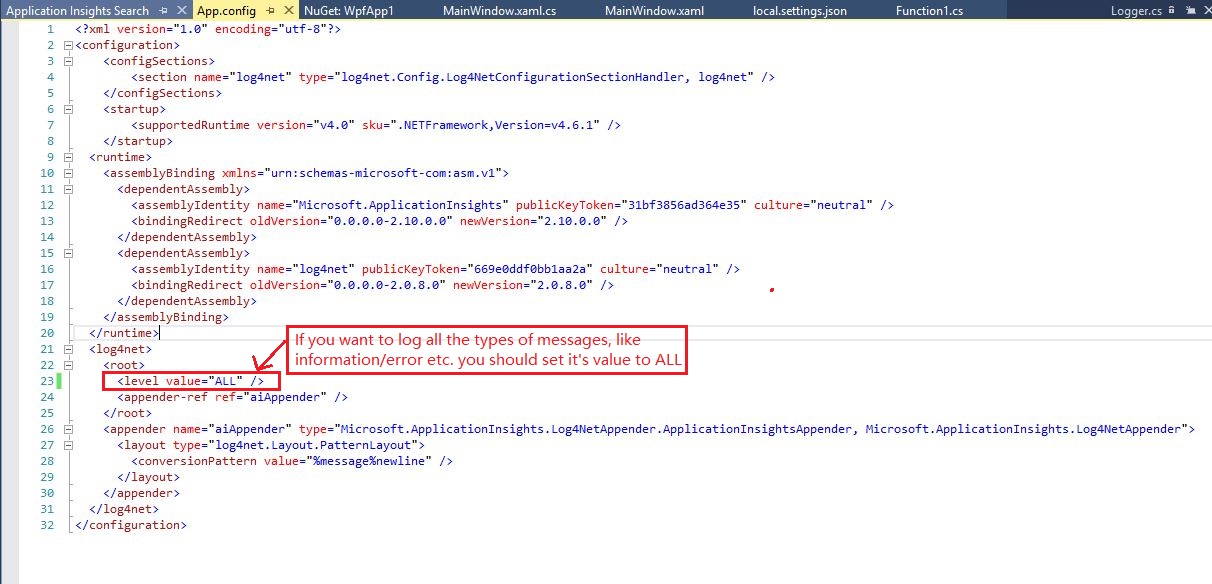
我的app.config:
使用visual studio进行调试:
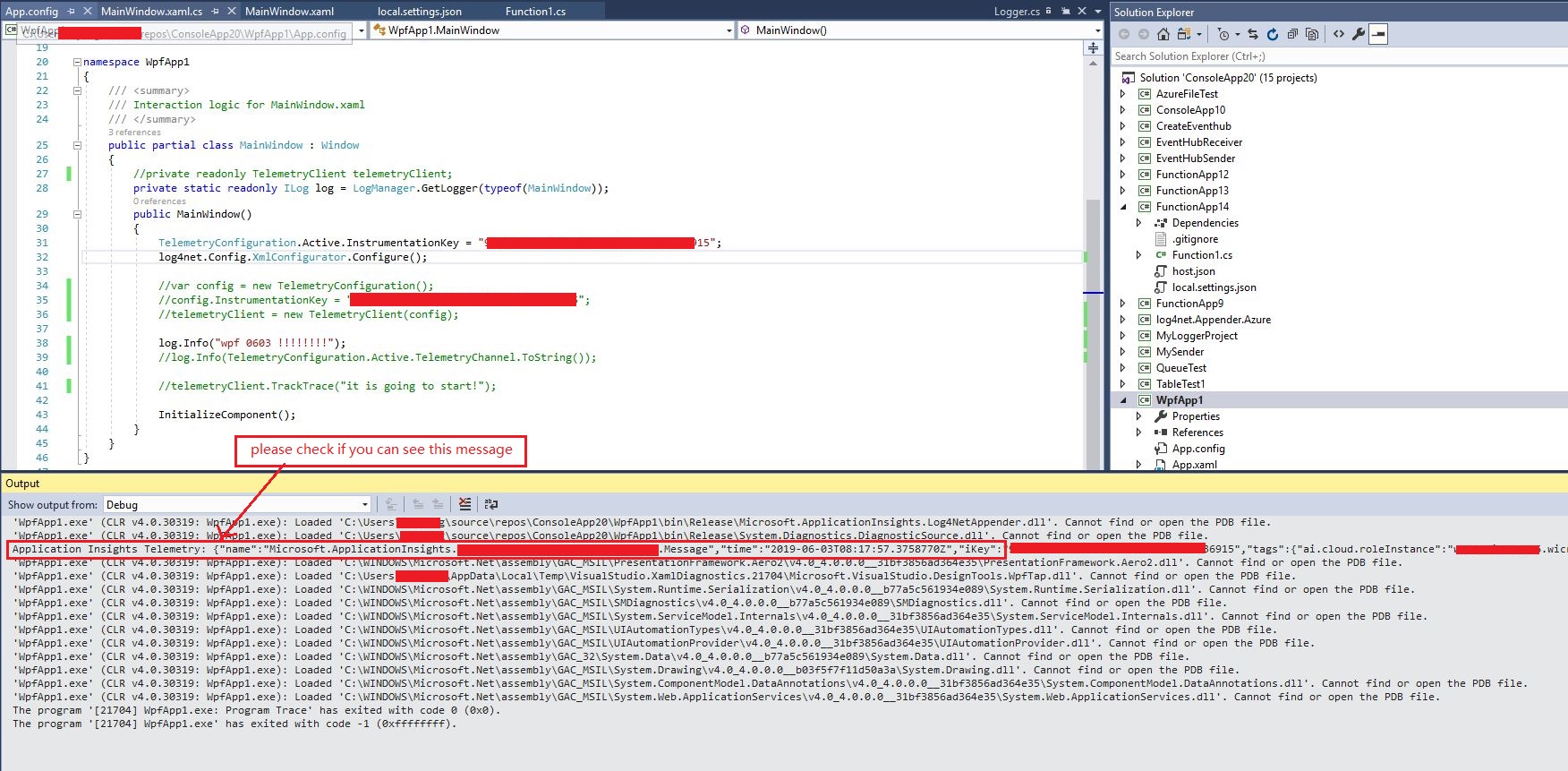
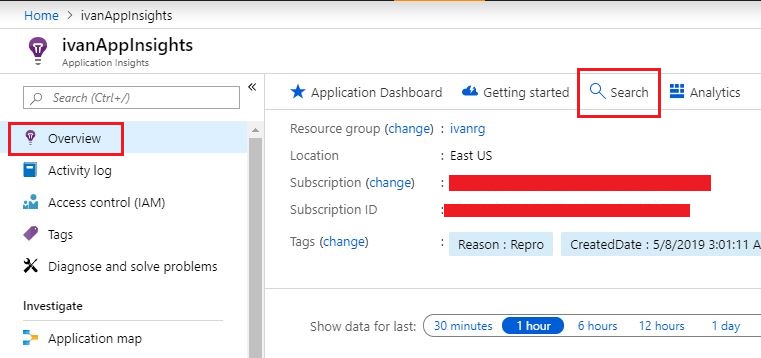
更新:请遵循下面的截图,并尝试找到您发送的信息。如果您仍然找不到信息,请提供详细的代码(删除个人/重要的数据,如仪表键,并提供给我们的nuget软件包和版本,您正在使用)。
1.单击概览页面中的搜索按钮:
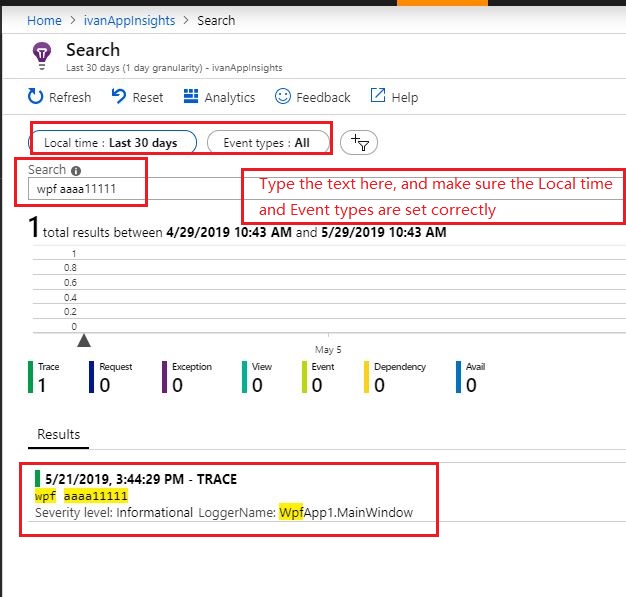
2.在搜索屏幕中,使本地时间和事件类型正确设置,然后尝试搜索消息:
您最好提供设置log4net和app洞察力键的代码。
我在wpf项目中做了一个简单的测试,下面的代码运行良好:
public partial class MainWindow : Window
{

    private static readonly ILog log = LogManager.GetLogger(typeof(MainWindow));
    public MainWindow()
    {
        TelemetryConfiguration.Active.InstrumentationKey = "the key";
        log4net.Config.XmlConfigurator.Configure();

        log.Info("wpf aaaa11111");


        InitializeComponent();
    }
 }
您会得到错误"AI:服务器遥测通道未初始化“,可能是由于配置不正确,例如在上面的工作代码中使用以下代码:
//when add the code, it will cause the error you mentioned.
TelemetryConfiguration.Active.TelemetryChannel = new ServerTelemetryChannel();
如果您必须添加一个遥测客户端(配置),并进行适当的配置,log4net和遥测客户端都可以将数据发送到应用程序洞察力。代码如下:
public partial class MainWindow : Window
{
    private readonly TelemetryClient telemetryClient;
    private static readonly ILog log = LogManager.GetLogger(typeof(MainWindow));
    public MainWindow()
    {
        //configure the key here for log4net
        TelemetryConfiguration.Active.InstrumentationKey = "the key";
        log4net.Config.XmlConfigurator.Configure();

        var config = new TelemetryConfiguration();

        //configure the key here for telemetry client
        config.InstrumentationKey = "the key";
        telemetryClient = new TelemetryClient(config);

        log.Info("wpf aaaa333");
        log.Info(TelemetryConfiguration.Active.TelemetryChannel.ToString());

        telemetryClient.TrackTrace("it is going to start!");

        InitializeComponent();
    }
}Stack Overflow用户
发布于 2019-06-03 10:59:33
所以,终于一切正常了。我在此再次提出所需的步骤:
- 将NugetPackages: log4net、Microsoft.ApplicationInsights、Microsoft.ApplicationInsights.Log4NetAppender和Microsoft.ApplicationInsights添加到项目中
- 在MainWindow.xaml.cs中: 私有静态只读ILog log = LogManager.GetLogger(typeof(MainWindow));公共MainWindow() {MainWindow=“key";log4net.Config.XmlConfigurator.Configure();log.Info("wpf aaaa11111");InitializeComponent();}
- 在App.config中:
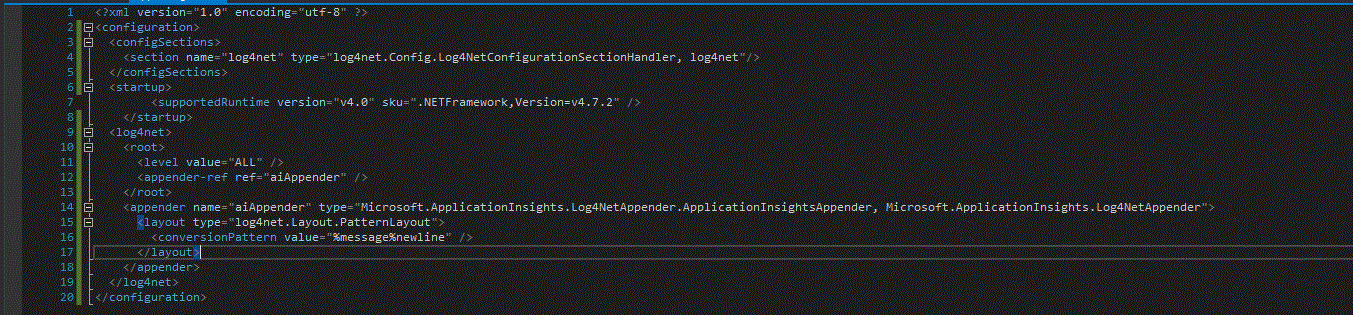
- 完成
非常感谢@Ivan为他的解决方案和他的时间帮助我!
https://stackoverflow.com/questions/56222102
复制相似问题
腾讯云开发者

Copyright © 2013 - 2026 Tencent Cloud. All Rights Reserved. 腾讯云 版权所有
深圳市腾讯计算机系统有限公司 ICP备案/许可证号:粤B2-20090059  粤公网安备44030502008569号
腾讯云计算(北京)有限责任公司 京ICP证150476号 | 京ICP备11018762号