
UITableViews循环与每个UITableView有不同的数据?
UITableViews循环与每个UITableView有不同的数据?
提问于 2019-05-19 13:26:24
我想建立一个todo应用程序,你可以在不同的日子(UITableViews)滑动。天数(UITableViews)需要在变量中是动态的。我希望循环中的每个表视图都显示与数组不同的数据。
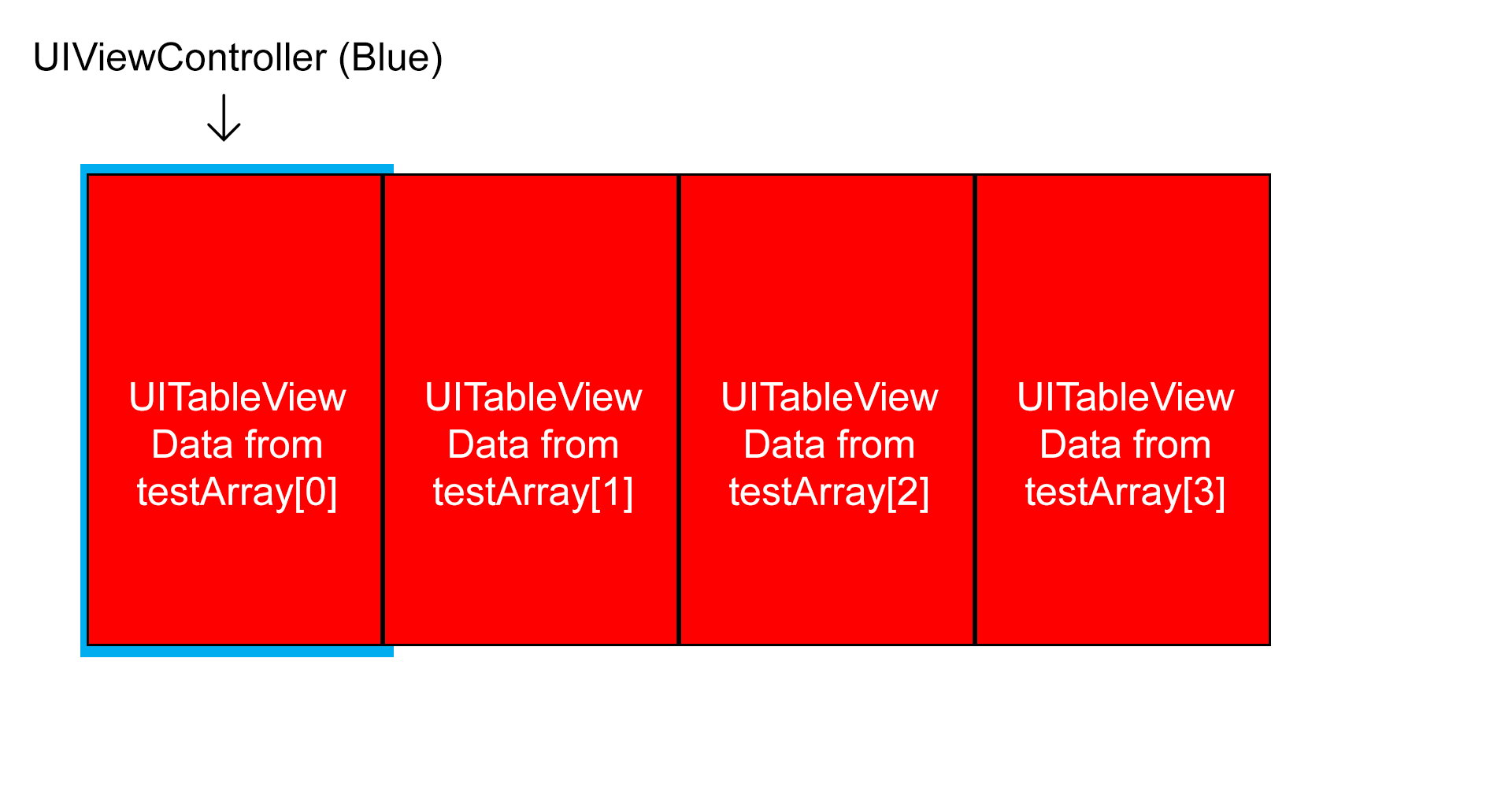
例如,使用此数组:
var testArray = [
["Day0-0","Day0-1","Day0-2"],
["Day1-0","Day1-1","Day1-2"],
["Day2-0","Day2-1","Day2-2"]
]
然后,我需要选择我的数据,例如:tableview的testArrayindexPath
做这件事最好的方法是什么?
回答 2
Stack Overflow用户
回答已采纳
发布于 2019-05-19 14:51:37
可以使用集合视图并在集合视图单元格中添加表视图。
CollectionCell.swift
class CollectionCell: UICollectionViewCell {
    let tableView = UITableView()
    override init(frame: CGRect) {
        super.init(frame: frame)
        commonInit()
    }
    required init?(coder aDecoder: NSCoder) {
        super.init(coder: aDecoder)
        commonInit()
    }
    func commonInit() {
        tableView.backgroundColor = .white
        tableView.translatesAutoresizingMaskIntoConstraints = false
        addSubview(tableView)
        addConstraints(NSLayoutConstraint.constraints(withVisualFormat: "V:|[tableView]|", options: [], metrics: nil, views: ["tableView":tableView]))
        addConstraints(NSLayoutConstraint.constraints(withVisualFormat: "H:|[tableView]|", options: [], metrics: nil, views: ["tableView":tableView]))
    }
}
ViewController.swift
class ViewController: UIViewController {

    var testArray = [["Day0-0","Day0-1","Day0-2"], ["Day1-0","Day1-1","Day1-2"], ["Day2-0","Day2-1","Day2-2"]]

    let collectionView = UICollectionView(frame: .zero, collectionViewLayout: UICollectionViewFlowLayout())
    override func viewDidLoad() {
        super.viewDidLoad()
        view.backgroundColor = .white

        let layout = collectionView.collectionViewLayout as! UICollectionViewFlowLayout
        layout.scrollDirection = .horizontal

        collectionView.delegate = self
        collectionView.dataSource = self
        collectionView.backgroundColor = .white
        collectionView.isPagingEnabled = true
        collectionView.translatesAutoresizingMaskIntoConstraints = false
        collectionView.register(CollectionCell.self, forCellWithReuseIdentifier: "CollectionCell")
        view.addSubview(collectionView)
        view.addConstraints(NSLayoutConstraint.constraints(withVisualFormat: "V:|[collectionView]|", options: [], metrics: nil, views: ["collectionView":collectionView]))
        view.addConstraints(NSLayoutConstraint.constraints(withVisualFormat: "H:|[collectionView]|", options: [], metrics: nil, views: ["collectionView":collectionView]))

    }
}
extension ViewController: UICollectionViewDelegate, UICollectionViewDataSource, UICollectionViewDelegateFlowLayout {
    func collectionView(_ collectionView: UICollectionView, numberOfItemsInSection section: Int) -> Int {
        return testArray.count
    }
    func collectionView(_ collectionView: UICollectionView, cellForItemAt indexPath: IndexPath) -> UICollectionViewCell {
        let cell = collectionView.dequeueReusableCell(withReuseIdentifier: "CollectionCell", for: indexPath) as? CollectionCell ?? CollectionCell()
        cell.tableView.tag = indexPath.item
        cell.tableView.reloadData()
        cell.tableView.delegate = self
        cell.tableView.dataSource = self
        return cell
    }
    func collectionView(_ collectionView: UICollectionView, layout collectionViewLayout: UICollectionViewLayout, sizeForItemAt indexPath: IndexPath) -> CGSize {
        return collectionView.frame.size
    }
}
extension ViewController: UITableViewDelegate, UITableViewDataSource {
    func tableView(_ tableView: UITableView, numberOfRowsInSection section: Int) -> Int {
        return testArray[tableView.tag].count
    }
    func tableView(_ tableView: UITableView, cellForRowAt indexPath: IndexPath) -> UITableViewCell {
        let cell = tableView.dequeueReusableCell(withIdentifier: "Cell") ?? UITableViewCell(style: .default, reuseIdentifier: "Cell")
        cell.textLabel?.text = testArray[tableView.tag][indexPath.row]
        return cell
    }
}Stack Overflow用户
发布于 2019-05-19 14:10:54
您可以以任何对您有意义的方式嵌套数据结构。
如果您想拥有一个表视图数据模型数组,请创建一个表视图数据模型数组。
通常,表视图的数据模型要么是一个简单的数组(对于单个分区的表视图),要么是一个数组的数组,用于分段的表视图。
我同意@GustafRosenblad关于使用页面视图控制器作为页面间滑动界面的建议。这是完美的选择。每个页面都有一个表视图。您可以使用当前页面的索引对数据模型数组进行索引,然后为该页的表视图获取数据并将其显示在该页面上。
页面原文内容由Stack Overflow提供。腾讯云小微IT领域专用引擎提供翻译支持
原文链接:
https://stackoverflow.com/questions/56208264
复制相关文章
相似问题
腾讯云开发者

Copyright © 2013 - 2026 Tencent Cloud. All Rights Reserved. 腾讯云 版权所有
深圳市腾讯计算机系统有限公司 ICP备案/许可证号:粤B2-20090059  粤公网安备44030502008569号
腾讯云计算(北京)有限责任公司 京ICP证150476号 | 京ICP备11018762号