
Gitlab的检查在Jenkins管道上失败了
Gitlab的检查在Jenkins管道上失败了
提问于 2019-05-17 10:10:15
我读过很多文档,但无法解决这个问题。
我在jenkinfile中使用下面的代码从gitlab签出
checkout changelog: true, poll: true, scm: [
      $class: 'GitSCM',
      branches: [[name: "origin/${env.gitlabSourceBranch}"]],
      doGenerateSubmoduleConfigurations: false,
      extensions: [[
        $class: 'PreBuildMerge',
        options: [
          fastForwardMode: 'FF',
          mergeRemote: 'origin',
          mergeStrategy: 'default',
          mergeTarget: "${env.gitlabTargetBranch}"
        ]
      ]],
      submoduleCfg: [],
      userRemoteConfigs: [[
        credentialsId: 'gitlab-jenkins-user-credentials',
        name: 'origin',
        url: "${env.gitlabSourceRepoHttpUrl}"
      ]]
    ]
我甚至试过
checkout changelog: false, poll: false, scm: [$class: 'GitSCM', branches: [[name: '*/master']], doGenerateSubmoduleConfigurations: false, extensions: [], submoduleCfg: [], userRemoteConfigs: [[credentialsId: 'gitlab-jenkins-user-credentials', url: 'http://jenkins-master/testproject/devops_artifacts/test_devops.git']]]但我一直在犯这个错误:
    Warning: CredentialId "gitlab-jenkins-user-credentials" could not be found.
Cloning the remote Git repository
Cloning repository http://gitlab-master.com/testproject/devops_artifacts/test_devops.git
 > C:\Program Files\Git\cmd\git.exe init C:\jenkins-docker\workspace\wildfly_gitlab # timeout=10
Fetching upstream changes from http://gitlab-master.com/testproject/devops_artifacts/test_devops.git
 > C:\Program Files\Git\cmd\git.exe --version # timeout=10
 > C:\Program Files\Git\cmd\git.exe fetch --tags --force --progress http://gitlab-master.com/testproject/devops_artifacts/test_devops.git +refs/heads/*:refs/remotes/origin/*
ERROR: Error cloning remote repo 'origin'
hudson.plugins.git.GitException: Command "C:\Program Files\Git\cmd\git.exe fetch --tags --force --progress http://gitlab-master.com/testproject/devops_artifacts/test_devops.git +refs/heads/*:refs/remotes/origin/*" returned status code 128:
stdout:
stderr: Logon failed, use ctrl+c to cancel basic credential prompt.
remote: HTTP Basic: Access denied
fatal: Authentication failed for 'http://gitlab-master.com/testproject/devops_artifacts/test_devops.git/'
我已经在这个表格中设置了web钩子。
gitlab
我测试了它的工作原理。就像我在Jenkins配置Gitlab一样
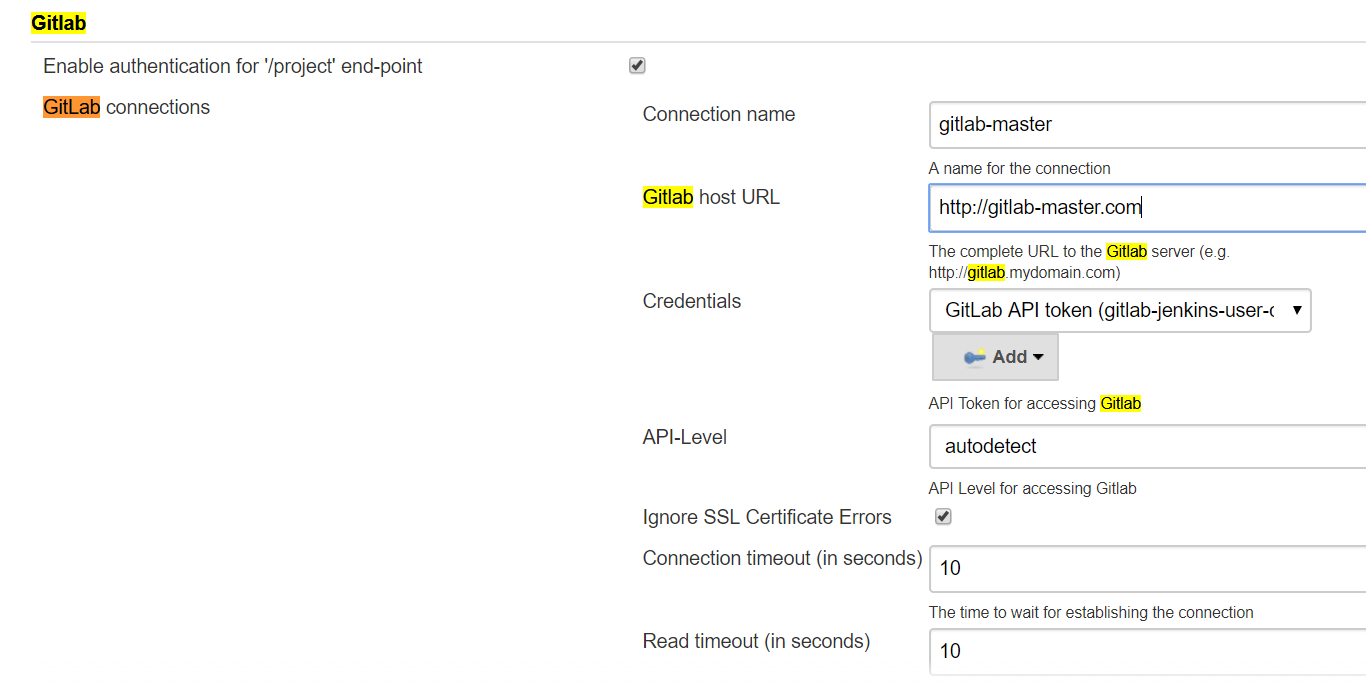
连接也起作用了。我不知道我为什么还会犯这个错误。
回答 1
Stack Overflow用户
发布于 2022-01-20 09:12:24
我假设您的“gitlab-jenkins-用户凭据”是用户凭据(针对特定用户的凭据范围)。
您可以通过使用withCredentials获得用户凭据,然后在userRemoteConfigs配置中使用带有凭据url的https:
    parameters {
    credentials(credentialType: 'com.cloudbees.plugins.credentials.impl.UsernamePasswordCredentialsImpl', defaultValue: '', description: 'Jenkins wants to use the "gitlab-jenkins-user-credentials" credentials. Select your credential to allow this.', name: 'gitlab-jenkins-user-credentials', required: true)
}
...

    withCredentials([usernamePassword(credentialsId: "gitlab-jenkins-user-credentials", passwordVariable: 'GITLAB_PASSWORD', usernameVariable: 'GITLAB_USER')]) {
       checkout([$class: 'GitSCM', branches: [[name: 'refs/tags/mytag']], userRemoteConfigs: [[url: "https://${GITLAB_USER}:${GITLAB_PASSWORD}@gitlab.com/myproject.git"]]])
    }
gitlab-jenkins-用户凭据是类型为“用户名和密码”凭据的用户凭据,创建时:
- id: gitlab-jenkins-用户凭据
- 用户名= gitlab令牌名
- 密码= gitlab令牌
在运行作业时,将提示用户选择其用户凭据。
但是,请注意,从安全性的角度来看,秘密的groovy内插并不是一个很好的实践(请参阅https://www.jenkins.io/doc/book/pipeline/jenkinsfile/#string-interpolation)。
页面原文内容由Stack Overflow提供。腾讯云小微IT领域专用引擎提供翻译支持
原文链接:
https://stackoverflow.com/questions/56184240
复制相关文章
相似问题
腾讯云开发者

Copyright © 2013 - 2026 Tencent Cloud. All Rights Reserved. 腾讯云 版权所有
深圳市腾讯计算机系统有限公司 ICP备案/许可证号:粤B2-20090059  粤公网安备44030502008569号
腾讯云计算(北京)有限责任公司 京ICP证150476号 | 京ICP备11018762号