
状态元素不会出现在使用react工具提示的map简单映射中。
代码与属性“name”一起工作,名称在地图上显示正确。
我想用来自mysql数据库的数据丰富json文件(例如,添加法语或西班牙语的国家名称)。
我添加了一个州“countries”,它将使用在object中转换的json文件进行初始化。我从sql数据库中获取数据,然后用我想要添加的数据设置州“countries”。
以下是代码:
import React, { Component } from "react"
import {
  ComposableMap,
  ZoomableGroup,
  Geographies,
  Geography,
} from "react-simple-maps"
import ReactTooltip from "react-tooltip"
import jsonWorldMap from "./maps/world-50m.json"

const wrapperStyles = {
  width: "100%",
  height: "100%",
  backgroundColor: "#0565A1"
}

class WorldMap extends Component {
  constructor(){
    super()

    this.state = {
      zoom: 1,
      color: "#39464E",
      countries: jsonWorldMap
    }
  }

  componentDidMount() {

    //get all countries in db
    fetch('http://localhost:3001/countries')
      .then(res => res.json())
      .then(body =>
        body.data.forEach(function(elementSql){
          jsonWorldMap.objects.units.geometries.forEach(function(elementJson){
            if(elementSql.alpha3 == elementJson.id)
            {
              elementJson.properties.nameFr = elementSql.name_fr;
            }
          })
        })
      )
      this.setState({ countries: jsonWorldMap }, () => console.log(this.state.countries))
  }


  render() {
    return (
      <div style={wrapperStyles}>
        <ComposableMap>
          <ZoomableGroup center={[0,20]}>
            <Geographies geography={this.state.countries}>
              {(geographies, projection) => geographies.map((geography, i) => geography.id !== "ATA" && (
                <Geography
                  className="Geography"
                  key={i}
                  data-tip={geography.properties.nameFr}
                  geography={geography}
                  projection={projection}
                />
              ))}
            </Geographies>
          </ZoomableGroup>
        </ComposableMap>
        <ReactTooltip />
      </div>
    )
  }
}

export default WorldMap
因此,您可以看到,我添加了一个组件,以便在组件的末尾有一个console.log。看看console.log给出了什么:
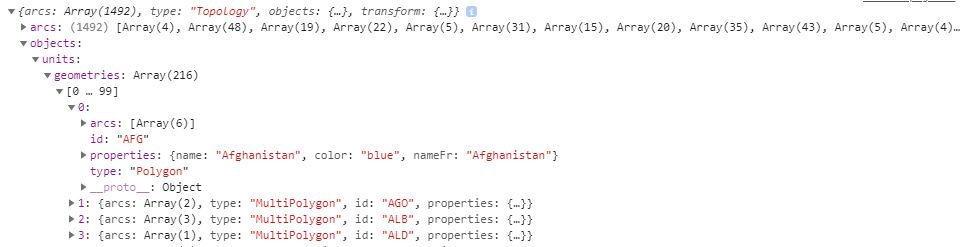
因此,您可以看到属性'nameFr‘存在于国家对象'countries’中。但是,如果我试图将它显示为工具提示,它就无法工作。它与属性'name‘(在数据提示中)完美地工作在一起。
回答 2
Stack Overflow用户
发布于 2019-05-23 20:29:10
如果data-tip={geography.properties.name}运行良好,但data-tip={geography.properties.nameFr}不工作,那么问题似乎与状态有关。
查看您的componentDidMount方法。在此方法的末尾使用jsonWorldMap更新状态。
但是,由于fetch是异步的,此时jsonWorldMap可能还没有更新。所以我觉得你应该把那条线移到里面去。请见下文:
  componentDidMount() {
    const _this = this; // hold this inside _this
    //get all countries in db
    fetch('http://localhost:3001/countries')
      .then(res => res.json())
      .then(body => {
        body.data.forEach(function(elementSql){
          jsonWorldMap.objects.units.geometries.forEach(function(elementJson){
            if(elementSql.alpha3 == elementJson.id)
            {
              elementJson.properties.nameFr = elementSql.name_fr;
            }
          })
        });
        _this.setState({ countries: jsonWorldMap }, () => console.log(this.state.countries)); //making sure setting updated jsonWorldMap to state
      }
      )
  }
希望能帮上忙。
谢谢
Stack Overflow用户
发布于 2019-05-21 11:42:31
用使用data-tip作为props的元素包装地理。
<div data-tip={geography.properties.nameFr}>
  <Geography ... />
</div>为了使<Geography data-tip={props.nameFr}/>工作,Geography组件需要使用data-tip属性内部,如下所示:
function Geography(props) {
  return <h1 data-tip={props['data-tip']}>I'm a map</h1>;
}要解决问题,需要将data-tip属性附加到Geography包装器,例如:
function Geography(props) {
  return <h1>I'm a map</h1>;
}

function ComponentWithTooltip({ props }) {
  return (
    <div data-tip="nameFr">
      <Geography />
    </div>
  );
}

function App() {
  return (
    <>
      <Geography data-tip="hello-world" />    // Your way, won't work

      <ComponentWithTooltip />                // Work

      <div data-tip="nameFr2">                // Work
        <Geography />
      </div>

      // Works with div wrapper, without won't work.
      {geographies.map((geofraphy, i) => (
        <div key={i} data-tip={geofraphy.properties.nameFr}>
          <Geography />
        </div>
      ))}

      <ReactTooltip />
    </>
  );
}
查看包含所有用例的演示:

https://stackoverflow.com/questions/56181372
复制相似问题
腾讯云开发者

Copyright © 2013 - 2026 Tencent Cloud. All Rights Reserved. 腾讯云 版权所有
深圳市腾讯计算机系统有限公司 ICP备案/许可证号:粤B2-20090059  粤公网安备44030502008569号
腾讯云计算(北京)有限责任公司 京ICP证150476号 | 京ICP备11018762号