
要让VSCode与TypeScript一起工作需要什么样的配置?
要让VSCode与TypeScript一起工作需要什么样的配置?
提问于 2019-05-15 02:36:43
我正试图让VSCode与TypeScript一起运行,但没有取得什么成功。
我要看的是:
https://code.visualstudio.com/docs/languages/typescript
看起来,一旦您安装了编译器,VSCode就可以工作了,但是有以下情况:
tsconfig.json
{
  {
  "compilerOptions": {
    "target": "es5",
    "module": "commonjs",
    "esModuleInterop": true
  }
}
package.json
{
  "name": "blahh",
  "version": "1.0.0",
  "description": "tryme",
  "main": "index.js",
  "author": "ghost",
  "license": "MIT",
  "devDependencies": {
    "typescript": "^3.4.5"
  }
}
tasks.json
{
  "version": "2.0.0",
  "tasks": [
    {
      "label": "tsc-watch",
      "command": "tsc",
      "args": ["-w", "-p", "."],
      "type":"shell",
      "isBackground": true,
      "group":"build",
      "problemMatcher": "$tslint5",
      "presentation":{
        "reveal": "always",
      }
    }
  ]
}
项目
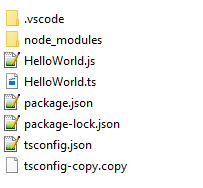
HelloWorld.ts
function sayHello(name: string): void {
    console.log(`Hello ${name}!`);
}

sayHello(1);从终端运行构建任务或tsc将正确地指示一个错误,直到我将1更改为字符串,然后生成HelloWorld.js。但是,编辑器没有工作,因为没有intelliSense、代码完成或错误突出显示。
我尝试过以下几种方法,但这也没有奏效:
VSCode TypeScript Intellisense not working
其他意见:
- 编辑器的边框中没有显示TypeScript版本号(正如我在屏幕截图示例中看到的那样)

- 当添加以下构建任务:https://code.visualstudio.com/docs/editor/tasks#vscode时,没有显示tsc:*模板。
VSCode Info
Version: 1.33.1 (user setup)
Commit: 51b0b28134d51361cf996d2f0a1c698247aeabd8
Date: 2019-04-11T08:27:14.102Z
Electron: 3.1.6
Chrome: 66.0.3359.181
Node.js: 10.2.0
V8: 6.6.346.32
OS: Windows_NT x64 10.0.17134
安装扩展
内建
TypeScript Language Basics: Enabled
... many others
外部
code --install-extension alanz.vscode-hie-server
code --install-extension alefragnani.Bookmarks
code --install-extension andyyaldoo.vscode-json
code --install-extension christian-kohler.path-intellisense
code --install-extension daiyy.quick-html-previewer
code --install-extension eamodio.gitlens
code --install-extension Edka.haskutil
code --install-extension esbenp.prettier-vscode
code --install-extension fabiospampinato.vscode-todo-plus
code --install-extension flowtype.flow-for-vscode
code --install-extension gcazaciuc.vscode-flow-ide
code --install-extension hoovercj.haskell-linter
code --install-extension jcanero.hoogle-vscode
code --install-extension justusadam.language-haskell
code --install-extension karigari.chat
code --install-extension mrmlnc.vscode-duplicate
code --install-extension ms-vscode.vscode-typescript-tslint-plugin
code --install-extension ms-vsliveshare.vsliveshare
code --install-extension ms-vsliveshare.vsliveshare-audio
code --install-extension ms-vsliveshare.vsliveshare-pack
code --install-extension phoityne.phoityne-vscode
code --install-extension SirTobi.code-clip-ring
code --install-extension WakaTime.vscode-wakatime
那么,我遗漏了什么/应该在设置中检查以启用TypeScript的交互式TypeScript功能吗?
回答 1
Stack Overflow用户
回答已采纳
发布于 2019-05-16 17:29:40
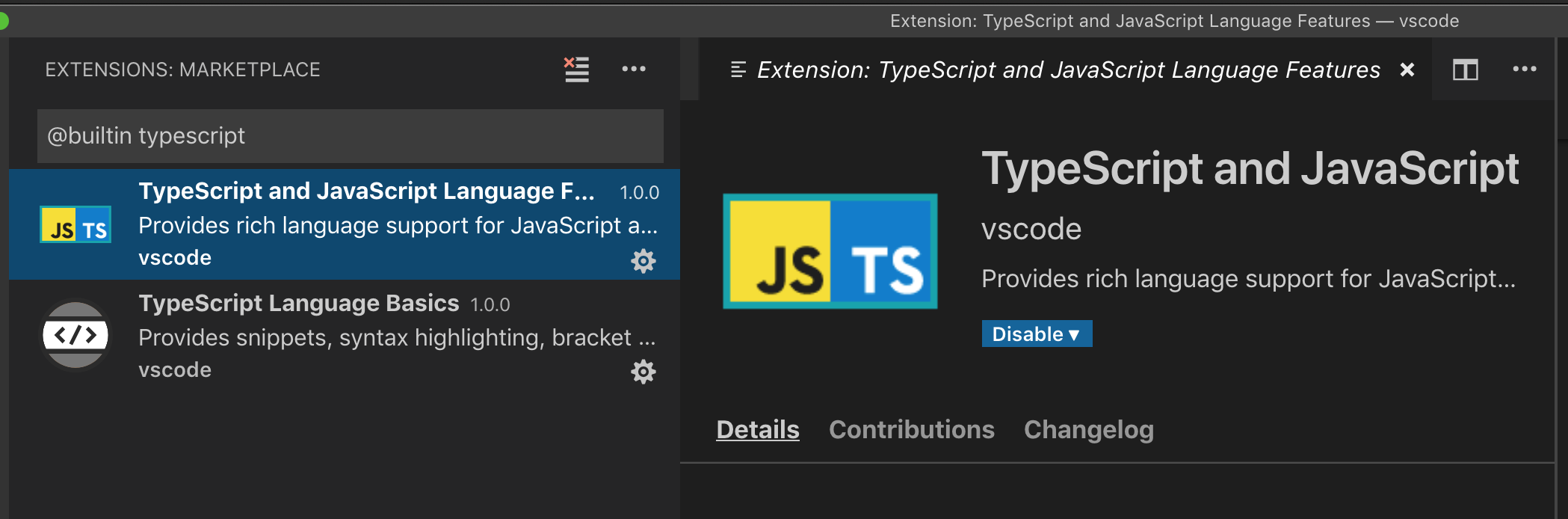
检查是否启用了内置TypeScript and JavaScript Language Features扩展。为此,搜索@builtin typescript扩展视图。
页面原文内容由Stack Overflow提供。腾讯云小微IT领域专用引擎提供翻译支持
原文链接:
https://stackoverflow.com/questions/56141044
复制相关文章
相似问题
腾讯云开发者

Copyright © 2013 - 2026 Tencent Cloud. All Rights Reserved. 腾讯云 版权所有
深圳市腾讯计算机系统有限公司 ICP备案/许可证号:粤B2-20090059  粤公网安备44030502008569号
腾讯云计算(北京)有限责任公司 京ICP证150476号 | 京ICP备11018762号