
PNG图像的PixelFormat格式
PNG图像的PixelFormat格式
提问于 2019-05-13 13:40:34
我正在尝试使用PDFsharp库提取图像。正如示例程序中提到的,库不支持非JPEG图像的提取,因此,我尝试自己进行提取。
为了同样的目的,我找到了一个不工作的样本程序。我使用下面的代码来提取嵌入在PDF文件中的400 x 400 PNG图像(该图像首先被插入到MS文件中,该文件随后被保存为一个PDF文件)。
PDF文件链接:
https://drive.google.com/open?id=1aB-SrMB3eu00BywliOBC8AW0JqRa0Hbd
提取代码:
 static void ExportAsPngImage(PdfDictionary image, ref int count)
    {
        int width = image.Elements.GetInteger(PdfSharp.Pdf.Advanced.PdfImage.Keys.Width);
        int height = image.Elements.GetInteger(PdfSharp.Pdf.Advanced.PdfImage.Keys.Height);
        System.Drawing.Imaging.PixelFormat pixelFormat = System.Drawing.Imaging.PixelFormat.Format8bppIndexed;

        byte[] original_byte_boundary = image.Stream.UnfilteredValue;
        byte[] result_byte_boundary = null;

        //Image data in BMP files always starts at a DWORD boundary, in PDF it starts at a BYTE boundary.
        //You must copy the image data line by line and start each line at the DWORD boundary.

            byte[, ,] copy_dword_boundary = new byte[3, height, width];

        for (int y = 0; y < height; y++)
        {
            for (int x = 0; x < width; x++)
            {
                if (x <= width && (x + (y * width) != original_byte_boundary.Length))
                // while not at end of line, take orignale array
                {
                    copy_dword_boundary[0, y, x] = original_byte_boundary[3*x + (y * width)];
                    copy_dword_boundary[1, y, x] = original_byte_boundary[3*x + (y * width) + 1];
                    copy_dword_boundary[2, y, x] = original_byte_boundary[3*x + (y * width) + 2];
                }
                else //fill new array with ending 0
                {
                    copy_dword_boundary[0, y, x] = 0;
                    copy_dword_boundary[1, y, x] = 0;
                    copy_dword_boundary[2, y, x] = 0;
                }
            }
        }
        result_byte_boundary = new byte[3 * width * height];
        int counter = 0;
        int n_width = copy_dword_boundary.GetLength(2);
        int n_height = copy_dword_boundary.GetLength(1);

        for (int x = 0; x < width; x++)
        {
            for (int y = 0; y < height; y++)
            {   //put 3dim array back in 1dim array
                result_byte_boundary[counter] = copy_dword_boundary[0, x, y];
                result_byte_boundary[counter + 1] = copy_dword_boundary[1, x, y];
                result_byte_boundary[counter + 2] = copy_dword_boundary[2, x, y];

                //counter++;
                counter = counter + 3;
            }
        }


        Bitmap bmp = new Bitmap(width, height, pixelFormat);
        System.Drawing.Imaging.BitmapData bmd = bmp.LockBits(new Rectangle(0, 0, bmp.Width, bmp.Height), ImageLockMode.WriteOnly, bmp.PixelFormat);
        System.Runtime.InteropServices.Marshal.Copy(result_byte_boundary, 0, bmd.Scan0, result_byte_boundary.Length);
        bmp.UnlockBits(bmd);
        using (FileStream fs = new FileStream(@"D:\TestPdf\" + String.Format("Image{0}.png", count), FileMode.Create, FileAccess.Write))
        {
            bmp.Save(fs, ImageFormat.Png);
            count++;
        }
    }
问题:
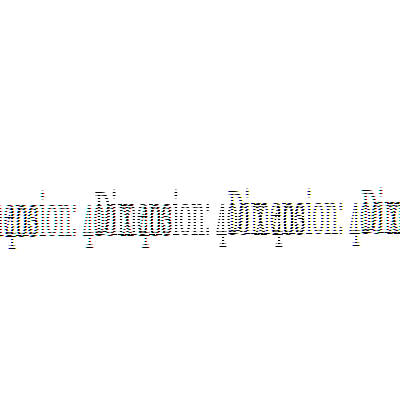
无论我选择什么PixelFormat格式,保存的PNG图像看起来都不正确。
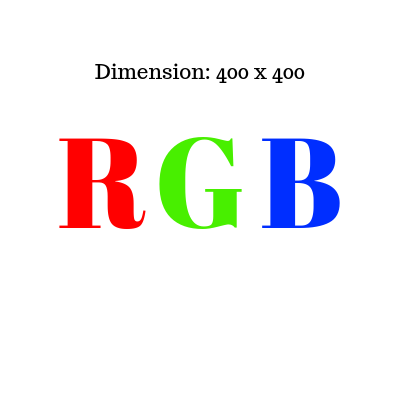
原始PNG图像(位深-32):
结果PixelFormat = Format24bppRgb
回答 1
Stack Overflow用户
发布于 2019-05-13 13:50:19
您可以从PDF文件中获取像素格式。由于你没有在你的帖子中包含PDF,我不能告诉你哪种格式是正确的。
PDF文件不包含PNG图像,相反,图像使用一种特殊的PDF图像格式,该格式与Windows使用的BMP文件有些相似,但在二进制数据中没有任何标题。相反,可以使用Image对象的属性找到"header“信息。有关详细信息,请参阅PDF参考文件。
页面原文内容由Stack Overflow提供。腾讯云小微IT领域专用引擎提供翻译支持
原文链接:
https://stackoverflow.com/questions/56113631
复制相关文章
相似问题
腾讯云开发者

Copyright © 2013 - 2026 Tencent Cloud. All Rights Reserved. 腾讯云 版权所有
深圳市腾讯计算机系统有限公司 ICP备案/许可证号:粤B2-20090059  粤公网安备44030502008569号
腾讯云计算(北京)有限责任公司 京ICP证150476号 | 京ICP备11018762号