
如何从主文件夹运行带有Apache的PHP项目
由于apache问题,旧的代码点火器项目将无法运行。尝试了所有的解决办法,在其他的帖子和其他论坛,但运气到目前为止。这是一个简单的问题,我认为这与权限有关。然而,权限设置似乎没有问题。
第一,问题。这就是我在浏览器中看到的。
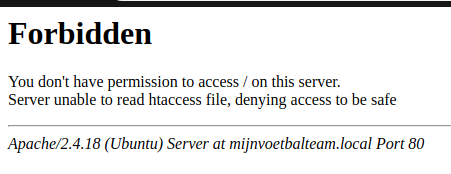
这就是我在apache日志中看到的:
pid 10672权限被拒绝:客户端127.0.0.1:38216 AH00529: /home/user_name/.htaccess pcfg_openfile:无法检查htaccess文件,确保它是可读的,并且'/home/user_name/‘是可执行文件127.0.0.1 - 11/2019:10:55:43 -0400 "GET / HTTP/1.1“403 575 - "Mozilla/5.0 (X11;Linux x86_64) AppleWebKit/537.36 (KHTML,类似壁虎) Chrome/74.0.3729.131 Safari/537.36” pid 10672权限被拒绝:客户端127.0.0.1:38216 AH00529: /home/user_name/.htaccess pcfg_openfile:无法检查htaccess文件,确保它是可读的,并且'/home/user_name/‘是可执行的,引用:site.local/ 127.0.0.1 - 11/2019:10:55:43 -0400 "GET /favicon.ico HTTP/1.1“403 585 "site.local/”Mozilla/5.0 (X11;Linux x86_64) AppleWebKit/537.36 (X11,类似壁虎) Chrome/74.0.3729.131 Safari/537.36“
请注意,apache正在尝试在/home/user_name/.htaccess中执行.htaccess文件。
我在项目文件夹中有一个.htaccess文件,并且认为这是Apache应该查找的。
第二,我的环境。万一我错过了什么,我会在这里给我的整个配置。
该项目位于我的/home/user_name/文件夹中,而不是/var/www/中。
.htaccess的文件权限:
-rwxr-xr-x 1 user_name www-data .htaccess项目文件夹权限:
drwxr-xr-x 11 user_name www-data my_php_site由于项目位于主文件夹中,所以我的/etc/host文件中有一个规则:
127.0.0.1 my_php_site.local我的站点的apache配置:
<Directory /home/user_name/code/projects/my_php_site>
    Require all granted
</Directory>
<VirtualHost *:80>
        ServerName my_php_site.local
        ServerAlias my_php_site.local
        ServerAdmin webmaster@localhost
        DocumentRoot /home/user_name/code/projects/my_php_site

        ErrorLog /home/user_name/code/projects/my_php_site/logs/apache2-error.log
        CustomLog /home/user_name/code/projects/my_php_site/logs/apache2-access.log combined
</VirtualHost>
最后,.htaccess文件本身:
RewriteEngine On
RewriteCond %{REQUEST_FILENAME} !-f
RewriteCond %{REQUEST_FILENAME} !-d
RewriteCond %{REQUEST_URI} !=/favicon.ico
RewriteRule ^(.*)$ index.php?/$1 [L]回答 1
Stack Overflow用户
发布于 2019-05-23 04:28:59
溶液
拥有用户组www_data的Apache必须能够遍历主文件夹。这意味着它需要八进制值5,符号r-x。
chmod 750 /home/user_name一个堆栈溢出帖子提到了项目文件夹的权限,但没有提到主文件夹本身的权限:https://askubuntu.com/questions/325498/apache-cant-access-folders-in-my-home-directory
以下步骤也是必要的,取决于版本和系统
允许Apache在主文件夹中执行文件
sudo a2enmod userdirsudo nano /etc/apache2/mods-available/php7.0.conf注释此部分(将#放在每一行的开头):
#<IfModule mod_userdir.c>
#    <Directory /home/*/public_html>
#        php_admin_flag engine Off
#    </Directory>
#</IfModule>
sudo nano /etc/apache2/apache2.conf
添加以下内容:
<Directory /home/*/public_html/>
        Options Indexes FollowSymLinks
        AllowOverride None
        Require all granted
</Directory>https://stackoverflow.com/questions/56091680
复制相似问题
腾讯云开发者

Copyright © 2013 - 2026 Tencent Cloud. All Rights Reserved. 腾讯云 版权所有
深圳市腾讯计算机系统有限公司 ICP备案/许可证号:粤B2-20090059  粤公网安备44030502008569号
腾讯云计算(北京)有限责任公司 京ICP证150476号 | 京ICP备11018762号