
当setup.py中加入细胞化时,Travis颜色消失
从https://travis-ci.org/nltk/nltk/builds/529221349中,我们可以看到几个构建,所有其他构建在运行tox时都有带有传递/失败/跳过颜色的日志。
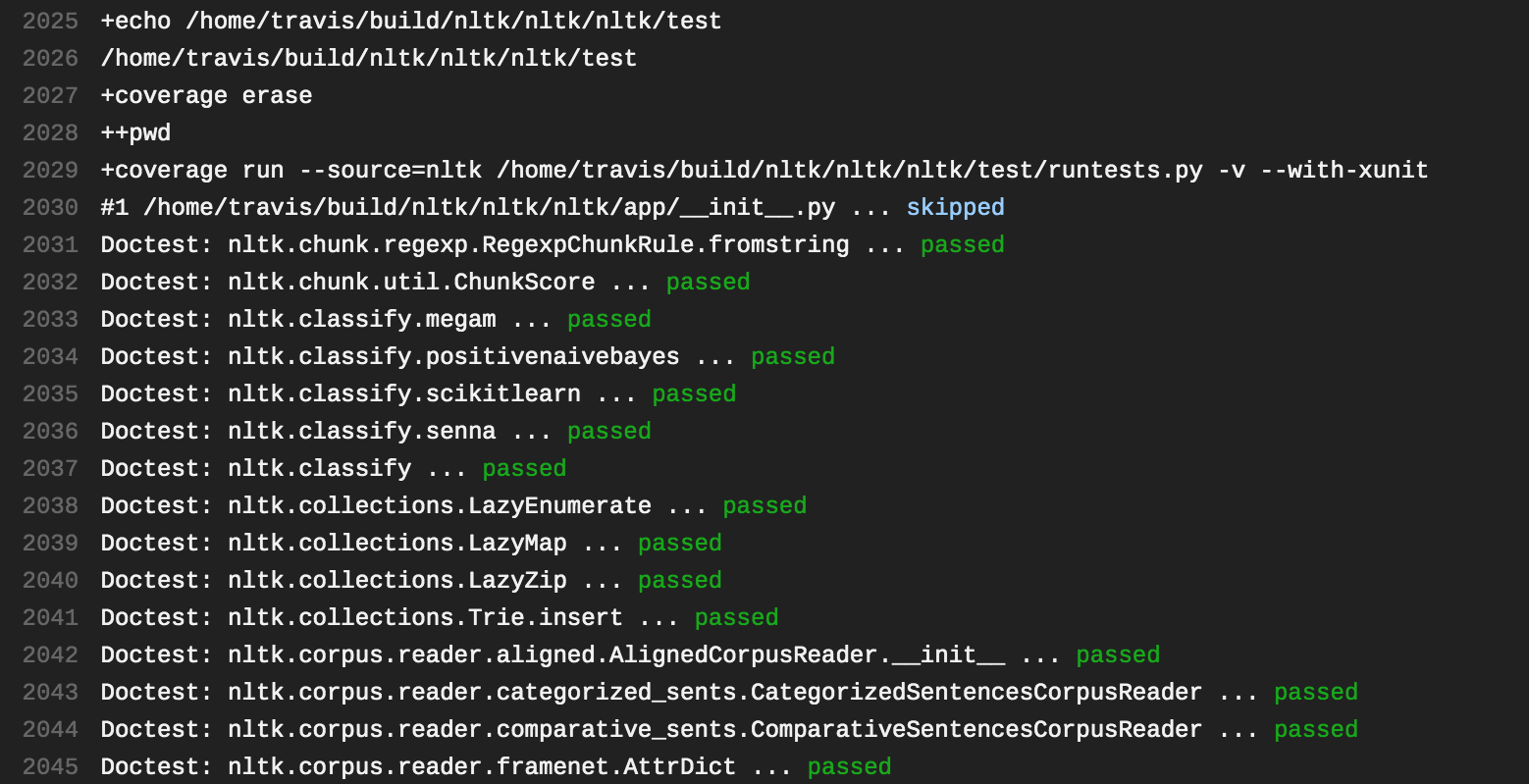
对tox.ini环境使用py-travis配置:
[tox]
envlist =
    py{27,35,36,37}
    pypy
    py{27,35,36}-nodeps
    py{27,35,36}-jenkins
    py-cythonized
    py-travis

[testenv]
; simplify numpy installation
setenv =
    LAPACK=
    ATLAS=None
    PYTHONWARNINGS=ignore

; Copy all environment variables to the tox test environment
passenv = *

deps =
    numpy
    nose >= 1.2.1
    coverage
    text-unidecode
    twython
    pyparsing
    python-crfsuite
    rednose

changedir = nltk/test
commands =
    ; scipy and scikit-learn requires numpy even to run setup.py so
    ; they can't be installed in one command
    pip install scipy scikit-learn

    ; python runtests.py --with-coverage --cover-inclusive --cover-package=nltk --cover-html --cover-html-dir={envdir}/docs []
    python runtests.py []

commands =
    python runtests.py []


[testenv:py-travis]
extras = all
setenv =
    NLTK_DATA = {homedir}/nltk_data/
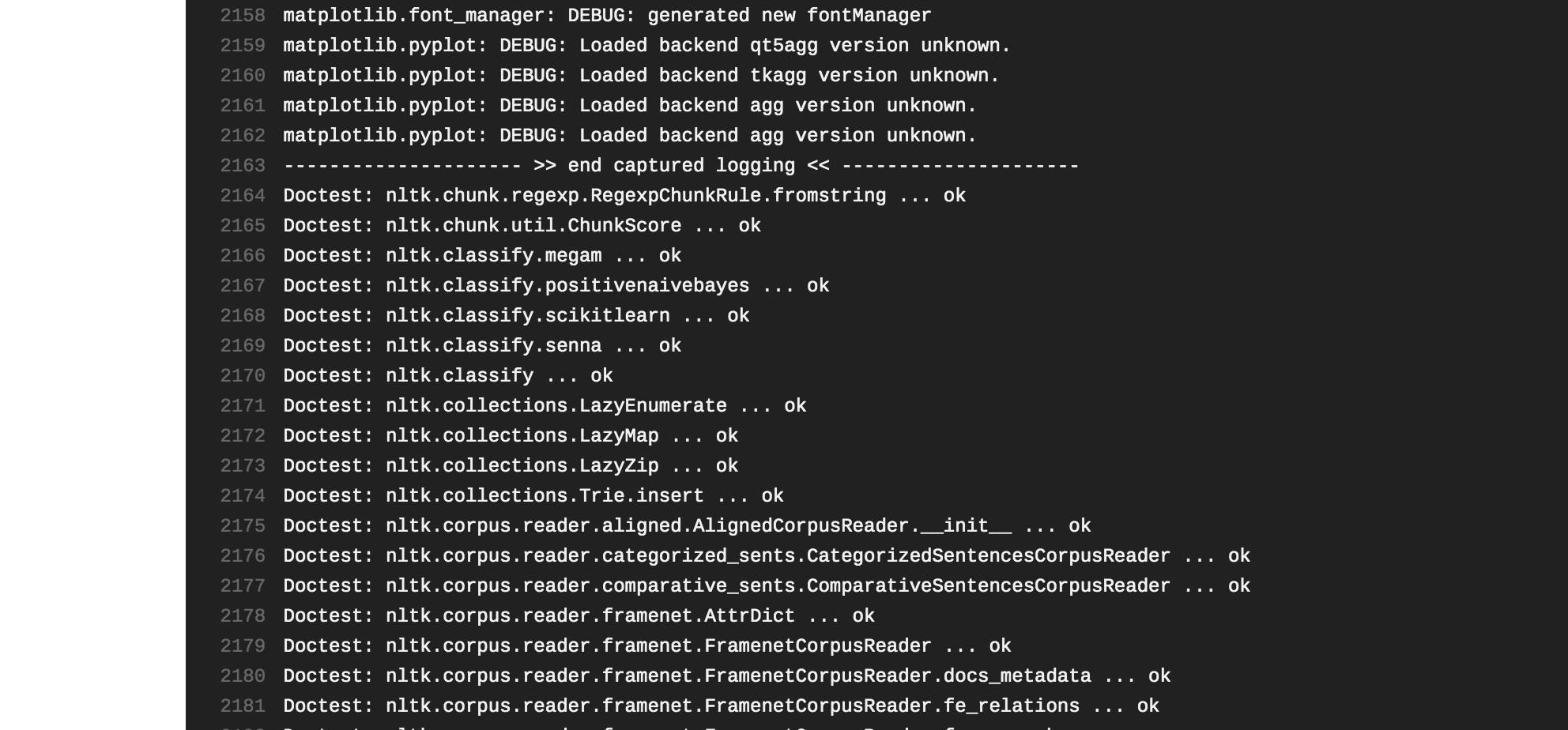
commands = {toxinidir}/tools/travis/coverage-pylint.sh但是当setup.py的细胞化开始时,毒理和特拉维斯的结构看起来是一样的,
[testenv:py-cythonized]
deps =
    Cython >= 0.28.5
setenv =
    CYTHONIZE_NLTK = true
    NLTK_DATA = {homedir}/nltk_data/
extras = all
commands = {toxinidir}/tools/travis/coverage-pylint.sh
运行生成时,颜色会消失:
安装setup.py与py-travis和py-cynthonized构建完全相同:
# Work around mbcs bug in distutils.
# http://bugs.python.org/issue10945
import codecs
try:
    codecs.lookup('mbcs')
except LookupError:
    ascii = codecs.lookup('ascii')
    func = lambda name, enc=ascii: {True: enc}.get(name == 'mbcs')
    codecs.register(func)

import os

# Use the VERSION file to get NLTK version
version_file = os.path.join(os.path.dirname(__file__), 'nltk', 'VERSION')
with open(version_file) as fh:
    nltk_version = fh.read().strip()

# setuptools
from setuptools import setup, find_packages

# Specify groups of optional dependencies
extras_require = {
    'machine_learning': ['gensim', 'numpy', 'python-crfsuite', 'scikit-learn', 'scipy'],
    'plot': ['matplotlib'],
    'tgrep': ['pyparsing'],
    'twitter': ['twython'],
    'corenlp': ['requests'],
}

# Add a group made up of all optional dependencies
extras_require['all'] = set(
    package for group in extras_require.values() for package in group
)

MODULES_TO_COMPILE = [
    'nltk.grammar',
    'nltk.parse.chart',
    'nltk.tokenize.*',
    'nltk.probability',
    'nltk.util',
    'nltk.stem.*',
    'nltk.lm.*',
    'nltk.translate.*',
    'nltk.tbl.*',
    'nltk.sentiment.*',
    'nltk.cluster.*',
    'nltk.classify.*',
    'nltk.metrics.*',
    'nltk.chunk.*',
    'nltk.sem.*',

]


def compile_modules(modules):
    """
    Compile the named modules using Cython, using the clearer Python 3 semantics.
    """
    import Cython
    from Cython.Build import cythonize
    files = [name.replace('.', os.path.sep) + '.py' for name in modules]
    print("Compiling %d modules using Cython %s" % (len(modules), Cython.__version__))
    return cythonize(files, language_level=3)


if os.getenv('CYTHONIZE_NLTK') == 'true':
    ext_modules = compile_modules(MODULES_TO_COMPILE)
else:
    ext_modules = None

setup(
    name="nltk",
    description="Natural Language Toolkit",
    version=nltk_version,
    url="http://nltk.org/",
    long_description="""\
The Natural Language Toolkit (NLTK) is a Python package for
natural language processing.  NLTK requires Python 2.7, 3.5, 3.6, or 3.7.""",
    license="Apache License, Version 2.0",
    keywords=[
        'NLP',
        'CL',
        'natural language processing',
        'computational linguistics',
        'parsing',
        'tagging',
        'tokenizing',
        'syntax',
        'linguistics',
        'language',
        'natural language',
        'text analytics',
    ],
    maintainer="Steven Bird",
    maintainer_email="stevenbird1@gmail.com",
    author="Steven Bird",
    author_email="stevenbird1@gmail.com",
    classifiers=[
        'Development Status :: 5 - Production/Stable',
        'Intended Audience :: Developers',
        'Intended Audience :: Education',
        'Intended Audience :: Information Technology',
        'Intended Audience :: Science/Research',
        'License :: OSI Approved :: Apache Software License',
        'Operating System :: OS Independent',
        'Programming Language :: Python :: 2.7',
        'Programming Language :: Python :: 3.5',
        'Programming Language :: Python :: 3.6',
        'Programming Language :: Python :: 3.7',
        'Topic :: Scientific/Engineering',
        'Topic :: Scientific/Engineering :: Artificial Intelligence',
        'Topic :: Scientific/Engineering :: Human Machine Interfaces',
        'Topic :: Scientific/Engineering :: Information Analysis',
        'Topic :: Text Processing',
        'Topic :: Text Processing :: Filters',
        'Topic :: Text Processing :: General',
        'Topic :: Text Processing :: Indexing',
        'Topic :: Text Processing :: Linguistic',
    ],
    package_data={'nltk': ['test/*.doctest', 'VERSION']},
    install_requires=[
        'six',
        'singledispatch; python_version < "3.4"'
    ],
    extras_require=extras_require,
    packages=find_packages(),
    ext_modules=ext_modules,
    zip_safe=False,  # since normal files will be present too?
)
为什么细胞化构建的颜色会消失?
如何为细胞化构建启用颜色?
对于某些背景,代码来自于nltk库,用于愤世嫉俗测试/构建的全部分支都在https://github.com/alvations/nltk/tree/cythonize上。
回答 1
Stack Overflow用户
发布于 2019-05-11 23:01:58
为什么古色化的建筑的颜色会消失?
因为py-cythonized环境没有安装nose (这就是为什么测试首先使用stdlib的unittest运行)和rednose (鼻子输出着色)。
之所以会发生这种情况,是因为env重写了deps。py-travis不声明任何自己的dep,因此它从全局testenv配置继承deps设置。py-cythonized需要Cython,因此它重新定义了deps列表,丢失了测试执行所需的所有包。
如何为细胞化的构建启用颜色?
将依赖项从全局testenv复制到py-cythonized。拟议的贴片:
diff --git a/tox.ini b/tox.ini
index a267d9a5a..41740e19b 100644
--- a/tox.ini
+++ b/tox.ini
@@ -133,6 +133,14 @@ commands =
 [testenv:py-cythonized]
 deps =
     Cython >= 0.28.5
+    numpy
+    nose >= 1.2.1
+    coverage
+    text-unidecode
+    twython
+    pyparsing
+    python-crfsuite
+    rednose
 setenv =
     CYTHONIZE_NLTK = true
NLTK_DATA = {homedir}/nltk_data/在应用了修补程序之后,测试输出的颜色很好:在travis上运行的示例
更新:使用条件设置
为了避免依赖关系的重复,可以使用条件依赖项:
[testenv]
deps =
    rednose  # this one is global dependency
    py-cythonized: cython  # this one is specific for testenv:py-cythonized
拟议的贴片:
diff --git a/tox.ini b/tox.ini
index a267d9a5a..fa0839b96 100644
--- a/tox.ini
+++ b/tox.ini
@@ -26,6 +26,7 @@ deps =
     pyparsing
     python-crfsuite
     rednose
+    py-cythonized: Cython >= 0.28.5

 changedir = nltk/test
 commands =
@@ -131,8 +132,6 @@ commands =

 # Test Cython compiled installation.
 [testenv:py-cythonized]
-deps =
-    Cython >= 0.28.5
 setenv =
     CYTHONIZE_NLTK = true
NLTK_DATA = {homedir}/nltk_data/来源:因素和因素-条件设置
https://stackoverflow.com/questions/56032382
复制相似问题
腾讯云开发者

Copyright © 2013 - 2026 Tencent Cloud. All Rights Reserved. 腾讯云 版权所有
深圳市腾讯计算机系统有限公司 ICP备案/许可证号:粤B2-20090059  粤公网安备44030502008569号
腾讯云计算(北京)有限责任公司 京ICP证150476号 | 京ICP备11018762号