
在引发浮动标签时如何在textinputlayout上添加info图标
在引发浮动标签时如何在textinputlayout上添加info图标
提问于 2019-05-07 12:04:55
如何添加信息图标时,浮动标签是引发旁边的提示。像这样的http://prntscr.com/nlipdn
我尝试了下面的代码:当焦点改变编辑,我添加了信息icon.But,我不知道如何设置信息图标旁边浮动标签。我补充了,但它的位置不合适。
 public void OnFocusChange(View v, bool hasFocus)
 {
            ImageView _infoView=null;
            if (_infoView != null)
            {
                _songTitleLayout.RemoveView(_infoView);
                _infoView = null;
            }

            if (v==_eSongTitle)
            {
                if(hasFocus)
                {
                    int length= _songTitleLayout.Hint.Length;
                    _infoView = new ImageView(this);
                    _infoView.SetImageResource(Resource.Drawable.MoreInfo);
                    _songTitleLayout.AddView(_infoView);
                }
            }
}回答 1
Stack Overflow用户
回答已采纳
发布于 2019-05-08 08:31:51
解决方案:
在添加margin之前,通过使用下面的代码,可以更改值以调整图像的页边距和大小:
ViewGroup.MarginLayoutParams paramsw = new ViewGroup.MarginLayoutParams(40,40);
paramsw.SetMargins(200,0,0,0);

CollapsingToolbarLayout.LayoutParams lp = new
CollapsingToolbarLayout.LayoutParams(paramsw);

txtlayoutusername.AddView(_infoView,0,lp);
下面是我测试的所有代码:
这是MainActivity中的代码:
public class MainActivity : AppCompatActivity
{
    TextInputLayout txtlayoutusername;
    EditText txtusername;
    ImageView _infoView;
    protected override void OnCreate(Bundle savedInstanceState)
    {
        base.OnCreate(savedInstanceState);
        SetContentView(Resource.Layout.activity_main);


        txtlayoutusername = FindViewById<TextInputLayout>(Resource.Id.textuernameInputLayout);
        txtusername = FindViewById<EditText>(Resource.Id.txtusername);

        txtusername.FocusChange += (object sender, View.FocusChangeEventArgs e) =>
        {


            if (_infoView != null)
            {
                txtlayoutusername.RemoveView(_infoView);
                _infoView = null;
            }

            if (sender == txtusername)
            {
                if (txtusername.IsFocused)
                {
                    int length = txtlayoutusername.Hint.Length;
                    _infoView = new ImageView(this);
                    _infoView.SetImageResource(Resource.Drawable.ttt);

                    ViewGroup.MarginLayoutParams paramsw = new ViewGroup.MarginLayoutParams(40,40);
                    paramsw.SetMargins(200,0,0,0);

                    CollapsingToolbarLayout.LayoutParams lp = new CollapsingToolbarLayout.LayoutParams(paramsw);

                    txtlayoutusername.AddView(_infoView,0,lp);
                }
            }
        };
    }
}
以下是Xaml中的代码:
<?xml version="1.0" encoding="utf-8"?>
<android.support.design.widget.CoordinatorLayout xmlns:android="http://schemas.android.com/apk/res/android"
    xmlns:app="http://schemas.android.com/apk/res-auto"
    xmlns:tools="http://schemas.android.com/tools"
    android:layout_width="match_parent"
    android:layout_height="match_parent">

    <LinearLayout
        android:orientation="vertical"
        android:layout_marginTop="80dp"
        android:layout_width="match_parent"
        android:layout_height="wrap_content">
        <android.support.design.widget.TextInputLayout
            android:layout_width="fill_parent"
            android:layout_height="wrap_content"
            android:id="@+id/textuernameInputLayout">
            <EditText
                android:layout_width="match_parent"
                android:layout_height="wrap_content"
                android:id="@+id/txtusername"
                android:hint="User Name"
                android:singleLine="true" />
        </android.support.design.widget.TextInputLayout>
        <android.support.design.widget.TextInputLayout
            android:layout_width="fill_parent"
            android:layout_height="wrap_content"
            android:orientation = "horizontal"
            android:id="@+id/textpasswordInputLayout">

            <EditText
                android:layout_width="match_parent"
                android:layout_height="wrap_content"
                android:id="@+id/txtpassword"
                android:inputType="textPassword"
                android:hint="Password"
                android:singleLine="true" />

        </android.support.design.widget.TextInputLayout>

    </LinearLayout>

</android.support.design.widget.CoordinatorLayout>
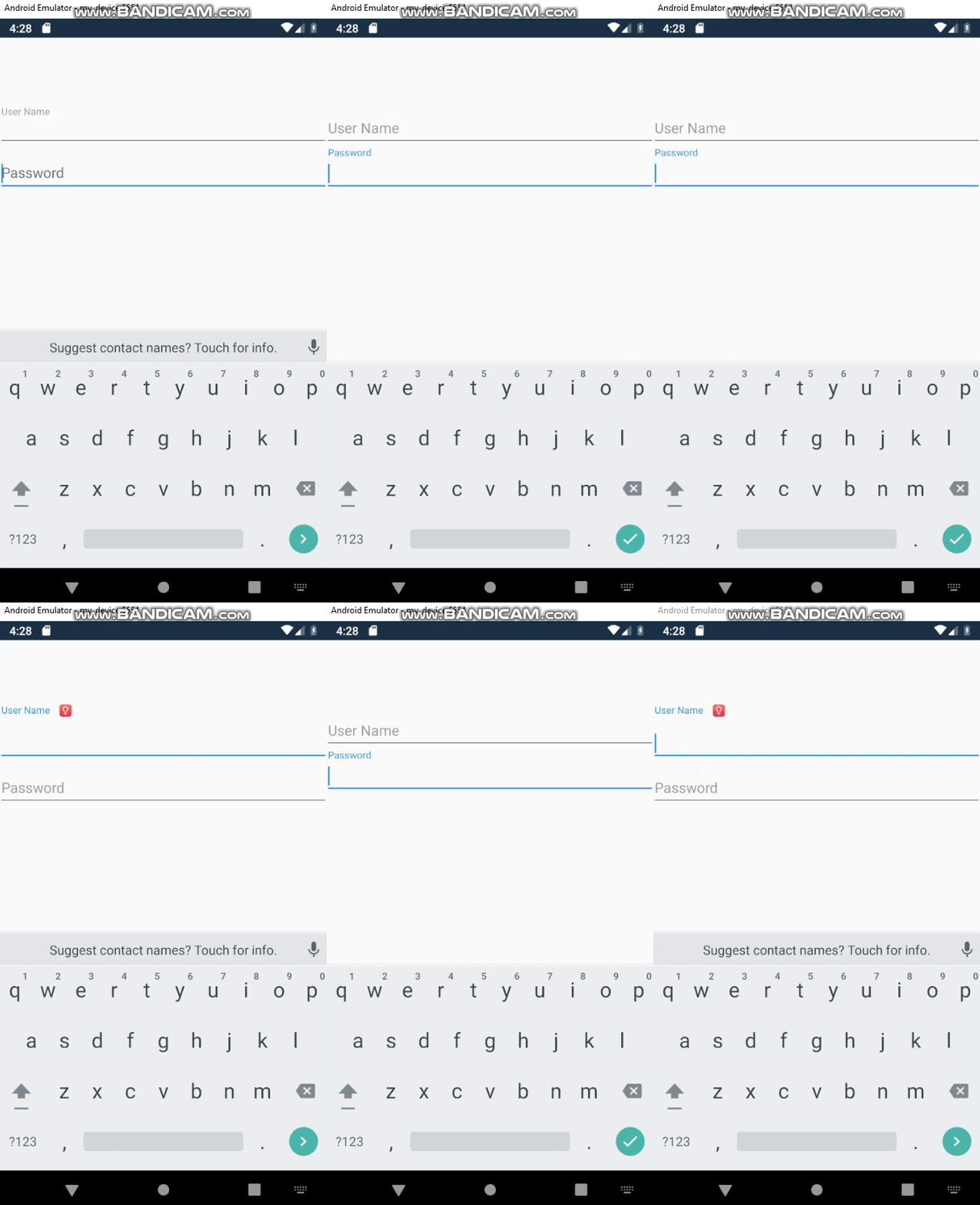
结果:
页面原文内容由Stack Overflow提供。腾讯云小微IT领域专用引擎提供翻译支持
原文链接:
https://stackoverflow.com/questions/56022238
复制相关文章
相似问题
腾讯云开发者

Copyright © 2013 - 2026 Tencent Cloud. All Rights Reserved. 腾讯云 版权所有
深圳市腾讯计算机系统有限公司 ICP备案/许可证号:粤B2-20090059  粤公网安备44030502008569号
腾讯云计算(北京)有限责任公司 京ICP证150476号 | 京ICP备11018762号