
芹菜:没有找到模块
我正在使用开放语义搜索( Open,OSS),我想使用花工具监视它的过程。芹菜所需的工人应在其网站上按开放源码软件状态分配。
工作人员将执行分析和索引排队文件等任务。这些工作人员由etl/tasks.py实现,并将在服务opensemanticsearch引导时自动启动。
这个tasks.py文件如下所示:
#!/usr/bin/python3
# -*- coding: utf-8 -*-

#
# Queue tasks for batch processing and parallel processing
#

# Queue handler
from celery import Celery

# ETL connectors
from etl import ETL
from etl_delete import Delete
from etl_file import Connector_File
from etl_web import Connector_Web
from etl_rss import Connector_RSS


verbose = True
quiet = False

app = Celery('etl.tasks')
app.conf.CELERYD_MAX_TASKS_PER_CHILD = 1

etl_delete = Delete()
etl_web = Connector_Web()
etl_rss = Connector_RSS()


#
# Delete document with URI from index
#

@app.task(name='etl.delete')
def delete(uri):
    etl_delete.delete(uri=uri)


#
# Index a file
#

@app.task(name='etl.index_file')
def index_file(filename, wait=0, config=None):

    if wait:
        time.sleep(wait)

    etl_file = Connector_File()

    if config:
        etl_file.config = config

    etl_file.index(filename=filename)

#
# Index file directory
#

@app.task(name='etl.index_filedirectory')
def index_filedirectory(filename):

    from etl_filedirectory import Connector_Filedirectory

    connector_filedirectory = Connector_Filedirectory()

    result = connector_filedirectory.index(filename)

    return result


#
# Index a webpage
#
@app.task(name='etl.index_web')
def index_web(uri, wait=0, downloaded_file=False, downloaded_headers=[]):

    if wait:
        time.sleep(wait)

    result = etl_web.index(uri, downloaded_file=downloaded_file, downloaded_headers=downloaded_headers)

    return result


#
# Index full website
#

@app.task(name='etl.index_web_crawl')
def index_web_crawl(uri, crawler_type="PATH"):

    import etl_web_crawl

    result = etl_web_crawl.index(uri, crawler_type)

    return result


#
# Index webpages from sitemap
#

@app.task(name='etl.index_sitemap')
def index_sitemap(uri):

    from etl_sitemap import Connector_Sitemap

    connector_sitemap = Connector_Sitemap()

    result = connector_sitemap.index(uri)

    return result


#
# Index RSS Feed
#

@app.task(name='etl.index_rss')
def index_rss(uri):

    result = etl_rss.index(uri)

    return result


#
# Enrich with / run plugins
#

@app.task(name='etl.enrich')
def enrich(plugins, uri, wait=0):

    if wait:
        time.sleep(wait)

    etl = ETL()
    etl.read_configfile('/etc/opensemanticsearch/etl')
    etl.read_configfile('/etc/opensemanticsearch/enhancer-rdf')

    etl.config['plugins'] = plugins.split(',')

    filename = uri

    # if exist delete protocoll prefix file://
    if filename.startswith("file://"):
        filename = filename.replace("file://", '', 1)

    parameters = etl.config.copy()

    parameters['id'] = uri
    parameters['filename'] = filename

    parameters, data = etl.process (parameters=parameters, data={})

    return data


#
# Read command line arguments and start
#

#if running (not imported to use its functions), run main function
if __name__ == "__main__":

    from optparse import OptionParser

    parser = OptionParser("etl-tasks [options]")
    parser.add_option("-q", "--quiet", dest="quiet", action="store_true", default=False, help="Don\'t print status (filenames) while indexing")
    parser.add_option("-v", "--verbose", dest="verbose", action="store_true", default=False, help="Print debug messages")

    (options, args) = parser.parse_args()

    if options.verbose == False or options.verbose==True:
        verbose = options.verbose
        etl_delete.verbose = options.verbose
        etl_web.verbose = options.verbose
        etl_rss.verbose = options.verbose

    if options.quiet == False or options.quiet==True:
        quiet = options.quiet

    app.worker_main()
我读了很多关于芹菜的教程,据我理解,这一行应该能做好。
celery -A etl.tasks flower但事实并非如此。结果是语句
错误:无法加载芹菜应用程序。找不到模块etl。
同为
celery -A etl.tasks worker --loglevel=debug所以芹菜本身似乎是在制造麻烦,而不是花。我也尝试过,例如芹菜,-A,etl.index_filedirectory,worker =debug,但是结果是一样的。
我遗漏了什么?我一定要告诉芹菜哪里能找到etl.tasks吗?在线研究并没有显示出类似的情况,大多数“模块未被发现”的错误似乎都发生在导入东西时。所以这可能是个愚蠢的问题,但我哪儿也找不到解决办法。希望你们能帮我。不幸的是,我要到周一才能回复,很抱歉提前。
回答 5
Stack Overflow用户
发布于 2019-06-28 12:19:44
我遇到了同样的问题,我安装并配置了我的队列,如下所示,它可以工作。
安装RabbitMQ
MacOS
brew install rabbitmq
sudo vim ~/.bash_profile在bash_profile中添加以下行:
PATH=$PATH:/usr/local/sbin
然后更新bash_profile:
sudo source ~/.bash_profile
Linux
sudo apt-get install rabbitmq-server
配置RabbitMQ
启动队列:
sudo rabbitmq-server
在另一个终端中,配置队列:
sudo rabbitmqctl add_user myuser mypassword
sudo rabbitmqctl add_vhost myvhost
sudo rabbitmqctl set_user_tags myuser mytag
sudo rabbitmqctl set_permissions -p myvhost myuser ".*" ".*" ".*"
发射芹菜
我建议进入包含task.py的文件夹,并使用以下命令:
celery -A task worker -l info -Q celery --concurrency 5
Stack Overflow用户
发布于 2019-11-07 15:03:31
请注意,此错误意味着两件事:
- 模块不见了
- 模块存在,但不能加载。如果其中有错误,例如SyntaxError。
若要检查是否不是后者,请运行:
python -c "import <myModuleContainingTasksDotPyFile>" 在这个问题上:
python -c "import etl" 如果它崩溃,首先修复它(与芹菜不同,您将得到详细的错误消息)。
Stack Overflow用户
发布于 2022-01-29 16:22:21
上面的解决方案对我没有用。
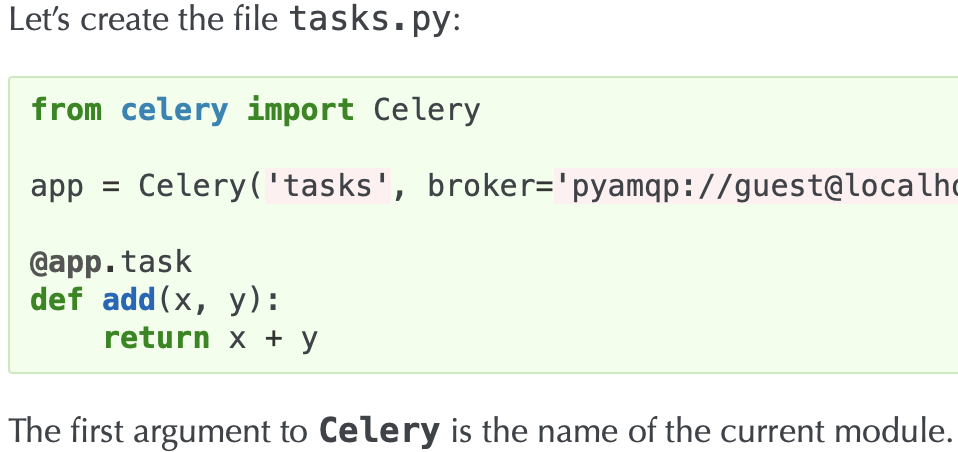
我也遇到了同样的问题,我的问题是,在主celery.py (即SmartCalend文件夹中)中,我有:
app = Celery('proj')但我必须在那里打字:
app = Celery('SmartCalend')其中SmartCalend是celery.py所属的实际应用程序名(!)。不是任何随机词,而是精确的应用程序名称。这里没有提到,只在官方文档中提到:
https://stackoverflow.com/questions/55954937
复制相似问题
腾讯云开发者

Copyright © 2013 - 2026 Tencent Cloud. All Rights Reserved. 腾讯云 版权所有
深圳市腾讯计算机系统有限公司 ICP备案/许可证号:粤B2-20090059  粤公网安备44030502008569号
腾讯云计算(北京)有限责任公司 京ICP证150476号 | 京ICP备11018762号