
windowSoftInputMode="adjustResize|stateHidden“键盘OverLays编辑错误
windowSoftInputMode="adjustResize|stateHidden“键盘OverLays编辑错误
提问于 2019-04-30 05:30:16
尝试使用window?.setSoftInputMode(WindowManager.LayoutParams.SOFT_INPUT_ADJUST_PAN)
在activity.Also内部,使用ADJUST_RESIZE Param进行了尝试,但没有起作用。
下面的代码是活动的清单
<activity android:name=".auth.AuthActivity"
          android:theme="@style/NoActionBarTheme"
          android:windowSoftInputMode="adjustResize|stateHidden">
</activity>
这是我的模拟器截图
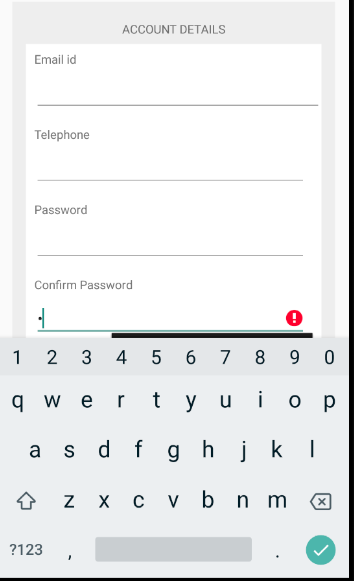
尝试了大多数的解决方案.May是我错过了正确的一个
回答 4
Stack Overflow用户
发布于 2019-04-30 05:56:50
在editBox上设置错误时,可以以编程方式隐藏键盘
 public void hideKeyboard() {
        View view = this.getCurrentFocus();
        if (view != null) {
            InputMethodManager imm = (InputMethodManager)
                    getSystemService(Context.INPUT_METHOD_SERVICE);
            if (imm != null) {
                imm.hideSoftInputFromWindow(view.getWindowToken(), 0);
            }
        }
}Stack Overflow用户
发布于 2019-04-30 06:14:11
使用layout中的layout,并将所有字段放在ScrollView中,以便它们可以垂直移动。然后,当键盘弹出,字段可以很容易地移动,什么都不会隐藏。
Stack Overflow用户
发布于 2019-04-30 06:42:03
使用此it工作代码
将此代码放在create上
getWindow().setSoftInputMode(WindowManager.LayoutParams.SOFT_INPUT_STATE_VISIBLE|WindowManager.LayoutParams.SOFT_INPUT_ADJUST_RESIZE);把这个放出来
android:windowSoftInputMode="adjustResize"页面原文内容由Stack Overflow提供。腾讯云小微IT领域专用引擎提供翻译支持
原文链接:
https://stackoverflow.com/questions/55914476
复制相关文章
相似问题
腾讯云开发者

Copyright © 2013 - 2026 Tencent Cloud. All Rights Reserved. 腾讯云 版权所有
深圳市腾讯计算机系统有限公司 ICP备案/许可证号:粤B2-20090059  粤公网安备44030502008569号
腾讯云计算(北京)有限责任公司 京ICP证150476号 | 京ICP备11018762号