
如何将Select2插件集成到JQuery数据表CellEdit上?
在我的应用程序中,我已经集成了一个JQuery数据表。但是,我想添加一个内联编辑器。有一个内联编辑工具,但这不是免费的。
因此,我在Google上搜索了另一个内联编辑器,并找到了一个开源的lib CellEdit,它提供内联编辑。我已经在datatable中成功地实现了它,并且运行良好。
但是,我想将Select2 JQuery插件添加到下拉列表中,因为我的应用程序datatable下拉包含许多值。因此,我无法轻松地选择值。Select2插件在下拉列表中提供了一个搜索选项,我使用它可以很容易地找到确切的选项。然而,CellEdit没有这种功能。有人能帮我添加Select2插件吗?
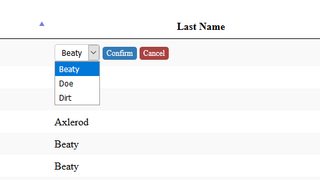
电流下降
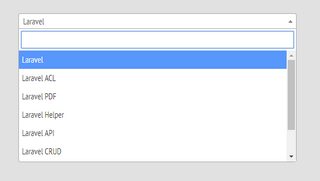
所需的下拉(带有搜索选项)
回答 2
Stack Overflow用户
发布于 2021-05-18 11:08:33
我尝试了@jawahar N的建议,但没有看到预期的输出。我意识到我没有定义"myselect“css类。
如果您想要快速输出,请使用类“js-样例-基本-单”而不是"myselect“。在select2.org网站https://select2.org/getting-started/basic-usage中推荐这样做。
不要忘记添加select2 css类和javascript文件。
Stack Overflow用户
发布于 2019-04-28 07:31:45
我找了很多次,却找不到任何解决办法。因此,我研究了这个( https://github.com/ejbeaty/CellEdit )核心JS文件。
在此路径( https://github.com/ejbeaty/CellEdit/tree/master/js )中可用。
最后,我找到了解决这个问题的办法。
在核心JS文件中,它们处理'getInputHtml‘函数上的所有输入类型(文本框、下拉列表、日期字段)。
实际上,在这个插件中,他们为两种类型的下拉代码编写了代码。一个是使用“确认”和“取消”按钮,这称为“'list-confirm'”,另一个是“没有任何按钮的‘list”。它由onChange自动处理。
因此,在这个'getInputHtml‘函数中,他们为两种类型的下拉式写了一个开关。
- 案件“清单-确认”
- 案件“名单”
为了集成插件,我们需要做以下事情,
- 需要在下拉列表中添加类名,比如
select class="myselect" - 需要在脚本
$(".myselect").select2();中添加下面的代码
如果你需要加入搜索选项。请将下面的代码替换为核心JS文件中的旧代码,
1.案例“列表-确认”:
case "list-confirm": // List w/ confirm
input.html = startWrapperHtml + "<select class='myselect " + inputCss + "'>";
$.each(inputSetting.options, function (index, option) {
if (oldValue == option.value) {
input.html = input.html + "<option value='" + option.value + "' selected>" + option.display + "</option>"
} else {
input.html = input.html + "<option value='" + option.value + "' >" + option.display + "</option>"
}
});
setTimeout(function () {
$(".myselect").select2();
},100);
input.html = input.html + "</select> <a href='javascript:void(0);' class='" + confirmCss + "' onclick='$(this).updateEditableCell(this);'>Confirm</a> <a href='javascript:void(0);' class='" + cancelCss + "' onclick='$(this).cancelEditableCell(this)'>Cancel</a>" + endWrapperHtml;
input.focus = false;
break;2.案件“名单”:
case "list":
        input.html = startWrapperHtml + "<select class='myselect" + inputCss + "' onchange='$(this).updateEditableCell(this);'>";
        $.each(inputSetting.options, function (index, option) {

            if (oldValue == option.value) {
                input.html = input.html + "<option value='" + option.value + "' selected>" + option.display + "</option>"
            } else {
                input.html = input.html + "<option value='" + option.value + "' >" + option.display + "</option>"
            }
        });
        setTimeout(function () {
            $(".myselect").select2();
        },100);
        input.html = input.html + "</select>" + endWrapperHtml;
        input.focus = false;
        break;
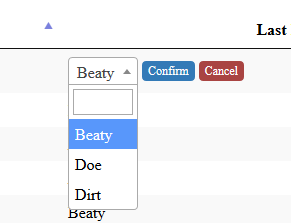
现在,我们可以在下拉列表中查看搜索选项。请看下面的屏幕,
https://stackoverflow.com/questions/55887498
复制相似问题
腾讯云开发者

Copyright © 2013 - 2026 Tencent Cloud. All Rights Reserved. 腾讯云 版权所有
深圳市腾讯计算机系统有限公司 ICP备案/许可证号:粤B2-20090059  粤公网安备44030502008569号
腾讯云计算(北京)有限责任公司 京ICP证150476号 | 京ICP备11018762号