
QT5.8 QTextEdit文本光标颜色不会改变
QT5.8 QTextEdit文本光标颜色不会改变
提问于 2019-04-27 06:06:57
我试图在QTextEdit红色(rgb(255,0,0))上设置文本光标。尽管我尽了最大的努力,它还是继续眨着眼睛。
根据我所发现的,样式表的“颜色”属性应该更改光标的颜色。不知道是怎么回事。
我的守则:
    textEntry = new QTextEdit();
    textEntry->setFont(QFont("Electrolize", 9, 1));
    textEntry->setMinimumHeight(25);
    textEntry->setMaximumHeight(25);
    textEntry->setLineWrapMode(QTextEdit::NoWrap);
    textEntry->setHorizontalScrollBarPolicy(Qt::ScrollBarAlwaysOff);
    textEntry->setStyleSheet("color: rgb(255, 0, 0);"
                             "border: 1px solid rgb(255, 0, 0);");
编辑:我鼓励充分阅读谢夫的答案。太棒了。不过,我注意到用他的解决方案创建的游标没有闪烁,所以我想与我的(缺乏经验的)附加部分共享一个从Scheff的代码中派生出来的闪烁版本。
TextEdit.h
#ifndef TEXTEDIT_H
#define TEXTEDIT_H

#include <QTextEdit>
#include <QTimer>

class TextEdit : public TextEdit
{
    Q_OBJECT
public:
    explicit TextEdit(QWidget *parent = nullptr);

private:
    QTimer *timer;
    QPainter *pPainter;
    bool bCursorVisible;

protected:
    virtual void paintEvent(QPaintEvent *pEvent) override;

signals:
    sendUpdate();

public slots:
    void timerSlot();
};

#endif // TEXTEDIT_H
TextEdit.cpp
#include "textedit.h"

#include <QPainter>
#include <QColor>
#include <QTimer>

TextEdit::TextEdit(QWidget *parent) : QTextEdit(parent) {
    bCursorVisible = true;

    timer = new QTimer(this);
    timer->start(500);
    connect(this, SIGNAL(sendUpdate()), this, SLOT(update()));
    connect(timer, SIGNAL(timeout()), this, SLOT(timerSlot()));
}

void TextEdit::paintEvent(QPaintEvent *event)
{
  // use paintEvent() of base class to do the main work
  QTextEdit::paintEvent(event);
  // draw cursor (if widget has focus)
  if (hasFocus()) {
    if(bCursorVisible) {
        const QRect qRect = cursorRect(textCursor());
        QPainter qPainter(viewport());
        qPainter.fillRect(qRect, QColor(255, 0, 0, 255));
    } else {
        const QRect qRect = cursorRect(textCursor());
        QPainter qPainter(viewport());
        qPainter.fillRect(qRect, QColor(0, 0, 0, 255));
    }
  }
}

void TextEdit::timerSlot() {
    if(bCursorVisible) {
        bCursorVisible = false;
    } else {
        bCursorVisible = true;
    }

    emit sendUpdate();
}回答 1
Stack Overflow用户
发布于 2020-07-14 08:04:02
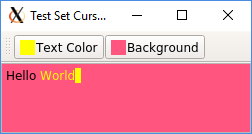
应请求,示例程序的Python3 / PyQt5端口位于我的另一个回答中
#!/usr/bin/python3

import sys
from PyQt5.QtCore import QT_VERSION_STR, QRect
from PyQt5.QtWidgets import QApplication, QMainWindow, QToolBar
from PyQt5.QtGui import QPainter, QIcon, QPixmap, QFontMetrics, QPalette
from PyQt5.QtWidgets import QTextEdit
from PyQt5.QtWidgets import QPushButton, QColorDialog


class TextEdit(QTextEdit):

    def __init__(self, parent=None):
        QTextEdit.__init__(self, parent)

    def paintEvent(self, event):
        # use paintEvent() of base class to do the main work
        QTextEdit.paintEvent(self, event)
        # draw cursor (if widget has focus)
        if self.hasFocus():
            rect = self.cursorRect(self.textCursor())
            painter = QPainter(self.viewport())
            painter.fillRect(rect, self.textColor())


class ColorButton(QPushButton):

    def __init__(self, text, custom_color, parent=None):
        QPushButton.__init__(self, text, parent)
        self.setColor(custom_color)

    def color(self):
        return self.custom_color

    def setColor(self, custom_color):
        self.custom_color = custom_color
        font_metrics = QFontMetrics(self.font())
        h = font_metrics.height()
        pixmap = QPixmap(h, h)
        pixmap.fill(self.custom_color)
        self.setIcon(QIcon(pixmap))

    def chooseColor(self):
        self.setColor(QColorDialog().getColor(self.custom_color))
        return self.custom_color


if __name__ == '__main__':
    print("Qt Version: {}".format(QT_VERSION_STR))
    app = QApplication(sys.argv)
    print(app.style())
    # build GUI
    win = QMainWindow()
    win.resize(250, 100)
    win.setWindowTitle("Test Set Cursor Color")
    text_edit = TextEdit()
    text_edit.setCursorWidth(QFontMetrics(text_edit.font()).averageCharWidth())
    win.setCentralWidget(text_edit)
    tool_bar = QToolBar()
    btn_color = ColorButton(
        "Text Color", text_edit.palette().color(QPalette.Text))
    tool_bar.addWidget(btn_color)
    btn_color_bg = ColorButton(
        "Background", text_edit.palette().color(QPalette.Base))
    tool_bar.addWidget(btn_color_bg)
    win.addToolBar(tool_bar)
    win.show()
    # install signal handlers
    btn_color.clicked.connect(
        lambda state: text_edit.setTextColor(btn_color.chooseColor()))

    def on_click(state):
        palette = text_edit.palette()
        palette.setColor(QPalette.Base, btn_color_bg.chooseColor())
        text_edit.setPalette(palette)

    btn_color_bg.clicked.connect(on_click)
    # runtime loop
    sys.exit(app.exec_())
输出:
Qt Version: 5.9.3
<PyQt5.QtWidgets.QCommonStyle object at 0x6ffffd8dc18>
页面原文内容由Stack Overflow提供。腾讯云小微IT领域专用引擎提供翻译支持
原文链接:
https://stackoverflow.com/questions/55877769
复制相关文章
相似问题
腾讯云开发者

Copyright © 2013 - 2026 Tencent Cloud. All Rights Reserved. 腾讯云 版权所有
深圳市腾讯计算机系统有限公司 ICP备案/许可证号:粤B2-20090059  粤公网安备44030502008569号
腾讯云计算(北京)有限责任公司 京ICP证150476号 | 京ICP备11018762号