
如何从Storyboard创建init VC?
如何从Storyboard创建init VC?
提问于 2019-04-24 12:44:50
我必须从UIStoryboard在AppDelegate中创建init VC。
我使用了.instantiateInitialViewController(),但我总是得到零。
func application(_ application: UIApplication, didFinishLaunchingWithOptions launchOptions: [UIApplication.LaunchOptionsKey: Any]?) -> Bool {
    // Override point for customization after application launch.
    self.window = UIWindow(frame: UIScreen.main.bounds)
    let storyBoard: UIStoryboard = .init(name: "Storyboard", bundle: nil)
    if let vc = storyBoard.instantiateInitialViewController() {
        window?.rootViewController = vc
        window?.makeKeyAndVisible()
    }

    return true
}
我的项目:
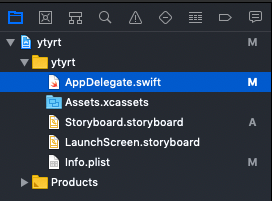
我没有'ViewController‘文件(也没有类)。为什么我总是在风险投资中得到“零”?它是怎么工作的?请解释一下。
回答 3
Stack Overflow用户
回答已采纳
发布于 2019-04-24 12:50:51
storyBoard.instantiateInitialViewController返回零的最可能原因是因为您的故事板没有初始的视图控制器。您可以在故事板中选择一个VC,并检查"Is初始视图控制器“,使其成为初始视图控制器:
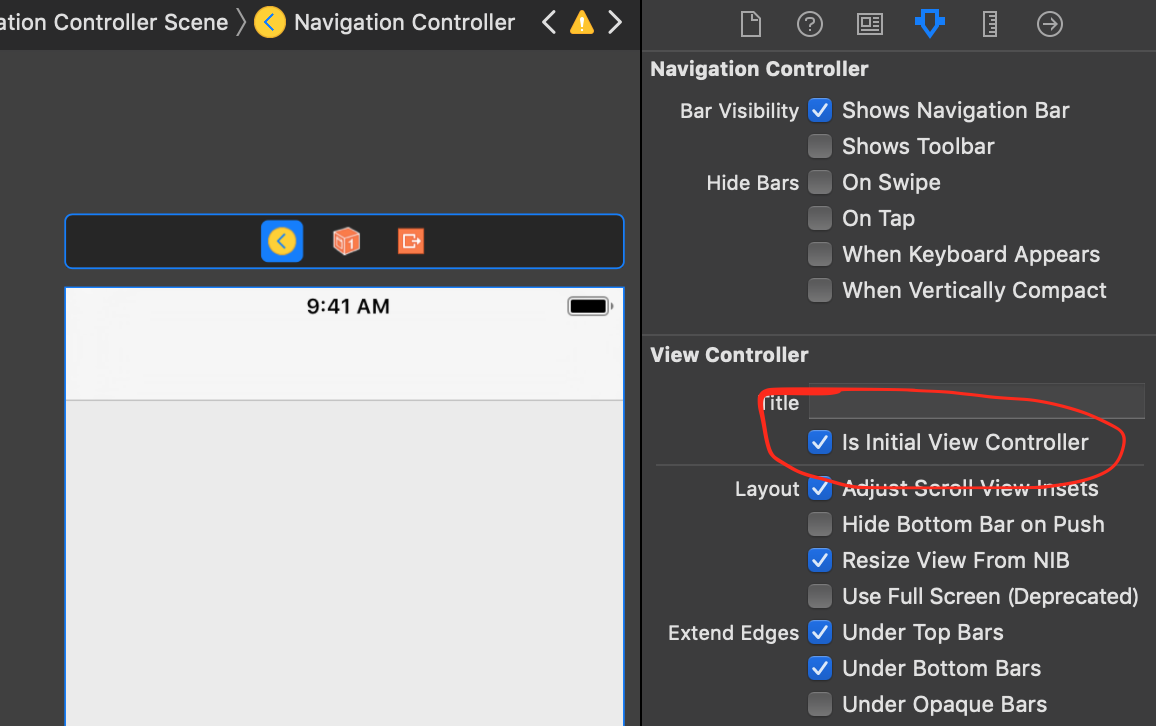
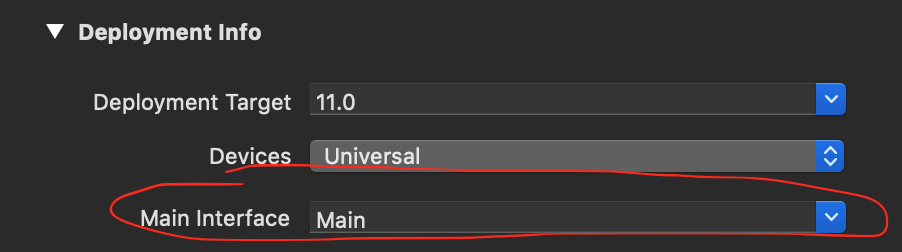
请注意,如果您将故事板设置为项目设置中的“主界面”,则初始VC将自动显示。
要避免这种情况,请将此设置更改为空字符串:
或者,您可以在“身份检查器”中为VC提供标识符:
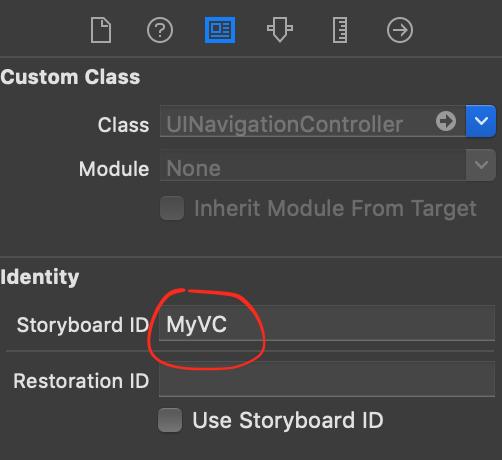
并使用instantiateViewController(withIdentifier)代替
storyBoard.instantiateViewController(withIdentifier: "MyVC")Stack Overflow用户
发布于 2019-04-24 12:52:44
试试这个..。
let navigationController = self.window?.rootViewController as! UINavigationController
    let storyboard = UIStoryboard(name: "Storyboard", bundle: nil)
    let messageVC = storyboard.instantiateViewController(withIdentifier: "YourViewControllerID")
navigationController.pushViewController(messageVC, animated: true)Stack Overflow用户
发布于 2019-04-24 13:49:12
尝尝这个。我总是用这些代码在视图控制器之间导航,
  let vc = storyboard?.instantiateViewController(withIdentifier: "ViewControllerStoryBoardId") as! YourViewControllerClass
        vc.page_idenifier = "Home page"//eg:- Passing data
navigationController?.pushViewController(vc, animated: true)页面原文内容由Stack Overflow提供。腾讯云小微IT领域专用引擎提供翻译支持
原文链接:
https://stackoverflow.com/questions/55830367
复制相关文章
相似问题
腾讯云开发者

Copyright © 2013 - 2026 Tencent Cloud. All Rights Reserved. 腾讯云 版权所有
深圳市腾讯计算机系统有限公司 ICP备案/许可证号:粤B2-20090059  粤公网安备44030502008569号
腾讯云计算(北京)有限责任公司 京ICP证150476号 | 京ICP备11018762号