
单击浏览器的“后退”按钮时清除“无线电和复选框”按钮状态
单击浏览器的“后退”按钮时清除“无线电和复选框”按钮状态
提问于 2019-04-24 07:50:01
在导航到下一页时,我遇到了与复选框按钮状态有关的问题,然后单击边缘(MS)浏览器的后退按钮。
在挖掘有关这个问题的信息时,我偶然发现了这个错误报告。自2015年以来,它没有任何更新。到目前为止,这个问题有什么解决办法吗?
用例如下;
- 用户访问页面
- 勾选是复选框或单选按钮
- 导航到另一个页面(通过地址栏或通过标记单击链接)
- 加载另一个页面后,单击边缘的后退按钮(或Alt +左箭头)
- 复选框或单选按钮的先前状态/值必须保持或保留。
现在,当通过边缘的后退按钮导航回页面时,状态/值将被清除。
回答 1
Stack Overflow用户
发布于 2019-04-25 06:16:21
是的,我在我这边重现问题,如果复选框或单选按钮在边缘浏览器中没有保存状态/值。这是一个已知的问题,我有反馈这个问题的边缘平台。
作为解决办法,我建议您可以尝试使用Web存储 (例如:本地存储或会话存储)来存储状态/值,然后重新加载这些状态/值。
守则如下:
<head>
    <meta charset="utf-8" />
    <title></title>
    <script>
        function myfunction() {
            //check whether the browser support storage
            if (typeof (Storage) !== "undefined") {
                // Code for localStorage/sessionStorage.

                if (sessionStorage.checkboxstatus) {
                    document.getElementById("Checkbox1").checked = true;
                }
                else {
                    document.getElementById("Checkbox1").checked = false;
                }

                if (sessionStorage.radiostatus) {
                    document.getElementById("Radio1").checked = true;
                }
                else {
                    document.getElementById("Radio1").checked = false;
                }

                //checkbox click event: use session storage to store the state
                document.getElementById("Checkbox1").addEventListener("click", function () {
                    if (document.getElementById("Checkbox1").checked) {
                        sessionStorage.checkboxstatus = true;
                    }
                    else {
                        sessionStorage.checkboxstatus = false;
                    }
                });
                //radio button click event: to store the state.
                document.getElementById("Radio1").addEventListener("click", function () {
                    if (document.getElementById("Radio1").checked) {
                        sessionStorage.radiostatus = true;
                    }
                    else {
                        sessionStorage.radiostatus = false;
                    }
                });
            } else {
                // Sorry! No Web Storage support..
                alert("No web storage support");
            }
        };
    </script>
</head>
<body onload="myfunction();">
    <input id="Checkbox1" type="checkbox" />
    <input id="Radio1" type="radio" />
    <a href="/HtmlPage2.html">Link</a>
</body>
结果如下:
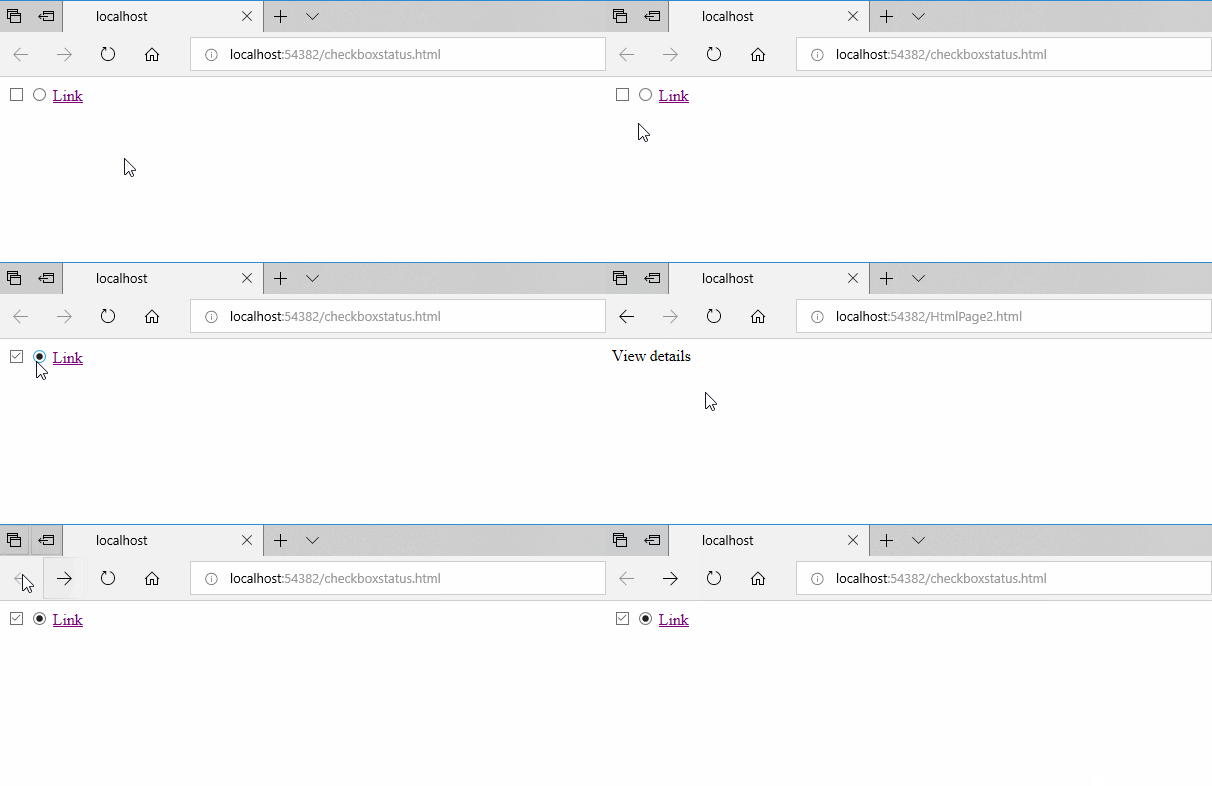
页面原文内容由Stack Overflow提供。腾讯云小微IT领域专用引擎提供翻译支持
原文链接:
https://stackoverflow.com/questions/55824906
复制相关文章
相似问题
腾讯云开发者

Copyright © 2013 - 2026 Tencent Cloud. All Rights Reserved. 腾讯云 版权所有
深圳市腾讯计算机系统有限公司 ICP备案/许可证号:粤B2-20090059  粤公网安备44030502008569号
腾讯云计算(北京)有限责任公司 京ICP证150476号 | 京ICP备11018762号