
如何在颤音中显示自定义吐司对话框?
如何在颤音中显示自定义吐司对话框?
提问于 2019-04-16 07:23:21
我想显示一个定制的toast (我自己的小部件布局)。我知道如何显示自定义的alert dialogue,但这不是我想要的。
因为,Alert dialogue**:**,
- 有黑色背景
- 当显示时防止触碰
- 必须手动解雇
我不想使用flutter吐司库,因为我不能用它来定制布局。
我想在所有其他小部件上显示我自己的布局,并让它在一段时间后消失。而且,当它显示时不应该阻止任何输入。
回答 2
Stack Overflow用户
回答已采纳
发布于 2019-04-16 07:27:18
您可以添加这个图书馆来添加和自定义您自己的祝酒词。
Widget widget = Center(
      child: ClipRRect(
        borderRadius: BorderRadius.circular(30.0),
        child: Container(
          width: 40.0,
          height: 40.0,
           color: Colors.grey.withOpacity(0.3),
          child: Icon(
            Icons.add,
            size: 30.0,
            color: Colors.green,
          ),
        ),
      ),
    );

    ToastFuture toastFuture = showToastWidget(
      widget,
      duration: Duration(seconds: 3),
      onDismiss: () {
        print("the toast dismiss"); // the method will be called on toast dismiss.
      },
);Stack Overflow用户
发布于 2021-05-01 13:20:28
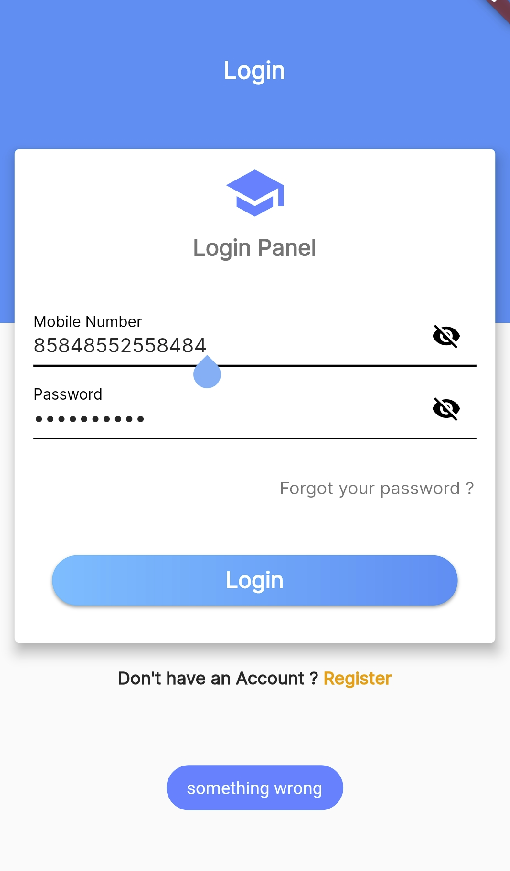
定制烤面包
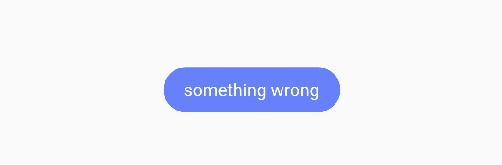
    import 'package:flutter/material.dart';
import 'package:flutter/widgets.dart';

class Toast {
  static void show(
    String msg,
    BuildContext context) {
    Color textColor = Colors.white;
    Color backgroundColor = Colors.blueAccent;
    dismiss();
    Toast._createView(msg, context, backgroundColor, textColor);
  }

  static OverlayEntry _overlayEntry;
  static bool isVisible = false;

  static void _createView(
    String msg,
    BuildContext context,
    Color background,
    Color textColor,
  ) async {
    var overlayState = Overlay.of(context);

    final themeData = Theme.of(context);

    _overlayEntry = new OverlayEntry(
      builder: (BuildContext context) => _ToastAnimatedWidget(
        child: Container(
          width: MediaQuery.of(context).size.width,
          child: Container(
            alignment: Alignment.center,
            width: MediaQuery.of(context).size.width,
            child: Container(
              decoration: BoxDecoration(
                color: background,
                borderRadius: BorderRadius.circular(20),
              ),
              margin: EdgeInsets.symmetric(horizontal: 20),
              padding: EdgeInsets.fromLTRB(16, 10, 16, 10),
              child: Text(
                msg,
                softWrap: true,
                style: themeData.textTheme.body1.copyWith(
                  fontFamily: 'intel',
                  color: Colors.white,
                ),
              ),
            ),
          ),
        ),
      ),
    );
    isVisible = true;
    overlayState.insert(_overlayEntry);
  }

  static dismiss() async {
    if (!isVisible) {
      return;
    }
    isVisible = false;
    _overlayEntry?.remove();
  }
}
class _ToastAnimatedWidget extends StatefulWidget {
  _ToastAnimatedWidget({
    Key key,
    @required this.child,
  }) : super(key: key);

  final Widget child;

  @override
  _ToastWidgetState createState() => _ToastWidgetState();
}

class _ToastWidgetState extends State<_ToastAnimatedWidget>
    with SingleTickerProviderStateMixin {

  bool get _isVisible => true; //update this value later

  @override
  void initState() {
    super.initState();
  }

  @override
  Widget build(BuildContext context) {
    return Positioned(
        bottom: 50,
        child: AnimatedOpacity(
          duration: Duration(seconds: 2),
          opacity: _isVisible ? 1.0 : 0.0,
          child: widget.child,
        )
    );
  }
}
for call
Toast.show(ApiContent.something_wrong, context);
页面原文内容由Stack Overflow提供。腾讯云小微IT领域专用引擎提供翻译支持
原文链接:
https://stackoverflow.com/questions/55702709
复制相关文章
相似问题
腾讯云开发者

Copyright © 2013 - 2026 Tencent Cloud. All Rights Reserved. 腾讯云 版权所有
深圳市腾讯计算机系统有限公司 ICP备案/许可证号:粤B2-20090059  粤公网安备44030502008569号
腾讯云计算(北京)有限责任公司 京ICP证150476号 | 京ICP备11018762号