
Nuxt存储区中的子文件夹正在扰乱模块。
尝试在Nuxt和类型记录中创建一个项目。然而,文档非常糟糕,我遇到了很多问题。以某种方式解决了其中的大部分问题,但与商店的问题层出不穷。基于Nuxt文档,存储目录中的每个文件都转换为一个模块。
为了更好地组织我的项目,我决定在存储文件夹中添加一个子文件夹。然而,在此更改之后,我的组件在调用突变、操作和从存储/模块获取值方面出现了问题。
当我在Vue Tab (Vuex)中检查开发人员控制台时,我可以看到我的状态和getter在模块之前有子文件夹名。
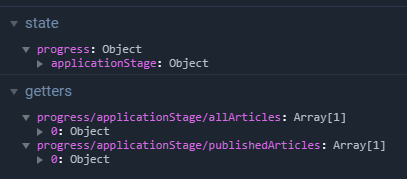
如果我决定将每个新的模块/存储放在存储文件夹中,那么一切都非常正常。
我正在为我的模块使用vuex-module-decorators包,因为在我看来,它提高了代码的可读性并简化了过程。
我得到的错误是:
[vuex] unknown action type: applicationStage/initializeArticles
[vuex] unknown mutation type: applicationStage/addArticle
所以问题是:
- 我做错了什么吗?
- 我是否可以在存储文件夹中有一个子文件夹,以及如何在创建模块时以跳过子文件夹名称的方式注册该模块?
我的存储文件夹结构
-store
--index.ts
--progress
---applicationStage.ts
./存储/进度/应用程序阶段
import {
  Module,
  Action,
  VuexModule,
  Mutation,
  MutationAction
} from "vuex-module-decorators";

interface Article {
  title: string;
  body: string;
  published: boolean;
  meta: {
    [key: string]: string;
  };
}

const articles = [
  {
    title: "Hello World!",
    body: "This is a sample article.",
    published: true,
    meta: {}
  },
  {
    title: "My writing career continues!",
    body: `...but I've run out of things to say.`,
    published: false,
    meta: {}
  }
];

@Module({
  name: "applicationStage",
  stateFactory: true,
  namespaced: true
})
export default class ApplicationStageModule extends VuexModule {
  articles: Article[] = [
    {
      title: "Initial article",
      body:
        "This is the starting point, before we initialize the article store.",
      published: true,
      meta: {}
    }
  ];

  get allArticles() {
    return this.articles;
  }

  get publishedArticles() {
    return this.articles.filter(article => article.published);
  }

  @MutationAction({ mutate: ["articles"] })
  async initializeArticles() {
    return { articles };
  }

  @Mutation
  addArticle() {
    this.articles.push({
      title: "Hello World 2!",
      body: "This is a sample article 2.",
      published: true,
      meta: {}
    });
  }
}
./components/HelloWorld.vue .
<template>
  <div>
    {{ message }}
    <h2>Published articles</h2>
    <article v-for="article in articleList" :key="article.title">
      <h3 v-text="article.title"/>
      <div v-text="article.body"/>
    </article>
  </div>
</template>

<script lang="ts">
import { Component, Vue } from "vue-property-decorator";
import { getModule } from "vuex-module-decorators";
import ApplicationStageModule from "../store/progress/applicationStage";

@Component
export default class HelloWorld extends Vue {
  message: string = "Hello world !";
  articleStore = getModule(ApplicationStageModule, this.$store);
  articleList: any[] = [
    {
      title: "Initial article",
      body:
        "This is the starting point, before we initialize the article store.",
      published: true,
      meta: {}
    }
  ];

  mounted() {
    this.articleStore.initializeArticles();  // ERROR LINE
    this.articleStore.addArticle();   // ERROR LINE
    this.updateArticles();
  }

  public updateArticles() {
    this.articleList = this.articleStore.allArticles;
  }
}
</script>我已经创建了一个沙箱,在这里我的问题可以被复制https://codesandbox.io/s/723xyzl60j。
回答 1
Stack Overflow用户
发布于 2019-04-24 09:24:09
您应该使用const applicationStage = namespace("progress/applicationStage/");而不是getModule(...)。当stateFactory是true时,module是“自动加载的”。您可能也需要在decorator中直接注入商店。嗯,当您使用stateFactory时,namespaced选项是无用的,因为它将是名称空间的,因为stateFactory 是 true。
https://stackoverflow.com/questions/55699712
复制相似问题
腾讯云开发者

Copyright © 2013 - 2026 Tencent Cloud. All Rights Reserved. 腾讯云 版权所有
深圳市腾讯计算机系统有限公司 ICP备案/许可证号:粤B2-20090059  粤公网安备44030502008569号
腾讯云计算(北京)有限责任公司 京ICP证150476号 | 京ICP备11018762号