
TypeError :无法读取属性“参数”
你好,我正在尝试给我的mysql数据库做一个web钩子,直到我尝试添加参数,一切都很完美。
我总是在firebase中看到这个错误。
exports.dialogflowFirebaseFulfillment.functions.https.onRequest (/user_code/index.js:17:47)中未定义的属性“参数”,at /var/tmp/worker/worker.js:783:7 at /var/tmp/worker/worker.js:766:11 at _combinedTickCallback (TypeError/TypeError/next_tick.js)::73:7)在process._tickDomainCallback (内部/process/next_tick.js:128:9)
它指向index.js:17,这里是我的代码:
// See https://github.com/dialogflow/dialogflow-fulfillment-nodejs
// for Dialogflow fulfillment library docs, samples, and to report issues
'use strict';

const functions = require('firebase-functions');
const {WebhookClient} = require('dialogflow-fulfillment');
const {Card, Suggestion} = require('dialogflow-fulfillment');
const mysql = require('mysql');
const express = require('express');

const bodypaser = require('body-parser');


process.env.DEBUG = 'dialogflow:debug'; // enables lib debugging statements

exports.dialogflowFirebaseFulfillment = functions.https.onRequest((request, response) => {
   const parameters = request.body.queryResult.parameters;
   const emailPar = parameters['email'];
   const namePar    = parameters['name'];
  console.log(emailPar);
  console.log(namePar);


  const agent = new WebhookClient({ request, response });
  console.log('Dialogflow Request headers: ' + JSON.stringify(request.headers));
  console.log('Dialogflow Request body: ' + JSON.stringify(request.body));

  function welcome(agent) {
    console.log('Inside function welcome');

   return callbackDB().then((rows) =>{
        console.log('inside callabck in welcome function');
        var reply =rows[0].ID;
        var name = rows[0].display_name;
        agent.add(`Welcome to my agent! My ID is: 0` + reply);
        agent.add(`My name is `+ name);

   }).catch((error) =>{
        console.log('In catch ERROR::: ' +error);
   });

  }
  function Orders(agent){
    return getOrderCallback().then((rows) =>{
        console.log('inside getOrderCallabck in orders function');
        var id =rows[0].order_id;
        var firstname = rows[0].billing_first_name;
        var lastname = rows[0].billing_last_name;
        var email = rows[0].billing_email;
        var ordereditems =rows[0].order_items;
        var dateorder =rows[0].post_date;
        var billing_address = rows[0].billing_address_1 + ' Postcode: '+ rows[0].billing_postcode + ' City : ' + rows[0].billing_city + ' Country: ' + rows[0].billing_state;
        agent.add('Hello there! The current orders made by you are the following: ');
        agent.add(`--Current Orders ---------------------------`);
        agent.add(`Order ID:  `+ id);
        agent.add('For : ' + firstname + ' ' + lastname);
        agent.add(`Contact: ` + email);
        agent.add(`Shipping Address: ` + billing_address);
        agent.add(`Order placed on :` + dateorder);
        agent.add(`Ordered Items : ` + ordereditems);

   }).catch((error) =>{
        console.log('In catch ERROR::: ' +error);
   });
  }
  function fallback(agent) {
    console.log('Inside function fallback');
    agent.add(`I didn't understand`);
    agent.add(`I'm sorry, can you try again?`);
  }


  let intentMap = new Map();
  intentMap.set('Default Welcome Intent', welcome);
  intentMap.set('Default Fallback Intent', fallback);
  intentMap.set('GetOrdersByEmailAndName', Orders);
  // intentMap.set('your intent name here', yourFunctionHandler);
  // intentMap.set('your intent name here', googleAssistantHandler);
  agent.handleRequest(intentMap);

  function getOrderCallback(){
    return new Promise((resolve,reject) =>{
        console.log('Inside getOrderCallback');
      try {
        var mysqlConnection = mysql.createConnection({
            host:'xxxx',
            user:'xxxxxxxxxxxxxxx',
            password:'xxxxxxxxx',
            database:'xxxxxxxxxxxxx',});

        mysqlConnection.connect((err)=>{
            if(!err){
                console.log('DB connection succeeded.');
                console.log('passed parameters : '+ emailPar + ' ' + namePar);
                mysqlConnection.query(`select
                                            p.ID as order_id,
                                            p.post_date,
                                            max( CASE WHEN pm.meta_key = '_billing_email' and p.ID = pm.post_id THEN pm.meta_value END ) as billing_email,
                                            max( CASE WHEN pm.meta_key = '_billing_first_name' and p.ID = pm.post_id THEN pm.meta_value END ) as billing_first_name,
                                            max( CASE WHEN pm.meta_key = '_billing_last_name' and p.ID = pm.post_id THEN pm.meta_value END ) as billing_last_name,
                                            max( CASE WHEN pm.meta_key = '_billing_address_1' and p.ID = pm.post_id THEN pm.meta_value END ) as billing_address_1,
                                            max( CASE WHEN pm.meta_key = '_billing_address_2' and p.ID = pm.post_id THEN pm.meta_value END ) as billing_address_2,
                                            max( CASE WHEN pm.meta_key = '_billing_city' and p.ID = pm.post_id THEN pm.meta_value END ) as billing_city,
                                            max( CASE WHEN pm.meta_key = '_billing_state' and p.ID = pm.post_id THEN pm.meta_value END ) as billing_state,
                                            max( CASE WHEN pm.meta_key = '_billing_postcode' and p.ID = pm.post_id THEN pm.meta_value END ) as billing_postcode,
                                            max( CASE WHEN pm.meta_key = '_order_total' and p.ID = pm.post_id THEN pm.meta_value END ) as order_total,
                                            max( CASE WHEN pm.meta_key = '_order_tax' and p.ID = pm.post_id THEN pm.meta_value END ) as order_tax,
                                            max( CASE WHEN pm.meta_key = '_paid_date' and p.ID = pm.post_id THEN pm.meta_value END ) as paid_date,
                                            ( select group_concat( order_item_name separator '|' ) from wp_woocommerce_order_items where order_id = p.ID ) as order_items
                                        from
                                            wp_posts p
                                            join wp_postmeta pm on p.ID = pm.post_id
                                            join wp_woocommerce_order_items oi on p.ID = oi.order_id
                                        group by
                                            p.ID
                                        HAVING billing_email = ? AND billing_first_name = ?`,[emailPar,namePar],
                 (error,rows,fields)=>{
                    if(!error){
                        console.log(rows);

                        resolve(rows);
                        }
                    else{
                        console.log(error);
                        reject(rows);
                        }
                    });

            }
        else{
            console.log('DB connection failed.');
        }
  });


      }
      catch (err){
        let results = 'error in try-catch';
        console.log(results);
        reject(results);
      }


    });
}


function callbackDB(){
    return new Promise((resolve,reject) =>{
      console.log('Inside callbackDB');

      try {
        var mysqlConnection = mysql.createConnection({
            host:'xxxx',
            user:'xxxxxxxxxxxxxxx',
            password:'xxxxxxxxx',
            database:'xxxxxxxxxxxxx',});
        mysqlConnection.connect((err)=>{
            if(!err){
                console.log('DB connection succeeded.');
                mysqlConnection.query('SELECT * FROM wp_users',(error,rows,fields)=>{
                    if(!error){
                        console.log(rows);
                        resolve(rows);
                        }
                    else{
                        console.log(error);
                        reject(rows);
                        }
                    });

            }
        else{
            console.log('DB connection failed.');
        }
  });


      }
      catch (err){
        let results = 'error in try-catch';
        console.log(results);
        reject(results);
      }

    });

}
});
这意味着它与第17行有关,即:
const参数= request.body.queryResult.parameters;
但我不明白我做错了什么
如能提供帮助或建议,将不胜感激。
回答 1
Stack Overflow用户
发布于 2019-04-15 15:24:06
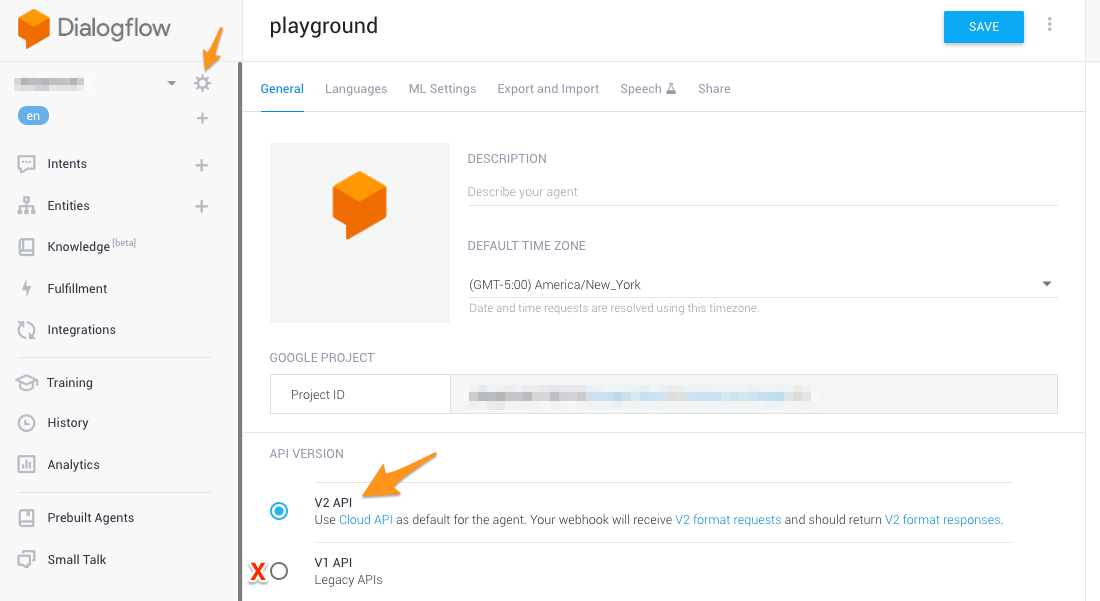
从您的评论中可以看出,您使用的是对话框流v1,它的参数位于request.body.result.parameters。对于对话框流v2,它已经更改为request.body.queryResult.parameters。
如果您仍然在使用对话框流v1,您应该立即进行更改,因为它将不再被支持。为此,请进入https://console.dialogflow.com/中的设置,并确保设置了v2 API。
https://stackoverflow.com/questions/55690995
复制相似问题
腾讯云开发者

Copyright © 2013 - 2026 Tencent Cloud. All Rights Reserved. 腾讯云 版权所有
深圳市腾讯计算机系统有限公司 ICP备案/许可证号:粤B2-20090059  粤公网安备44030502008569号
腾讯云计算(北京)有限责任公司 京ICP证150476号 | 京ICP备11018762号