
试图用Python-3.7刮取html的一个特定部分,但它返回"None“
我是个初学者,编写一些简单的Python代码来从网页中抓取数据。我已经找到了我想要抓取的html的确切部分,但是它一直返回“None”。它适用于网页的其他部分,但不适用于这一特定部分。
我使用BeautifulSoup来解析html,而且由于我可以抓取一些代码,所以我假设我不需要使用Selenium。但我还是找不到如何刮掉一个特定的部分。
下面是我编写的Python代码:
import requests

from bs4 import BeautifulSoup


url = 'https://www.rent.com/new-york/tuckahoe-apartments?page=2'

response = requests.get(url)

html_soup = BeautifulSoup(response.text, 'html.parser')

apt_listings = html_soup.find_all('div', class_='_3RRl_')
print(type(apt_listings))
print(len(apt_listings))

first_apt = apt_listings[0]

first_apt.a

first_add = first_apt.a.text

print(first_add)


apt_rents = html_soup.find_all('div', class_='_3e12V')
print(type(apt_rents))
print(len(apt_rents))

first_rent = apt_rents[0]

print(first_rent)

first_rent = first_rent.find('class', attrs={'data-tid' : 'price'})

print(first_rent)
以下是CMD的输出:
<class 'bs4.element.ResultSet'>
30
address not disclosed
<class 'bs4.element.ResultSet'>
30
<div class="_3e12V" data-tid="price">$2,350</div>
None“地址未披露”是正确的,并被成功刮去。,我想刮2,350美元,但它一直在返回“零”,,我想我已经快把它做好了,但我似乎没能拿到2350美元。任何帮助都是非常感谢的。
回答 2
Stack Overflow用户
发布于 2019-04-11 15:52:16
您需要使用属性.text of BeautifulSoup而不是.find(),如下所示:
first_rent = first_rent.text就这么简单。
Stack Overflow用户
发布于 2019-04-11 16:05:51
您可以从一个脚本标记中提取所有的列表,并将其解析为json。regex查找启动window.__APPLICATION_CONTEXT__ =的脚本标记。
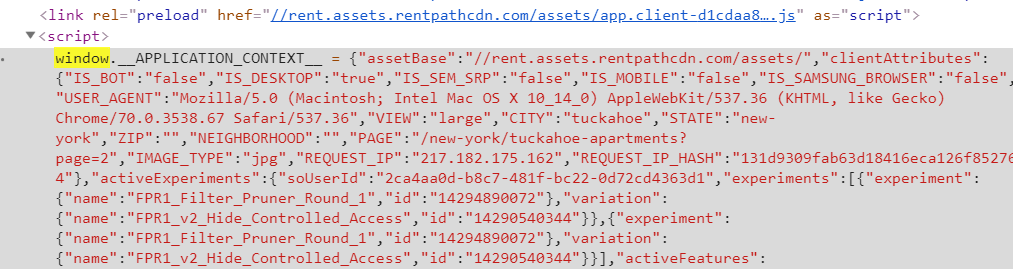
之后的字符串是通过regex (.*)中的组提取的。如果字符串使用json.loads加载,则可以将该javascript对象解析为json。
您可以探索json对象这里。
import requests
import json
from bs4 import BeautifulSoup as bs
import re
base_url = 'https://www.rent.com/'
res = requests.get('https://www.rent.com/new-york/tuckahoe-apartments?page=2')
soup = bs(res.content, 'lxml')
r = re.compile(r'window.__APPLICATION_CONTEXT__ = (.*)')
data = soup.find('script', text=r).text
script = r.findall(data)[0]
items = json.loads(script)['store']['listings']['listings']
results = []

for item in items:
    address = item['address']
    area = ', '.join([item['city'], item['state'], item['zipCode']])
    low_price = item['aggregates']['prices']['low']
    high_price = item['aggregates']['prices']['high']
    listingId = item['listingId']
    url = base_url + item['listingSeoPath']
    # all_info = item
    record = {'address' : address,
              'area' : area,
              'low_price' : low_price,
              'high_price' : high_price,
              'listingId' : listingId,
              'url' : url}
    results.append(record)
df = pd.DataFrame(results, columns = [ 'address', 'area', 'low_price', 'high_price', 'listingId', 'url'])
print(df)
结果样本:

带课堂的简短版本:
import requests
from bs4 import BeautifulSoup
url = 'https://www.rent.com/new-york/tuckahoe-apartments?page=2'
response = requests.get(url)

soup = BeautifulSoup(response.text, 'html.parser')
print(soup.select_one('._3e12V').text)
所有价格:
import requests
from bs4 import BeautifulSoup
url = 'https://www.rent.com/new-york/tuckahoe-apartments?page=2'
response = requests.get(url)

html_soup = BeautifulSoup(response.text, 'html.parser')
print([item.text for item in html_soup.select('._3e12V')])https://stackoverflow.com/questions/55636380
复制相似问题
腾讯云开发者

Copyright © 2013 - 2026 Tencent Cloud. All Rights Reserved. 腾讯云 版权所有
深圳市腾讯计算机系统有限公司 ICP备案/许可证号:粤B2-20090059  粤公网安备44030502008569号
腾讯云计算(北京)有限责任公司 京ICP证150476号 | 京ICP备11018762号