
JSplitPane忽略对齐
JSplitPane忽略对齐
提问于 2019-04-11 15:09:21
你好,StackExchange社区
我正试图把这个JSplitPane放到我的框架里,它是坐在我的框架的右边,而不是填充它,或者至少是坐在左边。如果有人能帮我解决这个问题,我会非常感激的。
下面是我的问题和代码的图片
问题区域是带有"tab1“和"tab2”的窗格,分隔符和该分隔符右侧的窗格:
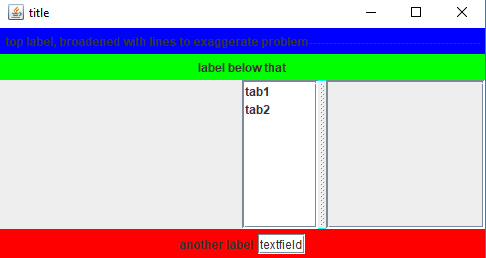
我已经尝试在setAlignmentX(Component.LEFT_ALIGNMENT)的各个部分设置JSplitPane。我还试着做了一个JPanel来保持它和对齐它。一切都没有结果。
此外,我找到的现有信息与此无关,大多数人都在讨论如何调整JSplitPane的内容。
下面的代码是使这个框架所需的全部,如果你们中的任何一个需要它来帮助我自由的话。
package test;

import java.awt.Color;
import java.awt.Component;
import java.util.ArrayList;

import javax.swing.BoxLayout;
import javax.swing.JFrame;
import javax.swing.JLabel;
import javax.swing.JList;
import javax.swing.JPanel;
import javax.swing.JScrollPane;
import javax.swing.JSplitPane;
import javax.swing.JTextField;
import javax.swing.ListSelectionModel;

public class FrameMaker {

    public int x = 0;
    private ArrayList<String> mpLabels;
    private JFrame theFrame;

    public void MakeFrame() {
    theFrame = new JFrame("title");
    theFrame.getContentPane().setLayout(new BoxLayout(theFrame.getContentPane(), BoxLayout.Y_AXIS));

    mpLabels = new ArrayList<String>();


    //label1
    JPanel bgSwitches = new JPanel();
    JLabel calcsLabel = new JLabel("top label, broadened with lines to exaggerate problem-------------------------------------------");
    bgSwitches.add(calcsLabel);


    //label2
    JPanel topLevel = new JPanel();
    JLabel textinfo = new JLabel("label below that");
    topLevel.add(textinfo);


    //splitpane tabs
    mpLabels.add("tab1");
    mpLabels.add("tab2");

    String[] mpLabelsAr = new String[mpLabels.size()];
    JList<String> posL = new JList<String>(mpLabels.toArray(mpLabels.toArray(mpLabelsAr)));
    posL.setSelectionMode(ListSelectionModel.SINGLE_SELECTION);

    //panel inside the right splitpane pane, this is needed for something later.
    JPanel RPanel = new JPanel();
    RPanel.setLayout(new BoxLayout(RPanel, BoxLayout.Y_AXIS));

    JScrollPane scrollPos = new JScrollPane(posL);
    JScrollPane scrollROI = new JScrollPane(RPanel);

    JSplitPane posPanel = new JSplitPane(JSplitPane.HORIZONTAL_SPLIT,scrollPos,scrollROI);
    posPanel.setOneTouchExpandable(false);
    posPanel.setDividerLocation(75);


    //label and textfield
    JLabel msLabel = new JLabel("another label");
    JTextField msField = new JTextField("textfield");
    JPanel buttonPanel = new JPanel();
    buttonPanel.add(msLabel);
    buttonPanel.add(msField);

    bgSwitches.setBackground(new Color(0,0,255));
    theFrame.add(bgSwitches);

    topLevel.setBackground(new Color(0,255,0));
    theFrame.add(topLevel);

    posPanel.setAlignmentX(Component.LEFT_ALIGNMENT);
    posPanel.setBackground(new Color(0,255,255));
    theFrame.add(posPanel);

    buttonPanel.setBackground(new Color(255,0,0));
    theFrame.add(buttonPanel);

    theFrame.pack();
    theFrame.setVisible(true);
    }
}回答 1
Stack Overflow用户
回答已采纳
发布于 2019-04-11 16:51:37
您还需要将所有其他元素与左侧对齐。
bgSwitches.setAlignmentX(Component.LEFT_ALIGNMENT);
topLevel.setAlignmentX(Component.LEFT_ALIGNMENT);
buttonPanel.setAlignmentX(Component.LEFT_ALIGNMENT);您还可以添加posPanel.setResizeWeight(VALUE BETWEEN 0 AND 1);来指定JSplitPane应该占用的空间的百分比,它将随着窗口的大小而调整大小。
页面原文内容由Stack Overflow提供。腾讯云小微IT领域专用引擎提供翻译支持
原文链接:
https://stackoverflow.com/questions/55635801
复制相关文章
相似问题
腾讯云开发者

Copyright © 2013 - 2026 Tencent Cloud. All Rights Reserved. 腾讯云 版权所有
深圳市腾讯计算机系统有限公司 ICP备案/许可证号:粤B2-20090059  粤公网安备44030502008569号
腾讯云计算(北京)有限责任公司 京ICP证150476号 | 京ICP备11018762号