
Heroku网站:启动脚本失败
我来接这个
在sequelize@1.0.0启动脚本时失败。
当部署一个快递+反应应用程序。我认为heroku和concurrently有问题。
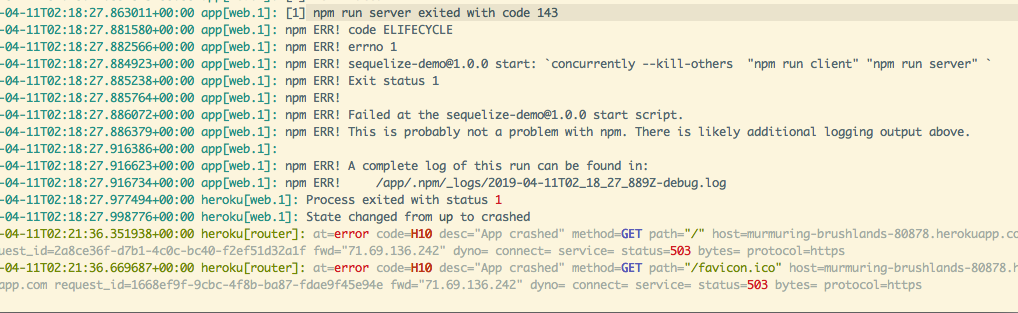
我做错什么了?我引用了this,但是这个解决方案与这个应用程序有点无关。
也引用了这个
根文件夹package.json
{
  "name": "sequelize-demo",
  "version": "1.0.0",
  "description": "",
  "main": "index.js",
  "scripts": {
    "client-install": "npm install --prefix client",
    "build": "concurrently \"cd client && npm run build\" \"npm build \"",
    "test": "echo \"Error: no test specified\" && exit 1",
    "client": "cd ./client && npm start ",
    "server-prod": "node app.js",
    "server": "nodemon app.js",
    "start": "concurrently --kill-others  \"npm run client\" \"npm run server\" ",
    "heroku-postbuild": "NPM_CONFIG_PRODUCTION=false npm install --prefix client && npm run build --prefix client"
  },
  "author": "",
  "license": "ISC",
  "dependencies": {
    "async": "^2.6.1",
    "bcrypt": "^3.0.2",
    "body-parser": "^1.18.3",
    "concurrently": "^4.1.0",
    "cookie-parser": "^1.4.3",
    "cookie-session": "^2.0.0-beta.3",
    "cors": "^2.8.5",
    "crypto": "^1.0.1",
    "dotenv": "^7.0.0",
    "express": "^4.16.4",
    "express-flash": "0.0.2",
    "express-session": "^1.15.6",
    "foreman": "^3.0.1",
    "jsonwebtoken": "^8.4.0",
    "morgan": "^1.9.1",
    "nodemailer": "^5.1.1",
    "nodemon": "^1.18.9",
    "passport": "^0.4.0",
    "passport-github": "^1.1.0",
    "passport-github2": "^0.1.11",
    "passport-jwt": "^4.0.0",
    "passport-local": "^1.0.0",
    "pg": "7.9.0",
    "pg-hstore": "^2.3.2",
    "sequelize": "^4.42.0",
    "sequelize-cli": "^5.4.0"
  },
  "devDependencies": {
    "chai": "^4.2.0",
    "mocha": "^6.1.2"
  }
}
client/package.json
{
  "name": "client",
  "version": "0.1.0",
  "private": true,
  "proxy": "http://localhost:8000",
  "dependencies": {
    "@material-ui/core": "^3.9.1",
    "@material-ui/icons": "^3.0.2",
    "axios": "^0.18.0",
    "history": "^4.7.2",
    "http-proxy-middleware": "^0.19.1",
    "jsonwebtoken": "^8.4.0",
    "jwt-decode": "^2.2.0",
    "material-ui-icons": "^1.0.0-beta.36",
    "moment": "^2.24.0",
    "react": "^16.7.0",
    "react-dom": "^16.7.0",
    "react-redux": "^6.0.0",
    "react-router-dom": "^4.3.1",
    "react-scripts": "2.1.3",
    "redux": "^4.0.1",
    "redux-thunk": "^2.3.0",
    "superagent": "^4.1.0"
  },
  "scripts": {
    "start": "react-scripts start",
    "build": "react-scripts build",
    "test": "react-scripts test",
    "eject": "react-scripts eject",
    "heroku-postbuild": "npm run build"
  },

  "eslintConfig": {
    "extends": "react-app"
  },
  "browserslist": [
    ">0.2%",
    "not dead",
    "not ie <= 11",
    "not op_mini all"
  ],
  "devDependencies": {
    "dotenv": "^6.2.0"
  }
}
Profile
web: npm run start日志
已创建了用户db和user表。 状态从开始到上升 端口32000上已经有东西在运行。 npm运行客户端退出代码0 将SIGTERM发送到其他进程。 npm运行服务器同时退出代码SIGTERM
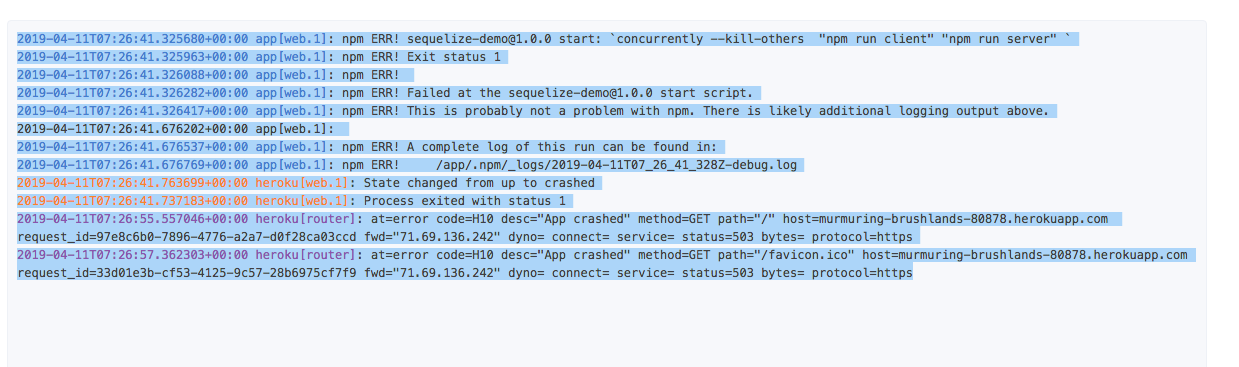
npm ERR! sequelize-demo@1.0.0 start:--杀死-其他"npm运行客户端“"npm运行服务器” npm错误!退出状态1 2019-04-11T07:26:41.326088+00:00附录1: 国家预防机制错误2019年-04-11T07:26:41.326282+00:00附录1: npm错误!在sequelize@1.0.0启动脚本时失败。
回答 1
Stack Overflow用户
发布于 2019-04-11 14:55:15
修正了,我没有反应。
这就是我从
现在,在将项目推送到Heroku存储库之前,我们需要确保项目中有一个构建文件夹。将下面的脚本添加到您的package.json文件中--博客的作者
因此,我在客户端目录上进行了npm运行构建。
然后将我的package.json更改为
{
  "name": "sequelize-demo",
  "version": "1.0.0",
  "description": "",
  "main": "index.js",
  "scripts": {
    "client-install": "npm install --prefix client",
    "build": "concurrently \"cd client && npm run build\" \"npm build \"",
    "test": "echo \"Error: no test specified\" && exit 1",
    "client": "cd ./client && npm start ",
    "server-prod": "node app.js",
    "server": "nodemon app.js",
    "start": "node app.js",
    "start:dev": "concurrently --kill-others  \"npm run client\" \"npm run server\" ",
    "heroku-postbuild":"NPM_CONFIG_PRODUCTION=false npm install --prefix client && npm run build --prefix client"
  },
  "author": "",
  "license": "ISC",
  "dependencies": {
    "async": "^2.6.1",
    "bcrypt": "^3.0.2",
    "body-parser": "^1.18.3",
    "concurrently": "^4.1.0",
    "cookie-parser": "^1.4.3",
    "cookie-session": "^2.0.0-beta.3",
    "cors": "^2.8.5",
    "crypto": "^1.0.1",
    "dotenv": "^7.0.0",
    "express": "^4.16.4",
    "express-flash": "0.0.2",
    "express-session": "^1.15.6",
    "foreman": "^3.0.1",
    "jsonwebtoken": "^8.4.0",
    "morgan": "^1.9.1",
    "nodemailer": "^5.1.1",
    "nodemon": "^1.18.9",
    "passport": "^0.4.0",
    "passport-github": "^1.1.0",
    "passport-github2": "^0.1.11",
    "passport-jwt": "^4.0.0",
    "passport-local": "^1.0.0",
    "pg": "7.9.0",
    "pg-hstore": "^2.3.2",
    "sequelize": "^4.42.0",
    "sequelize-cli": "^5.4.0"
  },
  "devDependencies": {
    "chai": "^4.2.0",
    "mocha": "^6.1.2"
  }
}将此添加到app.js中
app.use(express.static(path.join(__dirname, 'client/build')));

if(process.env.NODE_ENV === 'production') {
  app.use(express.static(path.join(__dirname, 'client/build')));
  //
  app.get('*', (req, res) => {
    res.sendfile(path.join(__dirname = 'client/build/index.html'));
  })
}
//build mode
app.get('*', (req, res) => {
  res.sendFile(path.join(__dirname+'/client/public/index.html'));
})
Profile
web: npm starthttps://stackoverflow.com/questions/55634179
复制相似问题
腾讯云开发者

Copyright © 2013 - 2026 Tencent Cloud. All Rights Reserved. 腾讯云 版权所有
深圳市腾讯计算机系统有限公司 ICP备案/许可证号:粤B2-20090059  粤公网安备44030502008569号
腾讯云计算(北京)有限责任公司 京ICP证150476号 | 京ICP备11018762号