
RESTEasy多文件上传
RESTEasy多文件上传
提问于 2019-04-11 13:16:16
我试图用RestEasy和Jboss制作一个多文件上传器,但是我只能上传一个文件。我在网上发现了好几个小时,但没有找到例子.
    @POST
    @Path("/upload")
    @Consumes("multipart/form-data")
    public Response uploadFile(@MultipartForm FileUploadForm form) {

        String fileName = form.getFileName() == null ? "Unknown" : form.getFileName() ;

        String completeFilePath = "c:/temp/" + fileName;
        try
        {
            //Save the file
            File file = new File(completeFilePath);

            if (!file.exists())
            {
                file.createNewFile();
            }

            FileOutputStream fos = new FileOutputStream(file);

            fos.write(form.getFileData());
            fos.flush();
            fos.close();
        }
        catch (IOException e)
        {
            e.printStackTrace();
        }
        //Build a response to return
        return Response.status(200)
            .entity("uploadFile is called, Uploaded file name : " + fileName).build();
    }
也尝试使用请求(Servlet),但是说:
org.jboss.resteasy.spi.UnhandledException: java.lang.IllegalStateException: UT010057: multipart在Servlet中不存在
非常感谢
回答 2
Stack Overflow用户
发布于 2020-09-20 17:13:41
您可以在下面的示例代码中找到使用resteasy和quarkus框架上传多个文件的代码。
import java.io.File;
import java.io.InputStream;
import java.nio.file.Files;
import java.nio.file.Paths;
import java.nio.file.StandardOpenOption;
import java.util.ArrayList;
import java.util.List;
import java.util.Map;

import javax.ws.rs.Consumes;
import javax.ws.rs.POST;
import javax.ws.rs.Path;
import javax.ws.rs.Produces;
import javax.ws.rs.core.MediaType;
import javax.ws.rs.core.MultivaluedMap;
import javax.ws.rs.core.Response;

import org.apache.commons.io.IOUtils;
import org.jboss.resteasy.annotations.providers.multipart.MultipartForm;
import org.jboss.resteasy.plugins.providers.multipart.InputPart;
import org.jboss.resteasy.plugins.providers.multipart.MultipartFormDataInput;

@Path("/multiupload")
public class MultiFileUploadController {

    private static String UPLOAD_DIR = "E:/sure-delete";

    @POST
    @Path("/files")
    @Consumes(MediaType.MULTIPART_FORM_DATA)
    @Produces(MediaType.TEXT_PLAIN)
    public Response handleFileUploadForm(@MultipartForm MultipartFormDataInput input) {

        Map<String, List<InputPart>> uploadForm = input.getFormDataMap();
        List<String> fileNames = new ArrayList<>();

        List<InputPart> inputParts = uploadForm.get("file");
        System.out.println("inputParts size: " + inputParts.size());
        String fileName = null;
        for (InputPart inputPart : inputParts) {
            try {

                MultivaluedMap<String, String> header = inputPart.getHeaders();
                fileName = getFileName(header);
                fileNames.add(fileName);
                System.out.println("File Name: " + fileName);
                InputStream inputStream = inputPart.getBody(InputStream.class, null);
                byte[] bytes = IOUtils.toByteArray(inputStream);
//
                File customDir = new File(UPLOAD_DIR);
                fileName = customDir.getAbsolutePath() + File.separator + fileName;
                Files.write(Paths.get(fileName), bytes, StandardOpenOption.CREATE_NEW);
            } catch (Exception e) {
                e.printStackTrace();
            }
        }
        String uploadedFileNames = String.join(", ", fileNames);
        return Response.ok().entity("All files " + uploadedFileNames + " successfully.").build();
    }

    private String getFileName(MultivaluedMap<String, String> header) {
        String[] contentDisposition = header.getFirst("Content-Disposition").split(";");
        for (String filename : contentDisposition) {
            if ((filename.trim().startsWith("filename"))) {
                String[] name = filename.split("=");
                String finalFileName = name[1].trim().replaceAll("\"", "");
                return finalFileName;
            }
        }
        return "unknown";
    }
}
检查下面的图片有关如何上传多个文件从邮递员客户端进行测试。
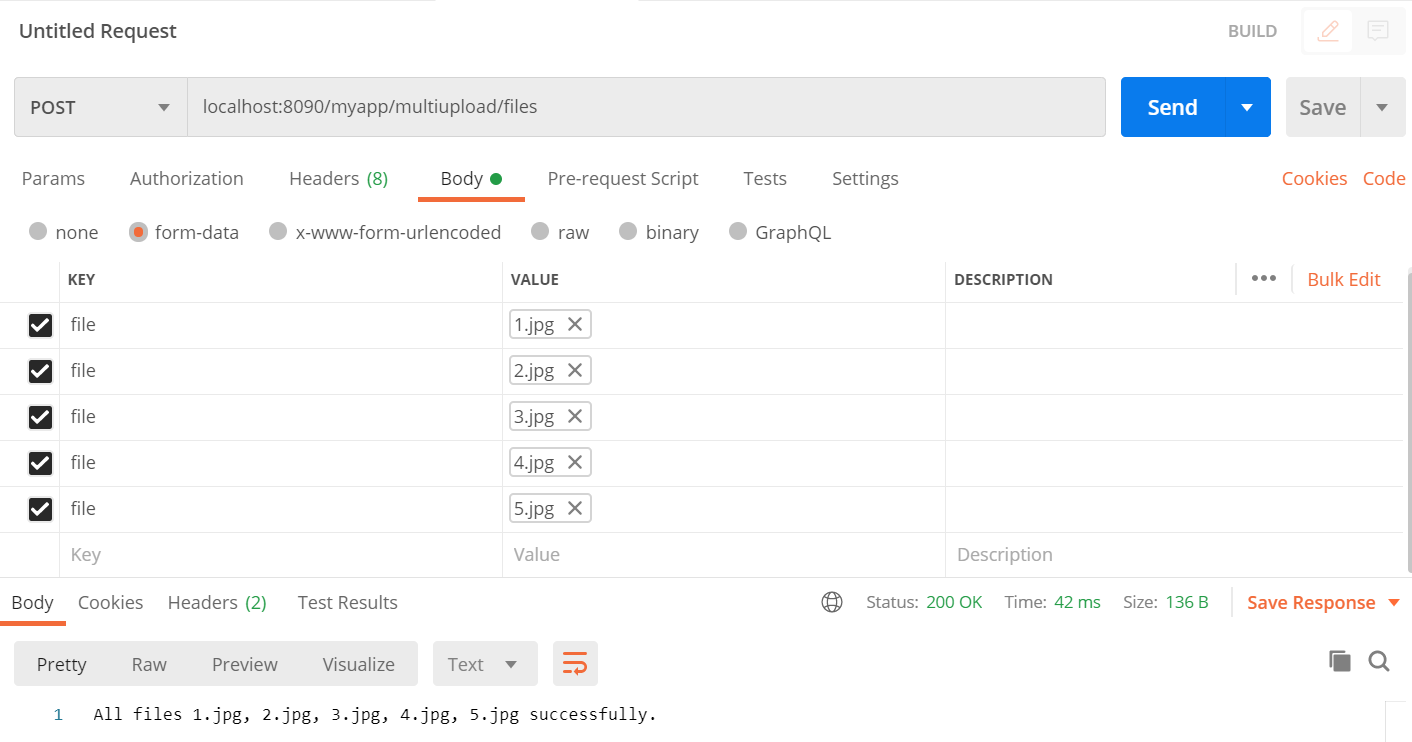
我希望这会有所帮助。
Stack Overflow用户
发布于 2019-11-29 07:23:52
@POST
@Path("/audio/file")
@Consumes(MediaType.MULTIPART_FORM_DATA)
public Response extractAudioWithFile(MultipartFormDataInput file) {
    for (InputPart inputPart : file.getFormDataMap().get("file")) {
        MultivaluedMap<String, String> headers = inputPart.getHeaders();

    }
    return Response.ok(file).build();
}页面原文内容由Stack Overflow提供。腾讯云小微IT领域专用引擎提供翻译支持
原文链接:
https://stackoverflow.com/questions/55633419
复制相关文章
相似问题
腾讯云开发者

Copyright © 2013 - 2026 Tencent Cloud. All Rights Reserved. 腾讯云 版权所有
深圳市腾讯计算机系统有限公司 ICP备案/许可证号:粤B2-20090059  粤公网安备44030502008569号
腾讯云计算(北京)有限责任公司 京ICP证150476号 | 京ICP备11018762号