
如何使用PDFBox 2和Boxable创建内部表?
如何使用PDFBox 2和Boxable创建内部表?
提问于 2019-04-10 08:43:41
我正在使用PDFBox v2和boxable,我需要生成一个包含2行的单元格。
我试着像维基解释的那样制作,但是在我的应用程序中,单元格内容实际上是打印出来的。
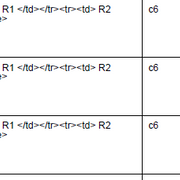
生成内部表的代码是:
activeRow.createCell(100f, "<table><tr><td> R1 </td></tr><tr><td> R2 </td></tr></table>");出什么问题了?
谢谢!
回答 2
Stack Overflow用户
回答已采纳
发布于 2019-04-16 08:20:39
我回答我自己的问题。
问题是调用createCell()。创建内部表的正确方法是createTableCell()。
Stack Overflow用户
发布于 2021-11-24 15:53:24
     float margin = 80;
    // starting y position is whole page height subtracted by top and bottom margin
    float yStartNewPage = page.getMediaBox().getHeight() - (2 * margin);
    // we want table across whole page width (subtracted by left and right margin ofcourse)
    float tableWidth = page.getMediaBox().getWidth() - (2 * margin);

    boolean drawContent = true;
    float yStart = yStartNewPage;
    float bottomMargin = 70;
    float yPosition = 550;
   cell = row.createTableCell((100), "", document, page, yPosition , bottomMargin, margin);
在表中创建简单的表单元格
页面原文内容由Stack Overflow提供。腾讯云小微IT领域专用引擎提供翻译支持
原文链接:
https://stackoverflow.com/questions/55608286
复制相关文章
相似问题
腾讯云开发者

Copyright © 2013 - 2026 Tencent Cloud. All Rights Reserved. 腾讯云 版权所有
深圳市腾讯计算机系统有限公司 ICP备案/许可证号:粤B2-20090059  粤公网安备44030502008569号
腾讯云计算(北京)有限责任公司 京ICP证150476号 | 京ICP备11018762号