
给定一个字符串,我想提取一些文本
给定一个字符串列表,我希望将字符串划分为不同的列。字符串并不总是以相同的格式出现,所以我不能每次使用相同的方法。我试图将LC-XXXXXX列在B栏中,然后删除"s“,并将文本放在"s”之后,并放在"^“或”“之间。(无论字符串包含什么)到C列中
对于保存为数组的每个字符串,我运行一个"for循环“,如下所示:
我已经使用分裂,修剪和中命令,但没有成功。
With Sheets("TELECOM")
.Range("A14", "I305").ClearContents
For Each objFile In objFolder.Files
On Error Resume Next
    If InStr(objFile.Name, "LC-9") > 0 And InStr(objFile.Type, "DWG File") > 0 Then
        drwn = objFile.Name
        .Cells(r, 2) = Left(drwn, InStr(1, drwn, "s") - 1) 'Get the drawing number and placing it here
        values = Array(drwn)
        Set re = CreateObject("vbscript.regexp")
        pattern = "(s\d+)"
    For i = LBound(values) To UBound(values)
        .Cells(r, 3) = Replace$(drwn, "s", vbNullString)
    Next
    r = r + 1
    End With

    Public Function GetId(ByVal re As Object, ByVal s As String, ByVal pattern As String) As String
With re
    .Global = True
    .MultiLine = True
    .IgnoreCase = False '? True if case insensitive
    .pattern = pattern
    If .test(s) Then
        GetId = .Execute(s)(0).SubMatches(0)
    End If
End With
端函数
我想把刺的列表放在B栏中的LC-XXXXX和表格编号( "s“和"^”之间,有时".dwg“或”.pdf“之间)。
新编辑04/06/2019
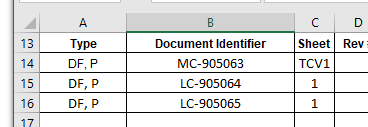
新编辑04/07/2019
主要代码子GetIssued() Dim objFSO作为对象Dim objFolder作为对象Dim objFile作为对象
Dim openPos As Integer
Dim closePos As Integer

Dim sh As Object

Dim drwn, SheetNum

Set objFSO = CreateObject("scripting.FileSystemObject")

r = 14


fle = ThisWorkbook.Sheets("Header Info").Range("D11") &
"\Design\Substation\CADD\Working\COMM\"

Set objFolder = objFSO.GetFolder(fle)

Set x1Book = ActiveWorkbook 'Using this Activeworkbook
Set sh = x1Book.Sheets("TELECOM") 'Using this particular sheet
With Sheets("TELECOM")
.Range("A14", "I305").ClearContents
For Each objFile In objFolder.Files
On Error Resume Next

If InStr(objFile.Name, "LC-9") > 0 And InStr(objFile.Type, "DWG
File") > 0 Then 'PEDs, Single Line, Cable and Wiring, Jumper and
Interconnection
        .Cells(r, 9) = objFile.Name 'Testing Purposes
        drwn = Array(.Cells(r, 9).Value)
        .Cells(r, 2) = Left(drwn, InStr(1, drwn, "s") - 1) 'Get the
drawing number and placing it here

        '-----------------------------------------------------------
        'Trying to Insert InstrMacro here
        '------------------------------------------------------------

        r = r + 1

        ElseIf InStr(objFile.Name, "MC-9") > 0 And InStr(objFile.Type, "DWG File") > 0 Then 'Cable List
        .Cells(r, 9) = objFile.Name 'Testing Purposes
        drwn = .Cells(r, 9).Value
        .Cells(r, 2) = Left(drwn, InStr(1, drwn, "s") - 1) 'Get the drawing number and placing it here

        '-----------------------------------------------------------
        'Trying to Insert InstrMacro here
        '------------------------------------------------------------

        r = r + 1

        ElseIf InStr(objFile.Name, "BMC-") > 0 And InStr(objFile.Type, "Adobe Acrobat Document") > 0 Then 'Bill of Materials
        .Cells(r, 9) = objFile.Name 'Testing Purposes
        drwn = .Cells(r, 9).Value
        .Cells(r, 2) = Left(drwn, InStr(1, drwn, "s") - 1) 'Get the drawing number and placing it here

        '-----------------------------------------------------------
        'Trying to Insert InstrMacro here
        '------------------------------------------------------------

        r = r + 1

        ElseIf InStr(objFile.Name, "CSR") > 0 And InStr(objFile.Type, "DWG") > 0 Then 'Single Line Diagram
        .Cells(r, 9) = objFile.Name 'Testing Purposes
        drwn = .Cells(r, 9).Value
        .Cells(r, 2) = Left(drwn, InStr(1, drwn, "s") - 1) 'Get the drawing number and placing it here

        '---------------------------------------------------------
        'Trying to Insert InstrMacro here
        '------------------------------------------------------------

        r = r + 1
    End If
Next
End With


 Range("A13:F305").HorizontalAlignment = xlCenter
 Range("A1").Select

 End Sub
我工作的马可在这里可以看到:
Sub InstrMacro()

Dim openPos As Integer
Dim closePos As Integer

Dim drwn, SheetNum
drwn = Range("E9") ' String to search in the sheet aka: the hot seat


'Performing a test to see if this is a new drawing or not
SheetNum = InStr(drwn, "^")

openPos = InStr(drwn, "s") 'True reguardless of the condition of the drawing

If SheetNum = 0 Then 'Assuming it is a new drawing
closePos = InStr(drwn, ".")
SheetNum = Mid(drwn, openPos + 1, closePos - openPos - 1)
Else

If SheetNum > 0 Then 'Assuming is NOT a new drawing
closePos = InStr(drwn, "^")
SheetNum = Mid(drwn, openPos + 1, closePos - openPos - 1)

End If
End If

Range("G20").Value = SheetNum


End Sub
这里可以看到这个宏的图片。
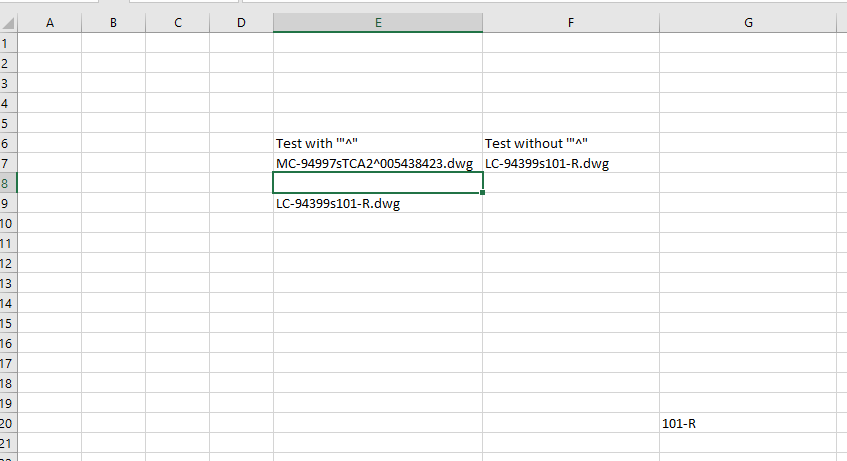
我尝试了一个单独的宏运行,并可以得到工作表编号,但看起来excel只是跳过这一步,并运行程序的其余部分。
我想把图纸编号放在B栏,表格编号放在c栏。
回答 4
Stack Overflow用户
发布于 2019-04-05 22:53:16
如果后面跟着一个数字/数字,并且这种模式只发生一次,则可以使用regex。
Option Explicit
Public Sub test()
    Dim re As Object, pattern As String, values(), i As Long
    values = Array("LC-94773s2^003735377.pdf", "LC-94773s2", "LC-93521s1-A^005241446")
    Set re = CreateObject("vbscript.regexp")
    pattern = "(s\d+)"
    For i = LBound(values) To UBound(values)
        Debug.Print Replace$(GetId(re, values(i), pattern), "s",vbNullString)
    Next
End Sub

Public Function GetId(ByVal re As Object, ByVal s As String, ByVal pattern As String) As String
    With re
        .Global = True
        .MultiLine = True
        .IgnoreCase = False '? True if case insensitive
        .pattern = pattern
        If .test(s) Then
            GetId = .Execute(s)(0).SubMatches(0)
        Else
            GetId = "No match"
        End If
    End With
End Function您可以更改此模式,例如,如果希望开始为LC-9
Public Sub test()
    Dim re As Object, pattern As String, values(), i As Long
    values = Array("LC-94773s2^003735377.pdf", "LC-94773s2", "LC-93521s1-A^005241446")
    Set re = CreateObject("vbscript.regexp")
    pattern = "LC-9(.*)(s\d+)"
    For i = LBound(values) To UBound(values)
        Debug.Print Replace$(GetId(re, values(i), pattern), "s",vbNullString)
    Next
End SubStack Overflow用户
发布于 2019-04-05 23:52:49
无循环或正则表达式的解
Sub FindIt()
    Dim strng As String, iPos As Long

    strng= "1sa2sb3s4sd5se"

    iPos = InStr(strng, "s")
    If iPos > 0 And iPos < Len(strng) Then
        If InStr("1234567890", Mid(strng, iPos + 1, 1)) > 0 Then
            MsgBox "Found s" & Mid(strng, iPos + 1,1) & " at position " & iPos
        End If
    End If
End Sub
可以很容易地按一下,以限制“s”字符后面的数字数。
Stack Overflow用户
发布于 2019-04-05 23:22:38
若要查看字符串是否包含小写s后面跟着数字:
Sub sTest()
    Dim s As String, i As Long
    s = "jkuirelkjs6kbco82yhgjbc"

    For i = 0 To 9
        If InStr(s, "s" & CStr(i)) > 0 Then
            MsgBox "I found s" & i & " at position " & InStr(s, "s" & CStr(i))
            Exit Sub
        End If
    Next i

    MsgBox "pattern not found"
End Subhttps://stackoverflow.com/questions/55544183
复制相似问题
腾讯云开发者

Copyright © 2013 - 2026 Tencent Cloud. All Rights Reserved. 腾讯云 版权所有
深圳市腾讯计算机系统有限公司 ICP备案/许可证号:粤B2-20090059  粤公网安备44030502008569号
腾讯云计算(北京)有限责任公司 京ICP证150476号 | 京ICP备11018762号