
服务主管az cli登录失败-没有找到订阅
尝试使用服务主体执行az cli登录,它正在抛出一个声明No subscriptions found for <Service_Principal_AppId>. If this is expected, use '--allow-no-subscriptions'的错误。此代码以前运行良好,但现在似乎不再工作了。正在使用的命令行如下:
$sp_appid = (Get-AzureRmADServicePrincipal -DisplayName $spDisplayName).ApplicationId.Guid
$sp_secret = (Get-AzureKeyVaultSecret -VaultName $kvName -Name $appKeySecretName).SecretValueText
az login --service-principal --username $sp_appid --password $sp_secret --tenant $tenant_Id我验证了服务主体在订阅级别上被分配了Contributor角色。
回答 6
Stack Overflow用户
发布于 2019-04-02 01:30:13
实际上,我不建议你把Azure Powershell和CLI混合在一起。如果你坚持这么做,我已经试过你的剧本了,我无法复制你的问题,它工作得很好。根据错误,您可以尝试传递一个--subscription,它也可以工作。
$sp_appid = (Get-AzADServicePrincipal -DisplayName joywebapp2).ApplicationId.Guid
$sp_secret = (Get-AzKeyVaultSecret -VaultName joykeyvault1 -Name joywebapp2).SecretValueText
$tenant_Id = "xxxxxxxxxxxx"
$subscription_Id = "xxxxxxxxxxx"
az login --service-principal --username $sp_appid --password $sp_secret --tenant $tenant_Id --subscription $subscription_Id
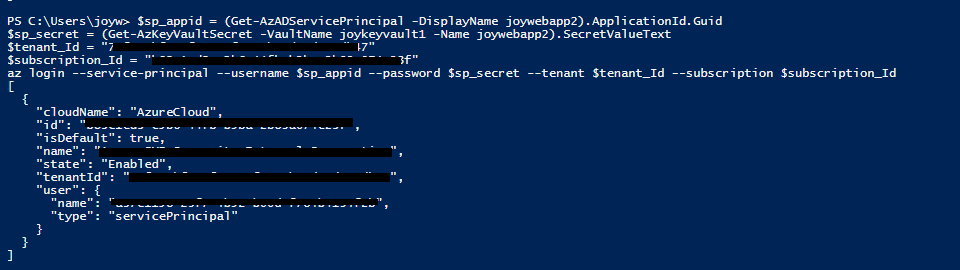
注意事项:由于AzureRM powershell模块已被废弃,我使用新的Az powershell模块,如果您想升级到Az,请参见此链接。(这可能不是问题的原因,但我建议您进行升级。)
更新
我们必须简单地使用AZ,因为我们试图grab...there的属性不是PowerShell等效的。
实际上,您可以通过powershell使用服务主体登录,strong password是其中的秘密,更详细的信息请参见此帖子。
$azureAplicationId ="Azure AD Application Id"
$azureTenantId= "Your Tenant Id"
$azurePassword = ConvertTo-SecureString "strong password" -AsPlainText -Force
$psCred = New-Object System.Management.Automation.PSCredential($azureAplicationId , $azurePassword)
Add-AzureRmAccount -Credential $psCred -TenantId $azureTenantId -ServicePrincipalStack Overflow用户
发布于 2022-01-08 17:33:27
在Azure Active Directory中创建服务主体之后,您需要在订阅中为这个新用户提供一些角色:
- 进入您的订阅
- 转到
Access Control (IAM) - 添加一个
roles assignment(例如,使您的服务主体contributor)
那么az login应该可以工作。
Stack Overflow用户
发布于 2019-04-04 11:40:43
最初的问题似乎是一个短暂的平台问题。昨天又回到了相同的代码中,没有问题。
https://stackoverflow.com/questions/55457349
复制相似问题
腾讯云开发者

Copyright © 2013 - 2026 Tencent Cloud. All Rights Reserved. 腾讯云 版权所有
深圳市腾讯计算机系统有限公司 ICP备案/许可证号:粤B2-20090059  粤公网安备44030502008569号
腾讯云计算(北京)有限责任公司 京ICP证150476号 | 京ICP备11018762号