
如何显示两棵具有中心根的树?
我正在尝试创建两个D3树,它似乎是共享的中心根。当用户单击我的节点时,树应该向右和向左扩展。
我在这里遇到了一个关于堆栈溢出的例子。
下面是到这个的链接:Tree with children towards multiple side in d3.js (similar to family tree)
我甚至在这里组装了一个bl.ocks.org版本的代码:https://bl.ocks.org/redcricket/de324f83aa6c84db2588c1a1f53cc5e3
上面的例子是D3 v3。我正在将上面的示例改编为D3 v4,并将其集成到角度组件中,但遇到了一个问题,一次只能显示一棵树。
我的代码的入口点是这个角组件及其服务组件:
构成部分:
import { Component, OnInit, OnChanges, ViewChild, ElementRef, Input, Output, EventEmitter} from '@angular/core';
import { AngularD3TreeLibService } from './custom-d3-tree.service';

@Component({
  selector: 'custom-angular-d3-tree-lib',
  template: `<div class="d3-chart" #chart></div> `,
  styleUrls: ['./custom-d3-tree.component.css']
})
export class AngularD3TreeLibComponent implements OnInit, OnChanges {
  @ViewChild('chart') private chartContainer: ElementRef;
  @Input() treeData: any = [];
  @Output() onNodeChanged: EventEmitter<any>= new EventEmitter();
  @Output() onNodeSelected: EventEmitter<any>= new EventEmitter();

  constructor( private treeService: AngularD3TreeLibService ) {
    treeService.setNodeChangedListener((node)=>{ this.onNodeChanged.emit(node); })
    treeService.setNodeSelectedListener((node)=>{ this.onNodeSelected.emit(node); })
  }

  ngOnInit() {}
  ngOnChanges(changes: any) { this.seedTree(); }

  seedTree(){
    if(!!this.treeData){
      this.treeService.createChart(this.chartContainer, this.treeData);
      this.treeService.update();
    }
  }
}
服务:
import { Injectable } from '@angular/core';
import { TreeModel } from './tree.dendo.model';

@Injectable({
  providedIn: 'root'
})
export class AngularD3TreeLibService {
  treeModel: TreeModel= new TreeModel();

  constructor() { }

  createChart(chartContainer: any, treeData: any): void {
    let element = chartContainer.nativeElement;
    element.innerHTML= "";
    this.treeModel.addSvgToContainer(chartContainer);
    this.treeModel.createLayout();
    this.treeModel.createTreeData(treeData);
  }

  update(){
    this.treeModel.rightTreeUpdate(this.treeModel.rroot);
    this.treeModel.leftTreeUpdate(this.treeModel.lroot);
  }
}注在AngularD3TreeLibService.update()方法中,我在调用leftTreeUpdate之前调用了leftTreeUpdate。这只会导致我的左树可见。
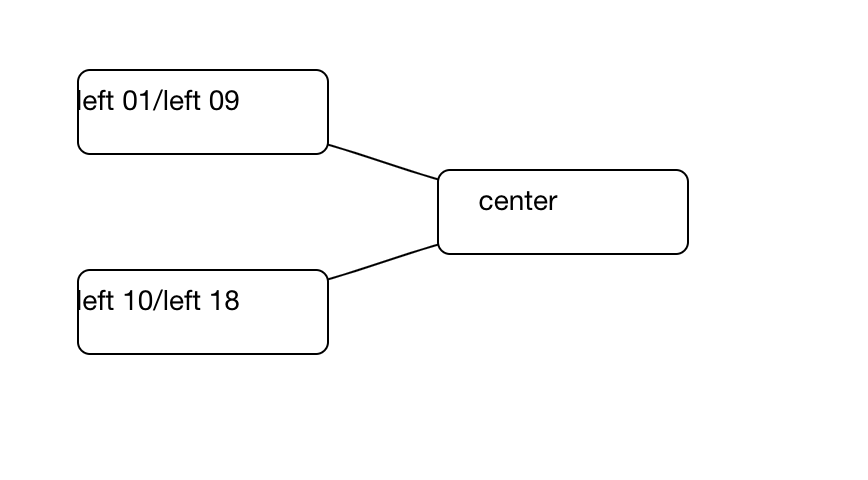
在我的TreeModel代码中,通过在leftTreeUpdate函数中在rightTreeUpdate之前调用rightTreeUpdate,可以显示右树,而不能显示左树。
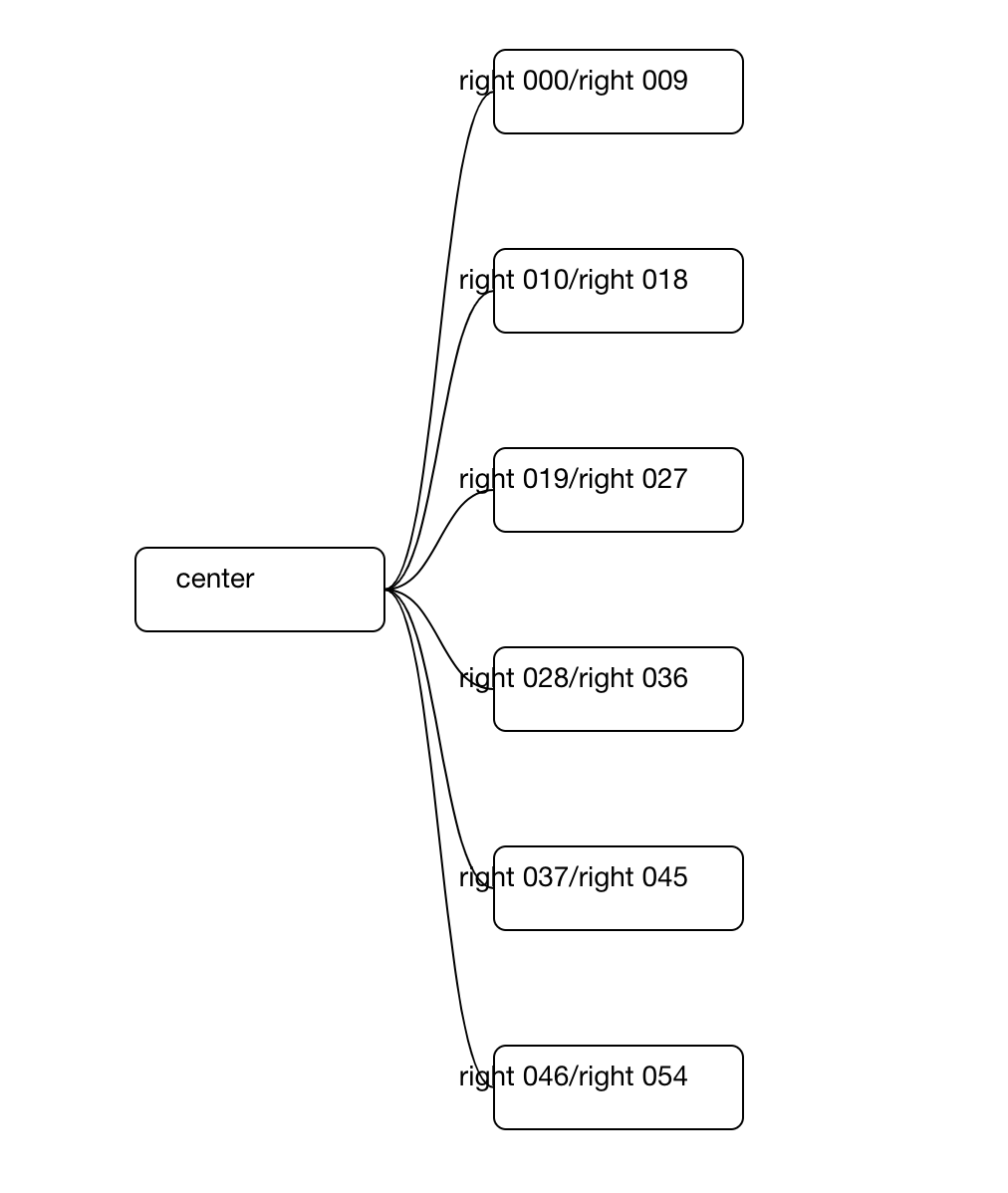
我怀疑我在setNodes()和setLinks()方法中做错了什么,因为我真的不理解nodeEnter、nodeUpdate和nodeExit等东西的目的。
这里是我的TreeModel的编辑版本(为了简洁)。
import * as d3 from 'd3';

export class TreeModel {

  rroot: any; // right root
  lroot: any; // left root
  treeLayout: any;
  svg: any;
  N: number = 10;
  treeData: any;

  rect_width: number = 125;
  rect_height: number = 42;

  height: number;
  width: number;
  margin: any = { top: 200, bottom: 90, left: 100, right: 90};
  duration: number= 750;
  nodeWidth: number = 1;
  nodeHeight: number = 1;
  nodeRadius: number = 5;
  horizontalSeparationBetweenNodes: number = 1;
  verticalSeparationBetweenNodes: number = 10;

  selectedNodeByDrag: any;

  selectedNodeByClick: any;
  previousClickedDomNode: any;

  ... omitted for brevity ...

  constructor(){}

  addSvgToContainer(chartContainer: any){
    let element = chartContainer.nativeElement;

    this.width = element.offsetWidth - this.margin.left - this.margin.right;
    this.height = element.offsetHeight - this.margin.top - this.margin.bottom;

    this.svg = d3.select(element).append('svg')
      .attr('width', element.offsetWidth)
      .attr('height', element.offsetHeight)
      .append("g")
      .attr("transform", "translate("
            + this.margin.left + "," + this.margin.top + ")");
    this.svg = this.svg.append("g");

    ... omitted for brevity ...
  }

  // zoom stuff
  ... omitted for brevity ...
  // end zoom stuff

  createLayout(){
    this.treeLayout = d3.tree()
      .size([this.height, this.width])
      .nodeSize([this.nodeWidth + this.horizontalSeparationBetweenNodes, this.nodeHeight + this.verticalSeparationBetweenNodes])
      .separation((a,b)=>{return a.parent == b.parent ? 50 : 200});
  }

  getRandomColor() {
    ... omitted for brevity ...
  }

  chunkify(a, n, balanced) {
    ... omitted for brevity ...
  }

  twoTreeBuildCenterNodesChildren(children:any) {
    // this routine is suppose to build a json/tree object that represent the children of the center node.
    // if there are more than N number of nodes on any level we need to create an additional level to
    // accommodate these nodes.
    ... omitted for brevity ...
  }


  compare(a,b) {
    ... omitted for brevity ...
  }

  buildTwoTreeData(apiJson:any) {
    var componentType = Object.keys(apiJson)[0];
    var centerNodeLeft = {'component_type': componentType, "name": apiJson[componentType].name, "color": "#fff", "children": []};
    var centerNodeRight = {'component_type': componentType, "name": apiJson[componentType].name, "color": "#fff", "children": []};
    var tmp_leftNodes = [];
    for ( var i=0; i < apiJson[componentType].multiparent.length; i++ ) {
      var c = apiJson[componentType].multiparent[i];
      c['color'] = this.getRandomColor();
      c['name'] = c.parent.name;
      tmp_leftNodes.push(c);
    }
    var leftNodes = tmp_leftNodes.sort(this.compare);
    var rightNodes = apiJson[componentType].children.sort(this.compare);
    var right_center_node_children = this.twoTreeBuildCenterNodesChildren(rightNodes.sort(this.compare));
    var left_center_node_children = this.twoTreeBuildCenterNodesChildren(leftNodes.sort(this.compare));
    centerNodeLeft.children = left_center_node_children;
    centerNodeRight.children = right_center_node_children;
    return[centerNodeLeft, centerNodeRight];

  }

  translateJson(apiJson:any){ return this.buildTwoTreeData(apiJson); }

  createTreeData(rawData: any){
    var parsedData = this.translateJson(rawData);
    this.lroot = d3.hierarchy(parsedData[0]);
    this.lroot.x0 = this.height / 2;
    this.lroot.y0 = 0;
    this.lroot.children.map((d)=>this.collapse(d));
    this.rroot = d3.hierarchy(parsedData[1]);
    this.rroot.x0 = this.height / 2;
    this.rroot.y0 = 0;
    this.rroot.children.map((d)=>this.collapse(d));
  }

  collapse(d) {
    if(d.children) {
      d._children = d.children
      d._children.map((d)=>this.collapse(d));
      d.children = null
    }
  }

  expand_node(d) {
    if (d.children) { d._children = d.children; d.children = null; } else { d.children = d._children; d._children = null; }
  }

  expand(d) {
    if(d._children) {
      d.children = d._children
      d.children.map((d)=>this.expand(d));
      d.children = null
    }
  }

  rightTreeUpdate(source) {
    const treeData = this.treeLayout(this.rroot);
    this.setNodes(source, treeData, 'right');
    this.setLinks(source, treeData, 'right');
  }

  leftTreeUpdate(source) {
    const treeData = this.treeLayout(this.lroot);
    this.setNodes(source, treeData, 'left');
    this.setLinks(source, treeData, 'left');
  }

  setNodes(source:any, treeData: any, side: string){
    let nodes = treeData.descendants();
    let treeModel= this;
    if ( side === 'left') {
      let width = this.width;
      nodes.forEach(function (d) { d.y = (d.depth * -180) });
    } else {
      // this draws everything to the right.
      nodes.forEach(function(d){ d.y = d.depth * 180});
    }

    var node = this.svg.selectAll('g.node')
        .data(nodes, function(d) { return d.id || (d.id = ++this.i); });
    var nodeEnter = node.enter().append('g')
        .attr('class', 'node')
        .attr("transform", function(d) {
            return "   translate(" + source.y0 + "," + source.x0 + ")";
        });

    nodeEnter.append('rect')
      .attr('class', 'node-rect')
      .attr('x', 0)
      .attr('y', 0)
      .attr('rx', 6)
      .attr('ry', 6)
      .attr('width', this.rect_width)
      .attr('height', this.rect_height)
      .attr('stroke', 'black')
      .style("fill", function(d) {
        return d.data.color;
      });

    nodeEnter.append('text')
      .attr('y', 20)
      .attr('x', 40)
      .attr("text-anchor", "middle")
      .text(function(d){
          return (d.data.name || d.data.description || d.id);
      });

    var nodeUpdate = nodeEnter.merge(node);
    nodeUpdate.transition()
      .duration(this.duration)
      .attr("transform", function(d) {
        return "translate(" + d.y + "," + d.x  + ")";
       });

    var nodeExit = node.exit().transition()
        .duration(this.duration)
        .attr("transform", function(d) {
            return "translate(" + source.y + "," + source.x + ")";
        })
        .remove();

    // On exit reduce the node circles size to 0
    nodeExit.select('circle')
      .attr('r', 1e-6);

    // Store the old positions for transition.
    nodes.forEach(function(d){
      d.x0 = d.x;
      d.y0 = d.y;
    });
    // On exit reduce the opacity of text labels
    nodeExit.select('text')
      .style('fill-opacity', 1e-6);

    nodeEnter
      .on('click', function(d){
        treeModel.click(d, this);
        //treeModel.update(d);
        // treeModel.rightTreeUpdate(d);
      });
  }

    ... omitted for brevity ...

  setLinks( source: any, treeData: any, side: string){
    let links = treeData.descendants().slice(1);
    var link = this.svg.selectAll('path.link')
      .data(links, function(d) { return d.id; });

    // Enter any new links at the parent's previous position.
    var linkEnter = link.enter().insert('path', "g")
      .attr("class", "link")
      .attr('fill', 'none')
      .attr('stroke', 'black')
      .attr('d', (d)=>{
        var o = {x: source.x0, y: source.y0}
        return this.rdiagonalCurvedPath(o, o)
      });

    var linkUpdate = linkEnter.merge(link);

    linkUpdate.transition()
      .duration(this.duration)
      .attr('d', (d)=>{return this.rdiagonalCurvedPath(d, d.parent)});

    var linkExit = link.exit().transition()
      .duration(this.duration)
      .attr('d', (d) => {
        var o = {x: source.x, y: source.y}
        return this.rdiagonalCurvedPath(o, o)
      })
      .remove();
  }

  click(d, domNode) {
    if( d._children ) {
      this.expand_node(d);
    } else if ( d.children) {
      this.collapse(d);
    } else {
      console.log('click() skipping load of new data for now ');
    }
    // HERE IS WHERE I CALL
    // rightTreeUpdate() after leftTreeUpdate() which displays the right tree, but not the left tree.
    this.leftTreeUpdate(this.lroot);
    this.rightTreeUpdate(this.rroot);
  }

    ... omitted for brevity ...
}回答 1
Stack Overflow用户
发布于 2019-03-30 02:09:29
在遵循Andrew的建议之后,我只修改了四行代码就可以画出两棵树。
在我的setNodes()方法中,我现在有了以下内容:
    // var node = this.svg.selectAll('g.node')
    var node = this.svg.selectAll('g.node'+side)
        .data(nodes, function(d) { return d.id || (d.id = ++this.i); });
    var nodeEnter = node.enter().append('g')
        // .attr('class', 'node')
        .attr('class', 'node'+side)
        .attr("transform", function(d) {
            return "   translate(" + source.y0 + "," + source.x0 + ")";
});在我的setLinks方法中,也有一个类似的变化:
    var link = this.svg.selectAll('path.link'+side)
      .data(links, function(d) { return d.id; });

    // Enter any new links at the parent's previous position.
    var linkEnter = link.enter().insert('path', "g")
      .attr("class", "link"+side)
      .attr('fill', 'none')
      .attr('stroke', 'black')
      .attr('d', (d)=>{
        var o = {x: source.x0, y: source.y0}
        return this.rdiagonalCurvedPath(o, o)
      });
这是我的两棵树现在的样子。
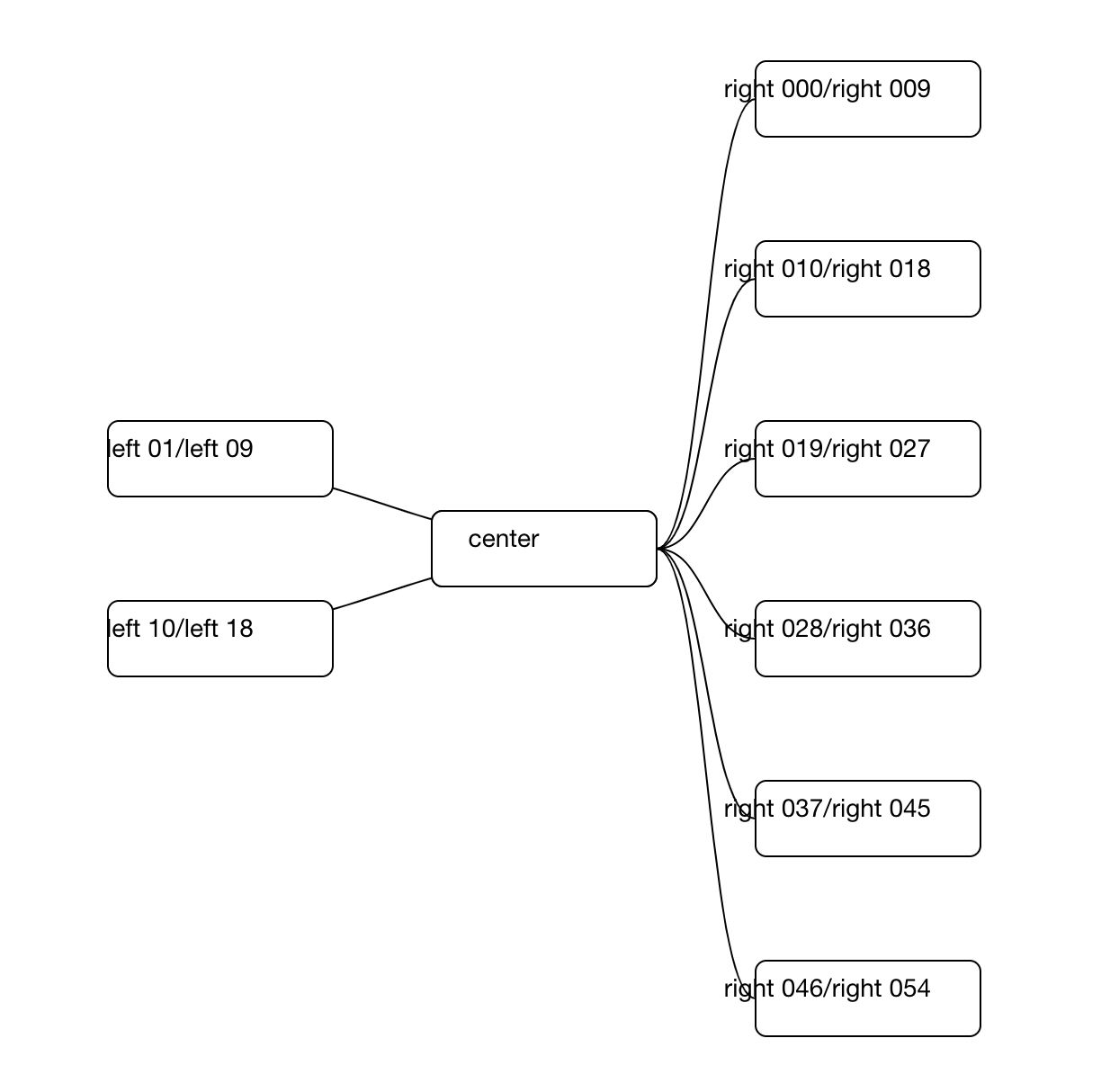
我仍然需要正确地绘制左边的链接,但这是另一个问题。谢谢安德鲁!
https://stackoverflow.com/questions/55425785
复制相似问题
腾讯云开发者

Copyright © 2013 - 2026 Tencent Cloud. All Rights Reserved. 腾讯云 版权所有
深圳市腾讯计算机系统有限公司 ICP备案/许可证号:粤B2-20090059  粤公网安备44030502008569号
腾讯云计算(北京)有限责任公司 京ICP证150476号 | 京ICP备11018762号