
角质材料排版设置不正确
我试图实现角材料排版,但我一直有一些困难,我不知道什么可能是问题。
我遵循了这里提供的指令,但是遇到了一个问题。问题是,苹果应用程序中的所有内容似乎都受到了影响,然而,有些人却被默认的排版所覆盖,我不知道自己做错了什么。
创建和使用排版
$typography-configuration: mat-typography-config(
  $font-family: 'Roboto, "Helvetica Neue", sans-serif',
  $display-4: mat-typography-level(112px, 112px, 300),
  $display-3: mat-typography-level(100px, 56px, 400),
  $display-2: mat-typography-level(100px, 48px, 400),
  $display-1: mat-typography-level(100px, 34px, 400),
  $headline: mat-typography-level(100px, 32px, 400),
  $title: mat-typography-level(100px, 32px, 500),
  $subheading-2: mat-typography-level(100px, 28px, 400),
  $subheading-1: mat-typography-level(100px, 24px, 400),
  $body-2: mat-typography-level(100px, 24px, 500),
  $body-1: mat-typography-level(100px, 22px, 400),
  $caption: mat-typography-level(100px, 22px, 400),
  $button: mat-typography-level(100px, 14px, 500),
  $input: mat-typography-level(100px, 1.125, 400)
);

@include angular-material-typography($typography-configuration);正如您所看到的那样,对于排版,我故意将第一个参数(字体大小)设置为100px,这样我就可以查看应用程序上的所有内容是否都实现了。
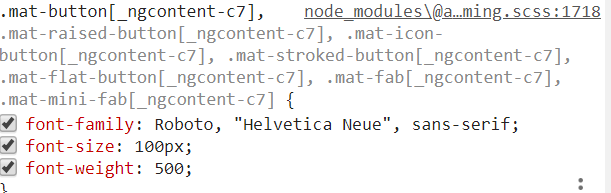
示例1:材料按钮
对于角度材料按钮(在html元素‘按钮’上使用‘Material’),我看到了我预期的结果,如下所示。文本设置为100 to。
示例2:工具栏
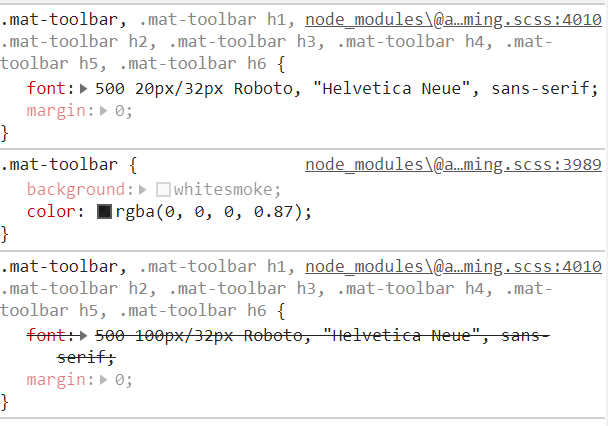
然而,对于Mat工具栏,我没有看到字体大小设置为100 do。在我看来,默认字体大小是覆盖100 is大小的,如下所示:
示例3:具有多个覆盖的不同工具栏
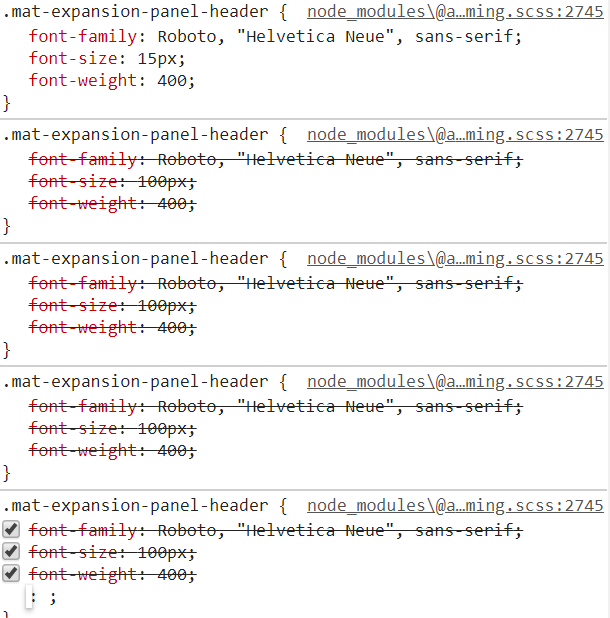
对于另一个工具栏上的最后一个示例,我们可以看到每次都会添加几次100 we,直到重写的最后一个也是20 we,所以字体大小不是100 we。
详细信息:
这里发现的棱角材料指南显示,我们在应用程序中有三种使用字体的方法:
// Override typography CSS classes (e.g., mat-h1, mat-display-1, mat-typography, etc.).
@include mat-base-typography($custom-typography);

// Override typography for a specific Angular Material components.
@include mat-checkbox-typography($custom-typography);

// Override typography for all Angular Material, including mat-base-typography and all components.
@include angular-material-typography($custom-typography);据我理解,我使用的第三个选项应该适用于在您使用class="mat-typography"的任何地方。所以我把这个添加到应用程序的body中,并在app-root上进行了尝试。但是,正如我们上面所看到的,只有一些应用程序受到了正确的影响。
我尝试在组件中将其添加到应用程序中的较小部分,但结果是一样的。
我不知道我的理解是否错误,我是否没有正确地使用它,或者在其他地方是否有问题,我假设我使用它是错误的,但是我找不到其他人创造的任何教程和例子。
我试着自己把这些类添加到诸如class="mat-display-1"这样的项目中,这似乎很好,但是如果我必须在整个应用程序中到处应用它,这似乎不是一个好的解决方案。
如果可能的话,我想让它在整个应用程序中应用,而不必为排版设置100多个类。
我知道我可以按照建议的这里在sass中应用到我自己的元素中,但是我认为他们自己也会这样做。
回答 1
Stack Overflow用户
发布于 2019-03-25 14:05:59
这可能是由于与sass文件的顺序及其函数调用有关的几个原因造成的:
原因:
发生这种情况的原因是由于角材料的_theming.scss文件调用sass混频器的顺序,该文件可以在node_modules\@angular\material\_theming.scss上找到。
麻烦的混音是mat-core和angular-material-typography。
使用主题:
当您创建一个主题,并调用角材料的主题混音mat-core,它有许多混音,它包括。
@mixin mat-core($typography-config: null) {
  @include angular-material-typography($typography-config);
  @include mat-ripple();
  @include cdk-a11y();
  @include cdk-overlay();
  @include cdk-text-field();
}正如您在上面的代码片段中所看到的那样,实际上调用了angular-material-typography混音。当调用mat-core时,is正在寻找排版配置,如果没有提供任何配置,它将使用默认配置。
使用印刷术:
当您只使用一个排版文件时,常见的情况如下:
@import '~@angular/material/theming';

$typography-configuration: mat-typography-config(
  $font-family: 'Roboto, "Helvetica Neue", sans-serif',
  $display-4: mat-typography-level(112px, 112px, 300),
  $display-3: mat-typography-level(100px, 56px, 400),
  $display-2: mat-typography-level(100px, 48px, 400),
  $display-1: mat-typography-level(100px, 34px, 400),
  $headline: mat-typography-level(100px, 32px, 400),
  $title: mat-typography-level(100px, 32px, 500),
  $subheading-2: mat-typography-level(100px, 28px, 400),
  $subheading-1: mat-typography-level(100px, 24px, 400),
  $body-2: mat-typography-level(100px, 24px, 500),
  $body-1: mat-typography-level(100px, 22px, 400),
  $caption: mat-typography-level(100px, 22px, 400),
  $button: mat-typography-level(100px, 14px, 500),
  $input: mat-typography-level(100px, 1.125, 400)
);

@include angular-material-typography($typography-configuration);从上面的代码片段中可以看到,我们创建了一个排版配置。以及我们称之为角材料的主题混合在typography-configuration中。这将为您设置排版,然而,如果您同时使用角材料主题以及角材料排版,您可以有您的排版被覆盖的情况。这就是秩序的问题所在。
不正确的实现导致您的问题:
@import './_theme-master.scss';
@import './theme-typography';
@include mat-core();例如,在您的styles.scss文件中,您导入了一个主题文件,其中包含设置主题调色板并调用@include angular-material-theme($theme);。在此之后,您决定导入您的排版文件。您的排版文件有一个排版配置,您也可以调用传递您的配置的@include angular-material-typography($typography-configuration);。
现在,在这些完成之后,您决定调用您的mat-core。此时,您的样式是为您的排版创建的,但是您很高兴在调用mat-core角时使用默认的排版配置创建另一组样式。现在,这些都是最新的样式,因此您的样式将被创建的最新样式所覆盖。
本质上是调用混合器,如下所示:
@include angular-material-typography($typography-configuration);
@include mat-core();
要解决您的问题:
相反,像这样加载您的排版配置:
@include mat-core($typography-configuration);现在,对于有许多排版风格的问题,创建和重写彼此。这很可能是因为一个文件(可能是包含您的排版的文件)多次被导入,导致混音被召回了几次。尝试将您的排版文件放置在1中央空间,例如在styles.scss中调用该文件一次
https://stackoverflow.com/questions/55308073
复制相似问题
腾讯云开发者

Copyright © 2013 - 2026 Tencent Cloud. All Rights Reserved. 腾讯云 版权所有
深圳市腾讯计算机系统有限公司 ICP备案/许可证号:粤B2-20090059  粤公网安备44030502008569号
腾讯云计算(北京)有限责任公司 京ICP证150476号 | 京ICP备11018762号